
Vandaag of morgen in huis

Kwaliteit gegarandeerd

Welkomstaanbiedingen ontgrendelen: GRATIS bezorging | Tot 80% korting | Gratis 30 dagen JoyPlus-proefperiode
Download de app
A monitor arm can free up desk space and make it easier to position your screen. However, many people choose a model based solely on the number of screens or the maximum screen size in inches. This often results in an unstable setup, an arm that slowly drops or a monitor that does not fit the mounting bracket.
This buying guide helps home workers, office professionals, gamers, receptionists and facilities managers compare their options with confidence. Pay particular attention to load capacity, VESA compatibility, mounting method and the amount of space the arm requires.
A 32-inch monitor can be relatively light, while a smaller ultrawide or curved monitor may actually be heavier. So, alongside the screen size in inches, always check the weight per screen. With a dual monitor arm, you should also check whether the load capacity applies per screen or to the system as a whole.
For example, a monitor arm for 2 screens with a capacity of 6 kg per screen is not automatically suitable for two 8 kg screens. An adapter fitted to an existing arm can also alter the centre of gravity and the load.
Most models in this selection support VESA 75 × 75 mm or 100 × 100 mm. Check the screw holes on the back of your monitor before ordering a VESA monitor arm. A larger or non-standard hole pattern can sometimes be accommodated with a VESA adapter plate, but this is not always included.
Also pay attention to the mounting type. A clamp-on desk monitor arm will not necessarily fit a thick, fragile or uneven desktop. For wall mounting, you need a suitable wall, wall plugs and often a different type of mounting hardware.
A gas-spring monitor arm or adjustable monitor arm is generally easier to move than a fixed monitor stand. That does not mean every arm is suitable for frequent repositioning or heavy screens. With a gas spring, the tension must be adjusted to match the weight of the screen. A screen that is too heavy can cause the arm to drop, while one that is too light may move upwards.
Also check that the arm has enough clearance when rotating and swivelling. A 180° stop can help limit contact with a wall or partition, but it is not a substitute for secure mounting.
Before buying, make a quick assessment:
For one large screen, there are models that support up to 49 inches and 18 kg. For a monitor arm for 3 screens, the load capacity per screen is often lower. Ideally, position the screens only after the clamp, grommet or wall bracket has been fully secured.
A VESA 75 × 75 mm or 100 × 100 mm connection is a practical starting point for many office and gaming monitors. If your screen is not listed in the product specifications, measure the horizontal and vertical distance between the mounting holes.
A desk clamp is useful when you do not want to drill holes in the desktop. A grommet secures the arm through a hole in the desk and can provide a tidy solution. A monitor wall bracket requires extra attention to the wall material. Do not mount solely into plasterboard without a suitable supporting structure.
Look out for the following features:
A monitor riser or desk monitor stand is a simpler alternative when you only want to raise the screen and do not need free movement.
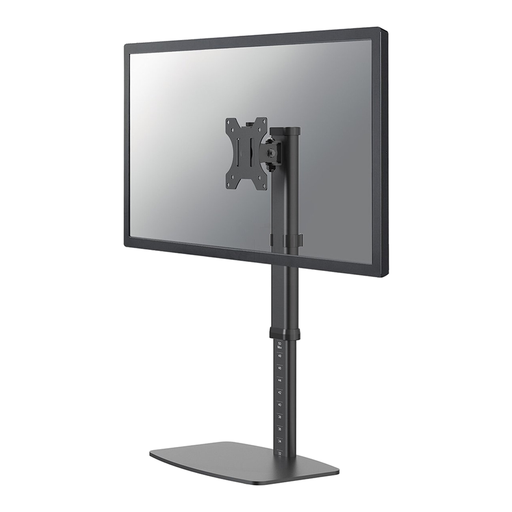
Why it suits this profile: For anyone who wants to mount one screen on a desk without immediately needing a fully articulated gas-spring arm. This model supports screens up to 30 inches and 6 kg.
The product specifications clearly state the maximum screen size, load capacity and VESA patterns. However, check these values against your own monitor.
Height-adjustable, tiltable, rotatable and suitable for VESA 75 × 75 and 100 × 100 mm.

Why it suits this profile: A flexible choice for a home office or workplace with one flat or curved screen up to 35 inches and weighing up to 9 kg.
The 9 kg load capacity and 17 to 35-inch range make it easy to check whether it is suitable. The 180° stop limits the risk of contact with a wall or partition.
Gas-spring height range from 21.5 to 49.5 cm, depth adjustment, cable management and top-fix clamp or grommet mounting.

Why it suits this profile: For multitasking, dashboards, video editing or a workspace where three screens are needed side by side.
The capacity is specified as 6 kg per screen. This allows you to compare the weight of each monitor separately rather than looking only at the total.
Suitable for three screens from 10 to 27 inches, with cable management, quick release and clamp or grommet mounting.
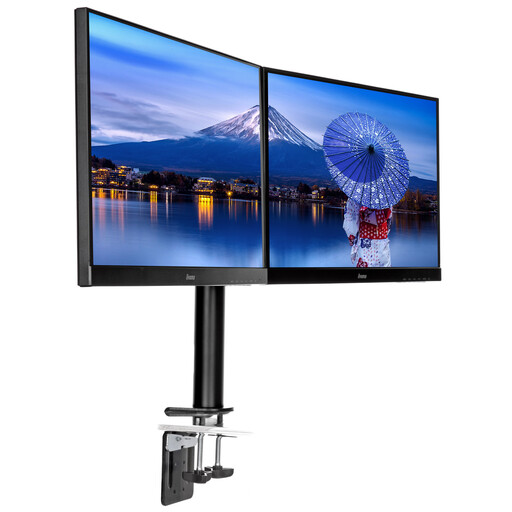
Why it suits this profile: A dual monitor arm for users with two screens up to 30 inches, for example at a reception desk, office workstation or home desk.
The product specification states 10 kg per monitor, the VESA sizes and an adjustment range of 200 to 400 mm. This makes it easy to check everything before buying.
Supports two screens up to 30 inches, with height, rotation and tilt adjustment, plus integrated cable management.
We have compiled a complete, up-to-date list of products that fully meet these strict selection criteria and the applicable European safety regulations.
No. The monitor must be compatible with the arm’s VESA size and fall within the specified screen size and load capacity. Some screens do not have a VESA connection or use a non-standard hole pattern. An adapter plate may sometimes be required.
That depends on the maximum load capacity and the weight of the screen. A gas-spring arm must be adjusted correctly. Also check that the desk is sturdy enough. Never exceed the stated capacity.
A monitor stand or monitor riser is suitable when you mainly want to raise the screen and rarely move it. A monitor arm offers greater flexibility for rotation, swivelling and depth adjustment. For two or three screens, a monitor bracket will generally save more desk space.
