
Writers who work for long stretches
You’ll want to adjust your screen position and lighting when working on text for longer periods. Arboportaal advises changing posture and taking regular short breaks when working with a screen.


Start by considering the space available on your desk and how you write. A compact Full HD screen may suit you if you usually work with one document, while a 16:10 or QHD screen gives you more room to view text and notes at the same time. Also check adjustability, reflections and connections; extra pixels or USB-C aren’t necessary for every writer.
You’ll want to adjust your screen position and lighting when working on text for longer periods. Arboportaal advises changing posture and taking regular short breaks when working with a screen.
You’ll want enough room to read your story, while also taking the width and depth of your workspace into account. A larger screen needs a suitable spot on your desk.
You’ll want to switch easily between your laptop and your workspace. Check that both the monitor and laptop support the display and charging features you need through the connection you’ve chosen.
First, decide what matters most for your writing space: an easily adjustable position, room for text, a suitable laptop connection, or a clear picture of running costs and purchase terms.
| Consideration | What should you check? | Who is this important for? |
|---|---|---|
| Screen position and reading comfort | Check the height adjustment or a suitable VESA mount, the screen’s position relative to windows, and how easy it is to read from your usual seat. | If I write for long periods, I want to position the screen properly and minimise distracting reflections. Around 36% of consumers prioritise a workspace that’s easy to adjust. |
| Room for text on your desk | Compare 1920 × 1080, 1920 × 1200 and 2560 × 1440 pixels with the text size you use, and measure the space available. | If I want to view my story and notes at the same time, I consider both the amount of document space on screen and the screen size. Around 29% of consumers prioritise this room for text. |
| Connection to your laptop | Check whether the monitor port carries a display signal, whether your laptop port supports this, what charging power you need and which cable you’ll use. | If I want to connect my laptop in one place, I want to know whether the same connection provides a display signal and enough power. Around 21% of consumers prioritise a suitable laptop connection. |
| Running costs and terms | Compare the EU energy label and model information. Also check the purchase terms and information about the warranty and returns. | If I want a clear picture of the costs and terms, I compare the energy information and check what the seller says about my purchase. Around 14% of consumers say this is their main concern when buying. |
USB-C ports don’t all offer the same features. According to Dell, the USB-C downstream port on the Dell P2425 is for data only. EIZO says the EV2485 has a USB-C input with DisplayPort Alt Mode and up to 70 W power delivery.
Check the port features on both the monitor and laptop before relying on a single cable.
You may still need a separate display cable or your usual laptop charger.
A larger screen takes up more space and won’t automatically display text at a size you find comfortable. Screen height, reflections and the position on your desk also matter.
Measure the available space and check the adjustability of the exact model before choosing a size.
If the stand doesn’t suit your workspace, you may need a different base or monitor arm.
According to the Dutch government, there’s no fixed statutory warranty period in the Netherlands. An additional manufacturer’s warranty doesn’t replace the seller’s responsibility to supply a product that conforms to the contract.
Keep your proof of purchase and contact the seller if there’s a fault.
The models discussed include a 24.1-inch 16:10 screen and a 27-inch QHD screen.
The 24E1N1300AE/00 discussed here combines a 23.8-inch Full HD screen with USB-C for compatible devices.
The FlexScan EV2485 is a 24.1-inch 16:10 office monitor with a specified USB-C display input.
These Joybuy product picks are monitors for working with text, including compact Full HD and QHD models, as well as screens with more room for additional material. For each model, check the desk space required, adjustability and connection to your computer.
 No image available
For anyone who wants to view a story and additional material on a larger screen and has enough desk space.
27 inches; 3840 × 2160 pixels; 60 Hz; 4 ms; HDMI and DisplayPort. The model described has a height-adjustable stand.
The 27-inch size takes up more room, so measure the space on your desk beforehand.
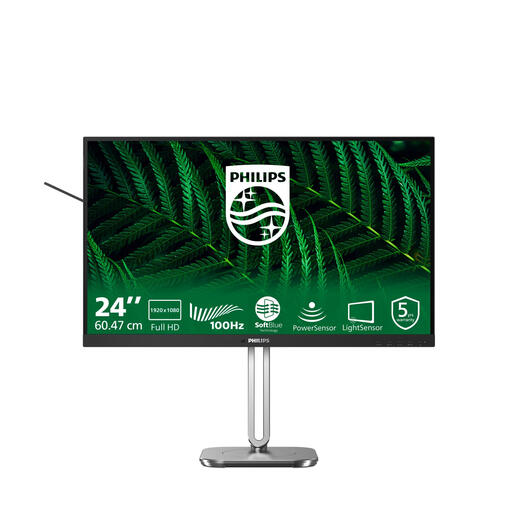 No image available
For anyone who usually works with one document and wants a compact screen with an adjustable position.
23.8 inches; 1920 × 1080 pixels; Full HD. The description mentions a matte screen, height and tilt adjustment, and SoftBlue technology.
 No image available
For anyone who wants more pixels on a relatively compact screen and would like to connect a laptop via USB-C.
24 inches; 2560 × 1440 pixels; USB-C with 90 W Power Delivery. The description mentions a height-adjustable stand.
Display via USB-C and charging depend on the features and power requirements of the connected laptop.
 No image available
For anyone who wants QHD resolution on a 24-inch screen, along with options for adjusting the monitor position.
24 inches; 2560 × 1440 pixels. The description mentions a matte IPS screen, 100 Hz and a stand adjustable for height, tilt, swivel and pivot.
 No image available
For anyone looking for a Full HD screen with a height that can be adjusted to suit their writing space.
24 inches; IPS; 1920 × 1080 pixels. The description lists a stand with 150 mm of height adjustment.
Adjust the text size, screen position and lighting so you can read the text comfortably and minimise distracting reflections. Also change posture and take short breaks. Arboportaal recommends this for screen work; it isn’t evidence that a particular monitor prevents discomfort.
Only if the monitor port supports display, the power output suits your laptop, and both the laptop and cable support the required features. EIZO specifies USB-C with DisplayPort Alt Mode and up to 70 W for the EV2485; Dell describes the USB-C downstream port on the P2425 as data-only.
Compare the EU energy label and, where available, the model information in EPREL on the same basis. According to the European Commission, the label for electronic displays includes details such as energy efficiency class, screen size and resolution.
For many online distance purchases from a business, you have 14 days to change your mind. According to the Dutch government, there’s no fixed statutory warranty period in the Netherlands; if a product doesn’t conform to the contract, the seller is your point of contact. Check the circumstances of your purchase and keep the manufacturer’s warranty separate from your statutory rights.
The regulations mentioned are aimed at employers and employees. If you write in your spare time, you can follow the advice on setting up your workspace and taking breaks, but employers’ obligations aren’t general purchasing requirements for every writer.