First, choose a monitor whose screen and stand both fit on your desk, and whose video connection works with your laptop. A compact Full HD monitor may be enough for working on a single document. For longer writing sessions, an adjustable stand can help you position the screen comfortably, while a 16:10 model may offer more vertical pixels than Full HD. Always check the exact model, the cables supplied and the connections: similar versions can differ.
Who is this choice relevant to?
Writer with a small desk
You mainly write in a single document and want to leave room for textbooks or a keyboard. So measure the screen and the stand, not just the diagonal. Lenovo Netherlands and Philips Netherlands highlight size and workspace as factors to consider when choosing a monitor.
Writer who works for long stretches
You often work for long periods at a time and want to adjust the height and viewing angle to suit your sitting position. Adjustability is therefore an important factor to consider. Arboportaal explains how working at a screen can put strain on your neck and shoulders.
Writer who consults reference materials
You switch between your story, notes and reference materials as you write. Compare the space available for documents and the video connections with those on your laptop. Lenovo Netherlands and Dell Netherlands provide specifications for relevant models and versions.
What should you look for?
Compact Full HD monitor
When to choose it: If you usually work in one document and desk space is your priority, compare a Full HD model with the dimensions of its stand.
Trade-off: Full HD has fewer vertical pixels than the separately specified WUXGA version. Screen size alone doesn’t tell you how deep the stand is.
Monitor with an adjustable stand
When to choose it: If you often write for long periods and want to adjust the screen height to suit your sitting position, check the exact version and its adjustment options.
Trade-off: Adjustability doesn’t guarantee that the monitor will connect to your laptop. According to Dell, the USB-C downstream port on the Dell P2425H is for data.
16:10 monitor for text and reference materials
When to choose it: If you often refer to notes or reference materials while writing, compare a 16:10 version, such as the Dell P2425, with a Full HD model.
Trade-off: The Dell P2425 and P2425H are different models. Don’t assume that the specifications or accessories of one version apply to the other.
| Factor to consider |
What should you check? |
Who is this important for? |
| Desk space |
Measure the available width and depth. Check the monitor’s dimensions, including the stand, and leave room for your keyboard and books. |
I want room for my keyboard and study materials too, so the stand needs to fit in my workspace. Around 36% of consumers say desk space is their main purchasing priority. |
| Adjustability |
Check whether the exact version is height-adjustable or only tilts, and consider whether you can position the screen comfortably. |
For longer writing sessions, I want to be able to adjust the screen height to suit my sitting position. Around 29% of consumers prioritise adjustability. |
| Space for text and reference materials |
Compare the resolution and aspect ratio of the exact model, and think about the document and window layout you need. |
If I want to view my story and notes side by side, I consider how much space there is for documents. Around 21% of consumers prioritise space for text and reference materials. |
| Laptop connection |
Compare your laptop’s video output with the monitor’s video input. Check which cable is included and whether you need an adapter. |
I want to connect my existing laptop without choosing an incompatible cable. Around 14% of consumers say the laptop connection is their main purchasing priority. |
Common buying mistakes
-
Measuring only the screen diagonal
The monitor, stand, keyboard and study materials all need to fit in your workspace.
Measure the space available and check the monitor’s dimensions with the stand before buying.
-
Assuming a USB-C port makes a complete laptop dock
Dell describes the USB-C port on the P2425H as a downstream data port. This description doesn’t confirm that it accepts video input from a laptop.
Compare the video connections on your laptop and the exact monitor version, and check which cable is included.
Brands to compare
Dell
The P2425H is an adjustable Full HD version, while the separate P2425 is a 16:10 model to compare it with.
- According to Dell, the P2425H can be adjusted for height, tilt, swivel and pivot. Dell lists HDMI and DisplayPort connections.
- According to Dell, the USB-C downstream port on the P2425H is for data. Don’t assume it can be used for laptop video or charging.
LG
According to LG, the LG 24BA450-B combines a 23.8-inch Full HD IPS screen with an adjustable stand.
- LG lists height, tilt, swivel and pivot adjustments for this model.
- Check the dimensions and connections of the exact version against your desk and laptop.
Philips
The Philips 24E1N1100A/00 is a Full HD IPS model to compare if you’re looking for a straightforward monitor for writing.
- Philips lists IPS technology and a LowBlue mode.
- The product listing doesn’t prove that this mode will reduce discomfort for an individual user. Check the stand and connections on the version being sold.
Lenovo
The ThinkVision T24d-30 is an office-focused WUXGA model to compare if you also want to check the accessories included.
- Lenovo lists a stand and power cable.
- According to Lenovo, a DP cable is included only in certain countries. Lenovo’s claims about visual comfort are manufacturer claims, not the result of independent user testing.
Joybuy products
This selection includes desktop monitors and portable screens you could consider for writing. Compare their dimensions, stands and connections with your student room and laptop.
 Image unavailable
AOC Gaming Q27G42XNE 27-inch Quad HD monitor
Consider this model only if a 27-inch screen will fit your desk setup.
The product name lists a resolution of 2560 × 1440 pixels, two HDMI 2.0 connections and one DisplayPort 1.4 connection.
View at Joybuy
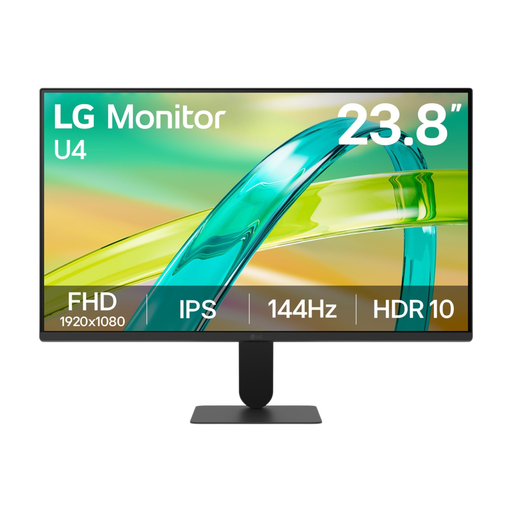 Image unavailable
LG 24U411B-B 23.8-inch monitor
This 23.8-inch version could be an option if you’re looking for a Full HD screen for your desk.
The product information lists IPS, Full HD resolution of 1920 × 1080 pixels and a tilt range of -5° to 15°.
View at Joybuy
 Image unavailable
TECLAST V16H 16-inch portable monitor
A portable 16-inch screen could suit a workspace you want to arrange differently from a fixed desktop monitor.
The product name lists a 16:10 screen, Full HD, a built-in stand, two USB-C ports and Mini HDMI. Check that the port and cables are compatible with your laptop’s video output.
View at Joybuy
 Image unavailable
TECLAST V16Q portable monitor
Compare this portable model with your laptop and the space available before choosing an extra screen.
The product information lists a 16:10 aspect ratio, 2560 × 1600 pixels, USB-C and Mini HDMI. Check which connection supports video from your laptop.
View at Joybuy
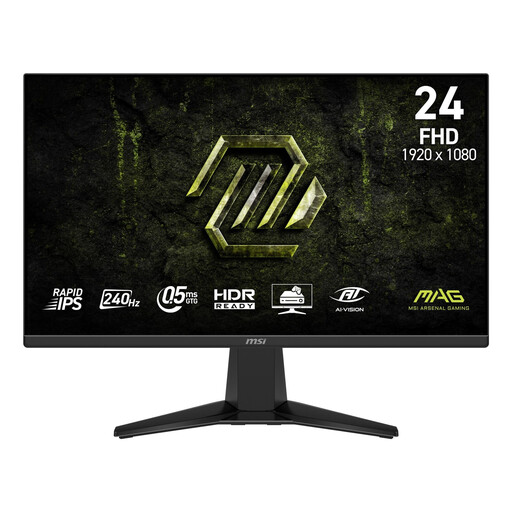 Image unavailable
MSI MAG 245F X24 23.8-inch Full HD monitor
This 23.8-inch version is worth comparing if you’re looking for a Full HD monitor for your desk.
The product information lists a resolution of 1920 × 1080 pixels and HDMI and DisplayPort connections. According to the product information, the stand only offers tilt adjustment.
View at Joybuy
Frequently asked questions
How should I position the screen when writing?
Place the screen directly in front of you and adjust its position to suit your chair and desk. Arboportaal recommends positioning the top of the screen slightly below eye level and tilting it so you can look straight at it.
Can I always connect a USB-C monitor to my laptop with a single cable?
No, it depends on the connections on the exact monitor and your laptop. Dell describes the USB-C downstream port on the P2425H as a data port; this doesn’t confirm that it accepts USB-C video input.
What can I compare if I’m concerned about energy consumption?
Compare the EU energy label or product information sheet for the exact version. The European Commission says that energy labelling rules also cover computer monitors. You can’t work out the cost on your own energy bill from this information alone, without comparable usage hours and product data.
Do monitors bought online always come with exactly two years’ warranty?
No. According to the Dutch government, there is no fixed statutory warranty period in the Netherlands. You’re entitled to a product that is fit for purpose, depending on what you can reasonably expect. If there’s a fault, contact the seller. A manufacturer’s warranty or an extended warranty doesn’t replace this right.
Can I return a monitor bought online within 14 days?
According to the Dutch government, distance purchases often come with a 14-day cooling-off period, although there are exceptions. Check the terms that apply to your purchase.


