Who is this choice relevant for?

Writers who work for long stretches

If you write at a screen for a long time, consider adjustability, reflections and varying your posture. Arboportaal also recommends looking away regularly and taking microbreaks. A monitor feature is no guarantee that it will prevent symptoms.

Writers who revise as they go

If you want to keep a chapter alongside notes or reference material, compare the available screen space with the room on your desk. The resolutions of the Dell P2425 and P2725D show why pixel count, as well as screen size, is a useful point of comparison, according to Dell Netherlands.

Writers with a laptop setup

If you want fewer cables on your desk, check separately whether the monitor supports USB-C video and provides enough charging power, and whether your laptop supports these features. Dell Netherlands and LG Netherlands describe different capabilities for their models.

What should you look for when choosing?

A compact screen for one document

Best for: mainly writing and reading in one window, with limited desk space.

Consider: compare adjustability and vertical pixel space. Dell Netherlands lists the P2425 at 1920 × 1200 pixels and the BenQ GW2490T at 1920 × 1080 pixels.

A larger screen for text and notes

Best for: revising with your story, notes or reference material all on screen at once, if you have enough desk space.

Consider: according to Dell Netherlands, the Dell P2725D is a 27-inch QHD monitor with 2560 × 1440 pixels. Measure your available space first.

USB-C for a combined writing and creative workspace

Best for: combining writing and creative work with a laptop that supports USB-C video.

Consider: LG lists USB-C for video, data and power delivery up to 96 W on the 27UP850K-W. Check that your laptop supports this and needs that charging capacity.

What to consider What to look for Who it matters most to
Adjustability and reading comfort Check the directions of adjustment, reflections in your workspace and the space needed for the monitor stand. If you have long writing sessions, you’ll want to adjust the screen position and take reflections and breaks into account; around 36% of consumers put posture and their reading environment first.
Space for text and notes Compare the resolution and screen size with your desk space and the text size you find comfortable to read. When revising, it can be helpful to see your story and reference material at the same time; around 29% of consumers name extra space for text as their top priority.
Compact and simple Measure the space available on your desk and check that the stand offers enough adjustment. If you mainly write in one window and have limited space, you may prefer a compact setup to room for multiple windows; around 21% of consumers prioritise a compact, simple setup.
Single-cable connection Check for USB-C video and Power Delivery on the monitor, and video output and charging requirements on the laptop. If you want to connect your laptop for video and power with one cable, both devices need to support these features; around 14% of consumers name a single-cable connection as their top priority.

Common pitfalls

  • Assuming every USB-C port supports video and laptop charging

    According to Dell, the USB-C downstream port on the Dell P2425 is for data and provides up to 15 W of power. That’s not the same as the video and power features LG lists for the 27UP850K-W.

    Check the features of the ports on the exact monitor and laptop before relying on a single-cable setup.

    If a port doesn’t transmit video, you may need a separate video cable.

  • Choosing based on screen size alone

    A 24.07-inch screen with 1920 × 1200 pixels and a 23.8-inch screen with 1920 × 1080 pixels have a similar stated diagonal measurement, but not the same amount of vertical pixel space.

    Compare resolution, aspect ratio, stand and desk space together.

  • Treating eye-comfort features as proven health benefits

    A reading mode or another monitor feature doesn’t prove that it prevents health problems. Arboportaal also recommends varying your posture, looking away and taking microbreaks.

    Think of features as adjustment options, and take reflections, posture and breaks into account too.

Relevant brands to consider

Dell

The P2425 and P2725D offer different screen sizes and resolutions for a writing setup.

  • Dell specifies an adjustable stand and 1920 × 1200 pixels for the P2425; the P2725D has a 27-inch screen and 2560 × 1440 pixels.
  • According to Dell, the P2425’s USB-C downstream port is for data only and provides up to 15 W of power; it doesn’t support video.

BenQ

The GW2490T is a 23.8-inch Full HD model with an adjustable stand.

  • BenQ specifies 1920 × 1080 pixels, an anti-glare coating, 110 mm of height adjustment and an ePaper display mode.
  • BenQ also makes claims about eye comfort; these aren’t proven health outcomes.

LG

The 27UP850K-W is worth considering if your workspace is also used for creative work and connecting a USB-C laptop.

  • LG specifies 27-inch 4K, a height-adjustable stand and USB-C for video, data and power delivery up to 96 W.
  • HDR and a wide colour gamut aren’t proven requirements for writing text alone.

Philips

The 24E1N1100A/00 is a straightforward 23.8-inch Full HD option.

  • Philips lists IPS, 1920 × 1080 pixels and a maximum refresh rate of 120 Hz.
  • Check separately whether the stand offers the adjustments you need.

Lenovo

The ThinkVision T24i-30 is an example of a business-focused 23.8-inch Full HD monitor.

  • Lenovo specifies 155 mm of height adjustment, tilt, swivel and pivot, plus HDMI and DisplayPort.

Joybuy monitors for your writing setup

This selection includes compact Full HD monitors, 27-inch QHD models for keeping text alongside other windows, and a portable 16-inch monitor with a 16:10 aspect ratio.

Acer SA242YH1 23.8-inch Full HD monitor

Acer SA242YH1 23.8-inch Full HD monitor

A compact Full HD option for writing and reading in a home office.

23.8 inches; 1920 × 1080 pixels.

View at Joybuy

MSI MAG 272QPF E20 27-inch QHD monitor

MSI MAG 272QPF E20 27-inch QHD monitor

A 27-inch option for viewing text and other windows side by side while revising.

2560 × 1440 pixels; IPS panel.

View at Joybuy

AOC Gaming Q27G42XNE 27-inch QHD monitor

AOC Gaming Q27G42XNE 27-inch QHD monitor

The 27-inch QHD resolution is worth considering if you want to compare several windows while writing.

2560 × 1440 pixels; VA panel.

View at Joybuy
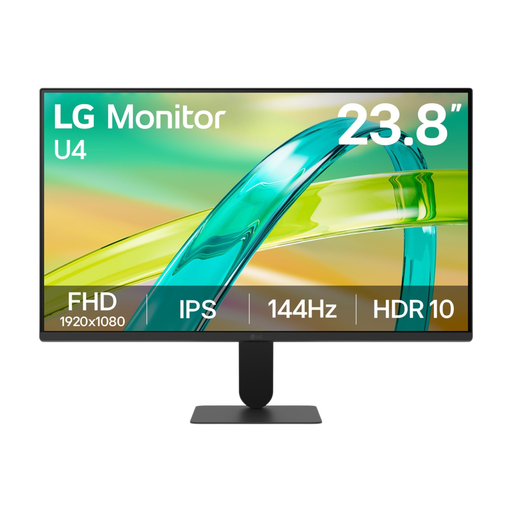
LG 24U411B-B 23.8-inch Full HD monitor

LG 24U411B-B 23.8-inch Full HD monitor

A 23.8-inch Full HD option for writing at your desk.

1920 × 1080 pixels; IPS panel.

View at Joybuy

TECLAST V16H 16-inch portable monitor

TECLAST V16H 16-inch portable monitor

A portable option with a smaller screen for a workspace where a 16:10 aspect ratio is preferred.

16 inches; 16:10; Full HD IPS screen; built-in stand.

View at Joybuy

Frequently asked questions

Do I need a 4K monitor for writing stories?

No, 4K isn’t essential for writing a story. Choose a resolution based on how much room you want for documents, a text size that’s easy to read and the dimensions of your workspace. The models mentioned range from Full HD and 1920 × 1200 to QHD and 4K.

Can any USB-C monitor connect to my laptop with one cable?

No, USB-C features vary by model. Dell lists the P2425 as having a downstream port for data only and up to 15 W of power; LG lists the 27UP850K-W as having USB-C for video, data and power delivery up to 96 W. Also check that your laptop supports video over USB-C and can receive enough power.

How should I set up for long sessions at a screen?

For screen-based work, Arboportaal recommends varying your posture, looking away regularly and taking microbreaks. This advice on how to work doesn’t mean that a particular monitor will prevent eye or neck problems.

What are my rights when I buy a monitor online?

For a standard online consumer purchase, you usually have 14 days from delivery to change your mind, according to ACM ConsuWijzer. Check which exceptions and returns terms apply to your purchase. The Netherlands Authority for Consumers and Markets says that the seller is responsible for the statutory guarantee; there is no single fixed statutory guarantee period in the Netherlands.

Do Dutch workplace health and safety rules apply if I write at home?

If you write at home as an employee, your employer’s duty of care may also apply to your home workspace, according to Arboportaal. For employees who work at a screen for more than two hours a day, Arboportaal says that the screen and keyboard must not be attached to one another. This doesn’t automatically mean that someone writing solely for personal reasons is required to buy a particular setup.
