
Writer who works with lots of source windows
Often keeps a draft, source pages and references open at the same time, and chooses mainly according to how easily they can arrange their windows.


Choose an ultrawide screen if you often want to view your draft and sources side by side, a 3:2 screen if you want to see more lines of a document at once, or a 27-inch 4K monitor if sharp text is your priority. Dell and BenQ specify these different screen sizes and resolutions. Also check that the screen layout, text size and connections suit your workspace and laptop.
Often keeps a draft, source pages and references open at the same time, and chooses mainly according to how easily they can arrange their windows.
Regularly reads and revises chapters and references, and wants text to be easy to read while keeping more lines of a document in view.
Works at a screen for long periods and wants to tailor the setup to their desk and sitting position. Workplace requirements apply to employees depending on their working situation.
| What to consider | What to look for when buying | Who is this important to? |
|---|---|---|
| Draft and sources side by side | Check the aspect ratio, screen width and resolution, and think about which windows you want to have open at the same time. | If I often want to keep my draft, sources and references side by side, I focus mainly on window layout; around 36% of consumers prioritise this. |
| Readable text and references | Check the resolution of the exact model and assess text at your preferred scaling and viewing distance. | If you want small text and links to be easy to read while writing, consider readability at your own scaling setting; around 29% of consumers prioritise text readability. |
| A workspace setup that suits you | Check the height adjustment, swivel, glare and how much desk space the monitor takes up. | If I work at my screen for long periods, I want to be able to position and adjust it to suit me; around 21% of consumers prioritise an adjustable workspace. |
| Connecting a laptop | Check video over USB-C, the power output required and the connections available on the exact monitor and laptop models. | If you want to handle both the picture and power through one connection, it’s worth checking your laptop’s capabilities and the monitor’s power output; around 14% of consumers prioritise laptop connectivity. |
Dell specifies a resolution of 3840 × 2160 pixels for the Dell P2725QE, while a Joybuy search result for the same model also listed QHD. This kind of discrepancy could affect how sharp you expect the text to look.
Compare the full model number and pixel resolution on the manufacturer’s and retailer’s websites.
The Dell P3425WE is an ultrawide model, while the BenQ RD280U has a 3:2 aspect ratio. Extra width doesn’t automatically mean you’ll see more lines of a document.
Measure the space available on your desk and decide in advance whether you mainly want to view windows side by side or documents stacked vertically.
The stated USB-C charging power varies by model: ASUS specifies 65 W for the PA278CV, while Dell specifies up to 90 W for the P3425WE.
Check whether your laptop’s USB-C port supports video and whether the charging power is suitable for your laptop.
ACM ConsuWijzer distinguishes between a manufacturer’s or seller’s warranty and your statutory right to a product that does what you can reasonably expect it to do.
Keep your purchase and model details, and contact the seller if there’s a fault.
Dell offers both a 27-inch 4K model and a 34.1-inch ultrawide USB-C hub monitor for this type of setup.
The RD280U is a 3:2 monitor for anyone who values document height as well as text detail.
The ProArt PA278CV is a 27-inch QHD model with an adjustable stand and additional features for working with images.
The 27E1N5600HE/00 combines a QHD screen with a built-in webcam, making it a good option if you also make video calls while writing.
These monitors are options for viewing draft text and source material side by side, or for reading and checking text on a 27-inch QHD or 4K screen.
 Image unavailable
A 27-inch QHD screen for viewing and checking text and references.
The title lists 2560 × 1440 pixels, a tiltable stand and 100 × 100 mm VESA mounting.
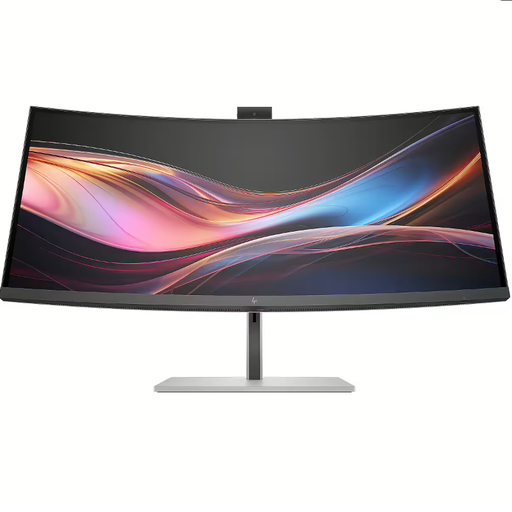 Image unavailable
The 34-inch WQHD format is an option if you want to view several work windows side by side.
The product information states that a charger isn’t included as standard; check whether you already have a suitable power supply.
 Image unavailable
A 49-inch monitor for viewing lots of work windows in a wide layout; check that it will fit on your desk first.
The product title lists 5120 × 1440 pixels.
 Image unavailable
A 27-inch 4K screen for anyone who wants to view text and source references at a high resolution.
The product title lists 3840 × 2160 pixels.
No. It’s mainly an option if you usually want to keep several windows side by side and have enough desk space for one. For long documents, a 3:2 model such as the BenQ RD280U offers a different way to use the screen space; try it at your preferred text size too.
Not necessarily. Check whether your laptop’s USB-C port supports video output and compare the power your laptop needs with the monitor’s Power Delivery specification. For example, ASUS lists DisplayPort Alt Mode and 65 W for the PA278CV.
Adjust the screen height, lighting and position to suit your workspace, and take breaks from screen work. According to the Dutch Arboportaal, specific requirements apply to employees who work at a screen for more than two hours a day, including requirements for the workplace; these rules aren’t a general product requirement for every private buyer.
Compare the EU energy label and product information for the exact models. The European Commission states that displays use an energy label scale from A to G; don’t estimate energy consumption based only on screen size or a general brand claim.
According to ACM ConsuWijzer, when you buy a product online you generally have up to 14 days from delivery to change your mind, subject to exceptions that you should check before buying. Your statutory guarantee is separate from any manufacturer’s warranty; if a product doesn’t meet expectations, contact the seller.