If you write with your story and section outline open at the same time, an ultrawide monitor can help you arrange both windows side by side, provided your desk has enough space. If you mainly work in one document, compare an adjustable 27-inch monitor with QHD or 4K, and try the text size and window layout that you find easy to read. For this writing task, a comfortable working position and the right connections matter more than high gaming specifications.
Who is this guide for?
Writers who want their section outline beside the text
You switch between your story and its structure as you write, and want to keep both windows visible. Philips’ product specifications describe an ultrawide model with room for side-by-side windows.
Writers who spend long sessions at the screen
You want to set the text to a comfortable size and adjust the screen to suit your workspace. Arboportaal recommends paying attention to readable text and reflections when working at a screen, among other things.
Laptop writers with a dedicated workspace
You want to know whether one monitor connection can handle video and data while providing enough power for your laptop. BenQ and Lenovo describe USB-C features on specific models; always check that they’re compatible with your laptop.
What should you look for when choosing?
First decide whether you want to use two windows at once or mainly write comfortably in one main window. Then consider text settings, adjustability and how the monitor connects to your laptop.
For this writing task, the percentages show which buying priorities matter most to consumers.
| What to consider |
What to look for |
Who should pay extra attention? |
| Story and outline side by side |
Compare the screen aspect ratio and dimensions, and check that both windows remain readable without becoming too small. |
If I keep my story and section outline open at the same time, I want to be able to read both windows and still have enough room on my desk. Around 36% of consumers mainly want to see two writing windows at once. |
| Readable story text |
Try your writing software with your preferred display scaling, font size and viewing distance, and compare the panel resolution. |
When reading long passages, I want the text to be comfortable to read from my usual viewing distance. Around 29% of consumers make readability their top priority. |
| An adjustable working position |
Check the height adjustment, tilt and any portrait mode, as well as how much space the screen needs. Arboportaal recommends paying attention to readability and reflections. |
When I write for a long time, I want to adjust the screen to suit my workspace and avoid distracting reflections. Around 21% of consumers prioritise an adjustable screen position. |
| Connecting a laptop |
Check whether your laptop supports USB-C video, and whether the power output and included cable suit your setup. |
For a tidy laptop workspace, I want to know whether one connection can handle video and data and charge my laptop sufficiently. Around 14% of consumers prioritise a suitable laptop connection. |
How to avoid common buying mistakes
-
Choosing a screen based on width alone
A wide screen gives you room for side-by-side windows, but that doesn’t automatically mean your text will remain readable at your preferred size.
Measure the available desk space and try out the window layout and text size you use before buying.
A screen that doesn’t fit your desk properly could limit the setup you want.
-
Assuming USB-C guarantees a single-cable setup
Video, data and charging depend on the capabilities of both the monitor connection and your laptop.
Before buying, compare your laptop’s video output and power requirements with the specifications of the exact monitor variant.
If the connection isn’t sufficient, you may need a separate adapter, cable or dock.
-
Confusing the manufacturer’s warranty with your full statutory rights
A commercial warranty is separate from your statutory rights. ACM ConsuWijzer explains that the retailer remains responsible when the conditions for a statutory guarantee are met.
First check which statutory rights apply and what an additional warranty contract actually adds.
Brands worth considering
These example models show the screen sizes, adjustment options and connections you can compare when choosing.
Dell
The Dell Pro 27 Plus P2725QE is a 27-inch 4K USB-C hub monitor for anyone looking to combine resolution and connectivity on a standard 16:9 screen.
- Dell Netherlands lists a resolution of 3840 × 2160 pixels and 90 W power delivery for this model.
- The 16:9 format isn’t as wide as a 21:9 screen.
Philips
According to Philips, the Philips 34E1C5600HE/00 is a 34-inch ultrawide monitor with a resolution of 3440 × 1440 pixels, designed for anyone who wants to arrange two windows side by side.
- The manufacturer lists a USB-C connection and a 21:9 aspect ratio.
- Check that the extra screen width and window layout suit your desk and text settings.
BenQ
The BenQ GW2790QT is a 27-inch QHD monitor with USB-C and portrait mode, making it worth considering for an adjustable laptop writing setup.
- BenQ Netherlands lists 110 mm of height adjustment and 65 W USB-C Power Delivery.
- Whether 65 W is sufficient depends on your laptop; also check that you have enough room to use the monitor in portrait mode.
LG
According to LG, the LG 27UP850K-W combines a 27-inch 4K panel with an adjustable stand.
- LG lists height, tilt and pivot adjustment for this model.
- The stated colour performance doesn’t, by itself, tell you whether the monitor will make writing more comfortable.
Lenovo
According to Lenovo, the Lenovo ThinkVision T27h-30 is a 27-inch QHD monitor with a USB-C dock and an adjustable stand.
- Lenovo lists a 155 mm lift range and an included USB-C cable.
- Check that your laptop supports the video and charging features you need through the connection.
Joybuy monitors for this writing setup
This selection focuses mainly on ultrawide monitors for anyone who wants to place story text and a section outline side by side.
 Image unavailable
Philips Evnia 49M2C8900/00 49-inch DQHD QD-OLED curved gaming monitor
This 49-inch ultrawide model suits anyone who wants to place their story and outline side by side. Check that the screen will fit on your desk before buying.
The product name lists DQHD, QD-OLED, a curved screen, 240 Hz and FreeSync Premium Pro. Gaming-focused specifications aren’t necessarily an advantage for writing text.
View at Joybuy
 Image unavailable
LG UltraWide 34U650A-B 34-inch monitor
This 34-inch ultrawide model suits a workspace where you want to place your story and outline side by side.
If you’re using a laptop, check that the monitor supports the video connection and power output your laptop needs.
View at Joybuy
 Image unavailable
Philips 6000 series 34B2U6603CH/00 34-inch Wide Quad HD LCD monitor
This 34-inch model is worth considering if you want to use two windows side by side while writing.
The product name lists a resolution of 3440 × 1440 pixels and a Wide Quad HD LCD screen. For a laptop setup, check that the connections and power supply are suitable for your device.
View at Joybuy
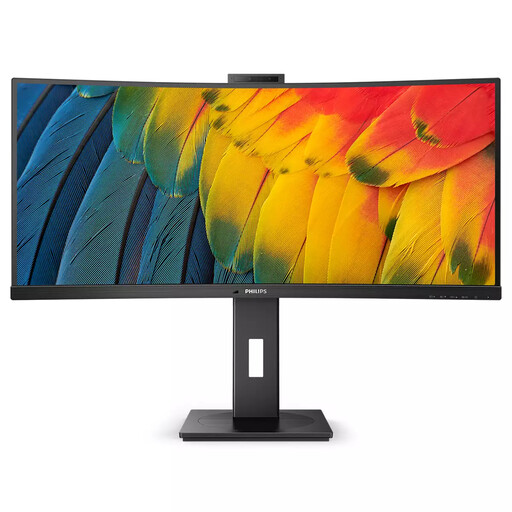 Image unavailable
Philips 5000 Series 34B1U5600CH/00 34-inch Wide Quad HD LCD monitor
This 34-inch monitor is an option to compare if you want to keep your story text and section outline on screen at the same time.
The product name lists a resolution of 3440 × 1440 pixels and a Wide Quad HD LCD screen. Try out your chosen window layout and text size to make sure they’re comfortable to read in your workspace.
View at Joybuy
 Image unavailable
LG 34WR50QK-B 34-inch Wide Quad HD monitor
This 34-inch model is designed for anyone who wants to arrange several windows side by side while writing.
The product name lists a resolution of 3440 × 1440 pixels and Wide Quad HD. Check that the screen layout and text size suit your writing software and desk.
View at Joybuy
Frequently asked questions
Do you need 4K to write a game story?
No, 4K isn’t essential: the 27-inch models described include both QHD and 4K options. Choose the text size and window layout that work comfortably with your own software, rather than focusing on the pixel count alone.
How should I set up my monitor for long writing sessions?
Choose a text size that’s easy to read, and pay attention to reflections and screen position. Arboportaal highlights these points for working at a screen; the employment rules that apply depend, among other things, on your working situation.
Can any laptop display video and charge through a single USB-C cable?
No, having a USB-C port alone doesn’t guarantee this. Compare your laptop’s video output and power requirements with the monitor specifications. For example, the BenQ GW2790QT lists DisplayPort Alt Mode, data and 65 W Power Delivery.
Should I take out an extra warranty for a monitor?
You don’t need an extra contract to have a statutory guarantee. According to ACM ConsuWijzer, statutory guarantees are separate from commercial warranties; the retailer remains responsible if the statutory conditions are met. What you could reasonably expect from the product also plays a part in the assessment.
Are there Dutch rules for working at a screen from home?
If you’re an employee, Arboportaal says your employer also has a duty of care to provide good and safe working conditions at home. Arboportaal also states that for employees who work at a screen for more than two hours a day, the screen and keyboard must not be attached to each other. This isn’t a general purchasing requirement for every individual writer.


