
Family memoir writer
You spend long periods working on chapters and want a screen and workspace that you can adjust to suit you. For writing, screen space and positioning matter more than gaming-focused features.


If you mainly write text, choose a screen that comfortably fits your document and is easy to adjust. If you often view family photos alongside your writing, compare larger screens with higher resolutions. Choose connections to suit your computer and external drive: a monitor hub doesn’t make backups or store files.
You spend long periods working on chapters and want a screen and workspace that you can adjust to suit you. For writing, screen space and positioning matter more than gaming-focused features.
You alternate between writing and copying files to external storage. Check how your computer, monitor and drive connect to one another; a monitor hub isn’t the same as a backup system.
You regularly view scanned photos alongside your writing and may value extra screen space and resolution more than a compact setup.
Start with the screen space and adjustability that suit your writing area. Then check that the connections work with your computer and external backup drive.
| What to consider | What to look for | Who is it mainly for? |
|---|---|---|
| Space for text | Compare screen size, aspect ratio and resolution. You can also adjust the text size on your computer to suit your preferences. | If I mainly write chapters, I want to be able to read my text comfortably without taking up too much desk space. Around 33% of consumers prioritise writing space. |
| Adjustability | Check whether the stand lets you adjust the height and viewing angle, and whether the screen fits your desk. | During longer writing sessions, I want to position the screen directly in front of me at a comfortable height. Around 25% of consumers prioritise adjustability. |
| Connections and file copying | Check the video connection, the function of the USB ports and your laptop’s power requirements. Also decide where you’ll connect the external drive. | If I want to copy files to an external drive, I need to know how it connects to my computer and how to make the copy. Around 25% of consumers prioritise connections and an offline workflow. |
| Archive photos | Measure the available desk space and compare the resolution and stated display specifications of the exact model. | When I often view scanned family photos alongside my writing, I want enough room to keep both on screen. Around 17% of consumers prioritise viewing archive photos. |
A monitor doesn’t store your memoir file. A backup is a separate copy that you make using your computer. The National Cyber Security Centre also warns that connected storage media can be vulnerable to ransomware.
Plan your offline copies separately from your monitor purchase and check how to connect the drive to your computer.
Remember to set aside time to make and check your copies, too.
Dell says the USB-C downstream port on the Dell P2425 is intended for data and delivers a maximum of 15 W. LG lists USB-C on the 27UP850K-W for video, data and charging up to 96 W. Capabilities therefore vary by model.
Check the functions of the port on the exact model and whether your laptop supports that connection and the required power delivery.
Depending on your computer and monitor, you may need a different video cable, power adapter or connection.
The Philips 24E1N1300A/00 and 24E1N1300AE have different model codes; the features of one version don’t automatically apply to the other.
Compare the full model code and the specifications of the version you actually want to buy.
The Dell P2425 is a 16:10 monitor for writing, with several adjustment options.
The LG 27UP850K-W is a 27-inch 4K screen for viewing text and images on a larger display.
The Philips 24E1N1300A/00 is a compact Full HD model with USB-C and power delivery, according to Philips.
This Joybuy selection includes larger screens for text and multiple windows, as well as compact monitors for writing areas with less room for a screen.
 No image available
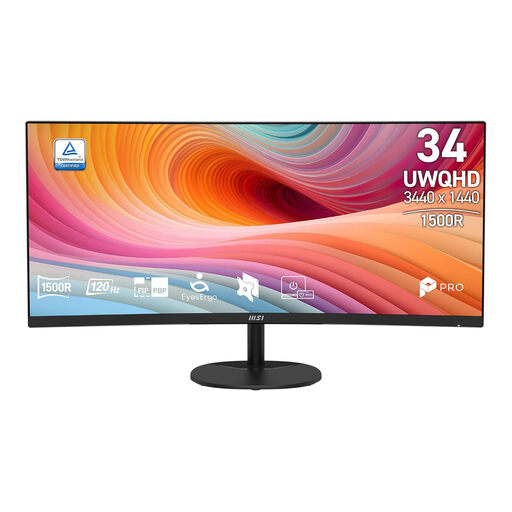
Could suit you if you want to view text and multiple windows side by side.
34 inches, UWQHD, 21:9, 1500R curvature, 120 Hz and VA panel.
 No image available
An option for viewing documents and family photos on a larger screen.
27 inches, IPS and 4K resolution of 3840 × 2160 pixels.
 No image available
Could suit you if you’re looking for a compact 16:10 setup and want to connect your laptop via USB-C.
16 inches, FHD, IPS, 144 Hz, two USB-C ports, mini-HDMI and built-in stand.
 No image available
Could suit a compact writing area; check that the connections and adjustment options work for your setup.
24 inches, Full HD, VA panel and 100 Hz.
 No image available
Could suit writing on a compact screen if its stated adjustment options work for your workspace.
24 inches, IPS, Full HD resolution of 1920 × 1080 pixels and a stand with height and tilt adjustment.
No. A backup is a separate copy of your files that you make using your computer, for example on an external drive. A monitor hub simply provides a connection. The National Cyber Security Centre warns that backups and USB storage can also be affected by ransomware.
Position the screen directly in front of you and adjust the height and viewing angle to suit your workspace. Arboportaal advises placing the top of the screen slightly below eye level and varying your posture. This doesn’t guarantee that a particular screen will prevent discomfort.
For a consumer purchase in the Netherlands, the Dutch government says the seller must provide a solution if a product is faulty. The Netherlands doesn’t have one fixed statutory guarantee period that applies to all products.
For many distance purchases from a business, the Dutch government says a 14-day cooling-off period applies. Check the terms of your specific purchase; a purchase from a private seller isn’t covered by the same distance-selling rule.
The obligations described by Arboportaal are aimed at employers and employees. A personal project doesn’t establish an employment relationship, so these employer obligations don’t automatically apply to everyone writing at home.