First, choose a screen that fits on your desk with its stand, then decide whether you need more room for your timeline or a larger 4K preview. For an SDR film, a suitable Rec.709 workflow matters more than an HDR logo alone. Also check your laptop’s video output and whether the USB-C power delivery is sufficient.
Who is this for?
Editor with limited desk space
Wants to check the screen width and stand dimensions in advance, so there’s enough room left to work while editing. BenQ lists the PD2506Q as 570.0 mm wide, with a stand depth of 256.9 mm; ASUS specifies a 24.1-inch screen size for the PA248CRV.
4K editor working on one screen
Wants to view footage and editing panels side by side, so weighs up a 27-inch screen against the available desk width. BenQ and ASUS list a resolution of 3840 × 2160 pixels for the PD2705U and PA279CRV.
Laptop editor who wants a single cable
Wants to combine video and charging over USB-C, provided the laptop supports the required video output and the power delivery is sufficient. BenQ lists 65 W Power Delivery for the PD models reviewed; ASUS lists 96 W for the PA279CRV.
What should you look for when buying?
First, measure the available space, including the area needed for the stand. Then compare the screen size and colour workflow with your editing needs, and check that the connections are compatible with your laptop.
| What to consider |
What should you check? |
Who should pay extra attention? |
| Desk space |
Measure the available width and depth, then compare them with the monitor’s dimensions including the stand. If considering an alternative, check its mounting options too. |
I want to fit the monitor on a compact desk without losing workspace; around 27% of consumers prioritise finding a monitor that fits their desk. |
| Colour reproduction and output |
Decide whether you’re delivering SDR/Rec.709 or HDR, and check the relevant colour mode for the exact model. A stated colour gamut is not, by itself, an independent measure of accuracy. |
If I’m matching colour correction to the final film format, I want to be able to set the right workflow; around 27% of consumers prioritise output colour. |
| Picture and timeline space |
Compare the screen resolution with your source footage and check that your preferred panel layout remains easy to read. |
I want to see detail and editing panels at the same time, and may be willing to choose a wider screen to do so; around 20% of consumers prioritise 4K detail and timeline space. |
| USB-C connection |
Check that your laptop’s port supports video output, and compare the power you need with the Power Delivery rating of the exact monitor model. |
I want to connect and charge my laptop with one cable, if both devices support it; around 26% of consumers prioritise this convenience. |
Common mistakes
-
Measuring only the screen diagonal
The stand may take up more desk depth than you’d expect from the screen size alone. The BenQ PD2506Q has a stated stand depth of 256.9 mm; for the PD2705U, it’s 256.8 mm.
Measure the space for the stand and check the dimensions or mounting options of the exact model.
-
Assuming an HDR logo proves a monitor is suitable for all HDR editing
A general HDR label alone doesn’t tell you what HDR performance a screen delivers. Adobe also distinguishes between SDR output and HLG and PQ HDR output.
First, decide on your delivery format, then match your software settings and the screen performance you need to it.
-
Assuming USB-C guarantees charging and video
A USB-C port doesn’t guarantee that your laptop can output video through it or that the power delivery will be suitable. BenQ lists 65 W for the PD models reviewed; ASUS lists 96 W for the PA279CRV.
Check the specifications of both your laptop and the exact monitor model before relying on a single cable.
If the connection or power supply isn’t sufficient, you may still need a separate power adapter or a different video connection.
Relevant brands for video-editing monitors
BenQ
The DesignVue models reviewed include the 25-inch PD2506Q and the 27-inch 4K PD2705U.
- BenQ lists a Rec.709 mode and a width of 570.0 mm for the PD2506Q; according to BenQ, the PD2705U is 614 mm wide and offers 4K.
- BenQ lists a maximum of 65 W over USB-C for both models. Check that this meets your laptop’s charging needs.
ASUS
The ProArt PA248CRV and PA279CRV reviewed represent a 24.1-inch WUXGA model and a 27-inch 4K model, respectively.
- ASUS lists 96 W USB-C Power Delivery for both models; for the PA279CRV, ASUS lists 99% DCI-P3 coverage.
- The PA248CRV has a lower resolution than the 27-inch 4K option reviewed. The stated DCI-P3 coverage is a manufacturer specification, not an independent measure of accuracy.
LG
The UltraFine 27UP850K-W reviewed is a 27-inch 4K model with USB-C.
- LG lists 95% DCI-P3 as a typical value and specifies an adjustable stand.
- A stated colour gamut alone doesn’t determine whether the screen suits your editing and output settings.
EIZO
EIZO positions the 26.9-inch 4K ColorEdge CS2740 for uses including video editing and colour correction.
- EIZO lists a resolution of 3840 × 2160 pixels.
- This is EIZO’s stated positioning; check separately that the screen size and stand suit your workspace.
Dell
The UltraSharp U2723QE reviewed is a 27-inch 4K screen with a USB-C hub.
- Dell lists IPS Black, a range of connections and up to 90 W power delivery for this model.
- Compare the dimensions and connection options with your own desk and laptop before making a choice.
Joybuy products for video editing
This selection includes compact 23.8-inch screens and 27-inch 4K options. Check the space available on your desk and the screen layout you want before choosing a size.
 No image available
ASUS ProArt Display PA24ACRV, 23.8-inch QHD monitor
A compact-screen option if you’re looking for a smaller size for a workspace with limited room.
23.8 inch; 2560 × 1440 pixels; QHD.
Joybuy
 No image available
HP Series 5 Pro 524pu, 23.8-inch FHD USB-C monitor
A 23.8-inch option to consider if a compact screen size is important for your desk.
23.8 inch; Full HD; USB-C.
The product information states that the charger must be purchased separately.
Joybuy
 No image available
LG UltraFine 27U711B-B, 27-inch 4K IPS monitor
A 27-inch option for anyone who has room on their desk for a larger screen layout.
27 inch; 4K; IPS.
Joybuy
 No image available
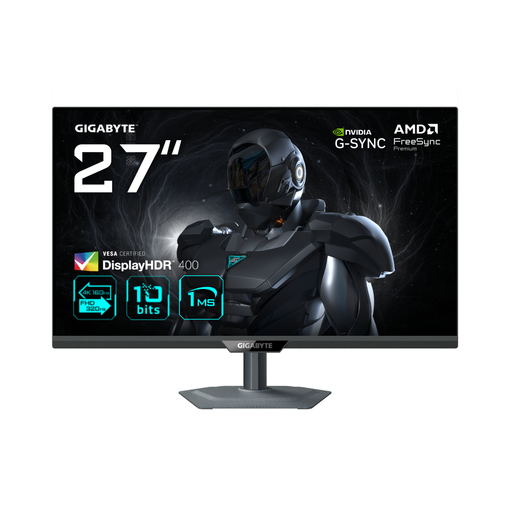
GIGABYTE G27U, 27-inch dual-mode IPS monitor
A 27-inch option if your desk has room for this size and you want to compare the stated display modes.
27 inch; 4K; 160Hz/FHD 320Hz; dual mode; IPS.
Joybuy
 No image available
Dell Plus S2725QS, 27-inch 4K monitor
A 27-inch screen to consider if you have enough room for this size.
27 inch; 3840 × 2160 pixels; 4K Ultra HD.
Joybuy
Frequently asked questions
Do I need to buy an HDR monitor for this film?
Not until you’ve decided on the output format. Adobe describes separate settings for Rec.709 SDR and HDR in Premiere; VESA distinguishes between general HDR labels and specified DisplayHDR performance levels.
How do I set up my colour workflow when using Premiere?
Choose the sequence setting and output colour space that suit your intended film output. Adobe describes a Rec.709 SDR preset and separate HLG and PQ HDR options.
Can I connect my laptop with a single USB-C cable?
Only if your laptop supports video output through that port and the monitor’s power delivery is suitable for your laptop. BenQ lists 65 W for the PD models reviewed; ASUS lists 96 W for the PA279CRV.
What are my rights when buying a monitor online in the Netherlands?
For eligible distance purchases, the Dutch government says you’ll often have a 14-day cooling-off period. You’re also entitled to a product that works as it should; if there’s a problem, the retailer is your point of contact for the legal guarantee. The exact rules depend on the purchase.


