
Vandaag of morgen in huis

Kwaliteit gegarandeerd

Welkomstaanbiedingen ontgrendelen: GRATIS bezorging | Tot 80% korting | Gratis 30 dagen JoyPlus-proefperiode
Download de app
A monitor arm, video bar kit or cable often seems like a straightforward purchase. In practice, problems tend to arise after installation: a screen doesn’t fit the mount, a video bar hangs in front of the camera, or a cable turns out to be just too short. Checking everything in advance helps you avoid returns, extra mounting hardware and an unstable meeting room.
This buying guide helps home and business users, IT and AV installers, office fit-out specialists and content creators compare monitor and video bar accessories. It focuses on specifications you can check, such as VESA size, load capacity, screen size and device-specific compatibility.
A universal video bar kit may work with many screens, but it still has its limits. Always check:
For example, an accessory for a Neomounts FL55 or WL55 series won’t necessarily fit another mount. Check the exact model number first.
Two 27-inch monitors can differ considerably in weight and VESA mounting pattern. With a dual monitor adapter, it’s not just the weight of each screen that matters: you also need to consider the load on the original monitor arm. A long rail increases the leverage on the desk clamp or wall mount.
A tidy setup needs more than just a mount. Think about cable clips, the right screw length, wall anchors and enough clearance behind the screen. For example, a 0.135-metre Corsair iCUE LINK cable with right-angle connectors is designed for compact PC setups, while a 0.60-metre extension cable gives you more slack. Both are suitable only if the connectors and components match.
The VESA size refers to the horizontal and vertical distance between the mounting holes, for example 75 × 75, 100 × 100 or 200 × 200 mm. Measure the distance or check your screen’s manual. A VESA adapter can sometimes solve a mismatch in hole patterns, but not every conversion plate fits every arm.
The Neomounts FPMA-LIFT100BLACK is designed for VESA sizes of 75 × 75 and 100 × 100 mm. Its height is adjustable from 0 to 17.7 cm, and its stated maximum load capacity is 8 kg per screen. A larger or heavier screen will need a different mounting system.
When checking an accessory, don’t just add up the weight of the device. Also check the maximum load capacity of the existing arm, trolley, wall mount or ceiling structure. The Neomounts AV2-500BL and AV2-500WH have a maximum load capacity of 10 kg for the video bar. They’re specified for screens from 43 to 110 inches and VESA patterns from 200 × 200 to 800 × 600 mm.
The combined platforms on the Neomounts AFL-875WH1 and AFL-875BL1 have a maximum load capacity of 9 kg. These kits are designed for specific FL55-875 and WL55-875 mounts and include an adapter for the Logitech Rally Bar and Rally Bar Mini. Don’t exceed the stated load capacity of the platforms, and distribute the weight evenly.
Measure the space above and below the screen before buying a video bar mount. Also check that the camera, sensors and speakers won’t be obstructed. For a projector ceiling mount, the strength of the ceiling is just as important as the length of the mount. The Neomounts ACL25-500BL extends compatible CL25-540BL1 and CL25-550BL1 ceiling mounts by 89 cm. This extension doesn’t increase the maximum load capacity of the original mount.
For wall-mounted monitors, the wall, wall plugs and screws need to be suitable for concrete, brick, wood or another surface. Don’t install on weak plasterboard without suitable anchors.
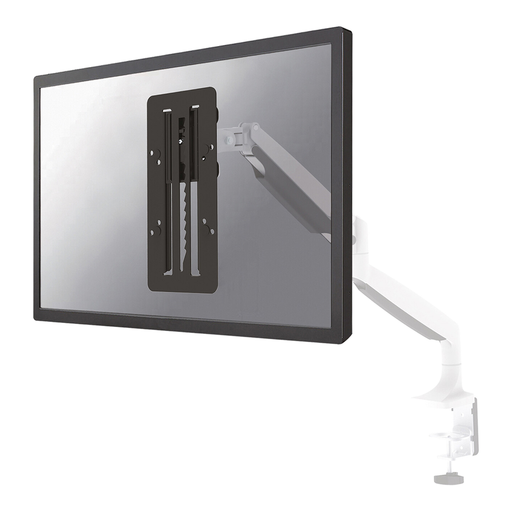
Why it suits this type of user: A practical choice for a smaller screen when extra height matters more than an elaborate arm structure.
The VESA sizes of 75 × 75 and 100 × 100 mm and the maximum load capacity of 8 kg are clearly specified.
Height adjustment from 0 to 17.7 cm; suitable for screens up to 27 inches, according to the product specifications.
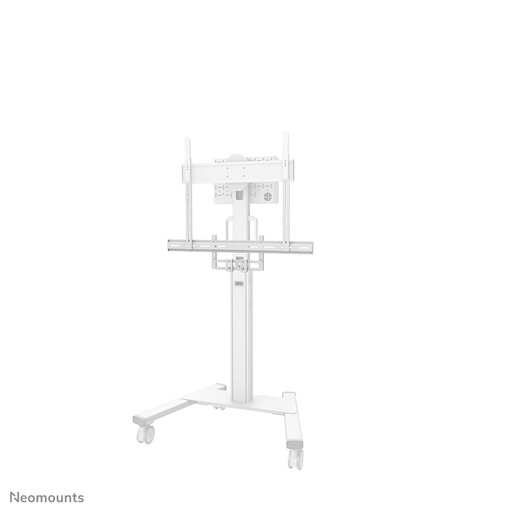
Why it suits this type of user: Ideal for meeting rooms where the screen, camera and soundbar need to be aligned flexibly on a single structure.
The width and height of the VESA frame are adjustable; just check that your screen is between 43 and 110 inches.
Maximum load capacity of 10 kg; can be positioned above or below the screen; suitable for wall, floor, desk and ceiling mounting when the base is suitable.
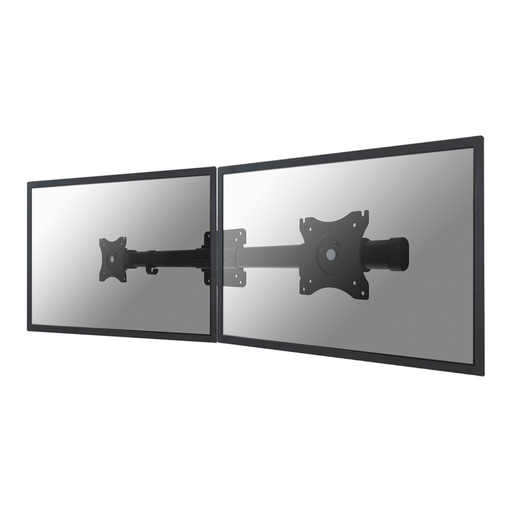
Why it suits this type of user: Useful for home offices, dashboards and multitasking with two screens from 10 to 27 inches.
Compatibility with VESA sizes of 75 × 75 and 100 × 100 mm, along with the maximum screen weight, can be checked in advance.
Both screens can be adjusted independently; the rail includes cable clips and mounting hardware.
We’ve put together a complete, up-to-date list of products that meet these strict selection criteria and current European safety regulations.
Measure the horizontal and vertical distance between the mounting holes. Many compact monitors use 75 × 75 or 100 × 100 mm. Larger screens may use 200 × 200 mm or more. Also check the maximum weight supported by the arm and adapter.
No. Check the weight, mounting holes and clearance around the lens, microphones and speakers. Some kits specify compatibility with particular products, such as the Logitech Rally Bar adapter on selected Neomounts models. “Universal” means it suits a broad range of setups, but you should still check the exact model.
Their lifespan depends on the load, installation quality, movement and environment. Check screws and connections regularly, especially on mobile stands and adjustable arms. Replace cables with damaged connectors or kinks. In the EU, the legal guarantee for many products is at least two years; additional manufacturer warranties vary by model.
