
Vandaag of morgen in huis

Kwaliteit gegarandeerd

Welkomstaanbiedingen ontgrendelen: GRATIS bezorging | Tot 80% korting | Gratis 30 dagen JoyPlus-proefperiode
Download de app
A monitor arm, TV mount or stand may seem straightforward to choose. Yet problems often only appear after installation: a screen hangs crooked, the arm slowly drops or cables remain visibly in the way. Home workers, gamers, content creators and professional AV installers in particular should look beyond screen size and price.
The main pitfalls are usually:
VESA refers to the distance between the mounting holes on the back of a screen. Many monitors use 75 × 75 mm or 100 × 100 mm. Larger televisions often have patterns such as 200 × 200, 400 × 400 or 600 × 400 mm.
Check the following before buying:
A VESA mount that only supports 75 × 75 and 100 × 100 mm is not suitable for a television with a larger mounting pattern without an additional adapter.
With a single monitor arm, the key figure is the maximum weight of one screen. With a dual monitor arm, you must also check whether the limit applies per monitor or to the system as a whole.
For example, the Neomounts FPMA-D550DVBLACK supports two screens weighing up to 6 kg each. The combined weight of the screen, any adapter and accessories must remain below this limit. Do not use a monitor arm at its maximum capacity if the screen is moved frequently; also check that the desk is sturdy enough.
The difference is even greater with TVs. A TV wall mount for a lightweight television is not comparable to a TV pole mount for a large screen. Therefore, pay attention to both the stated maximum weight and the diameter or shape of the pole.
An adjustable monitor arm can tilt, rotate and be adjusted in height or depth. This is useful when several people share the same workspace or when you want to use a screen in both landscape and portrait orientation.
Pay attention to the specific figures:
A monitor stand with a fixed base does not require installation on the wall or desk, but it does take up more desk space. A desk monitor stand is suitable when drilling is not desirable, provided the desk edge and fastening can support the load.
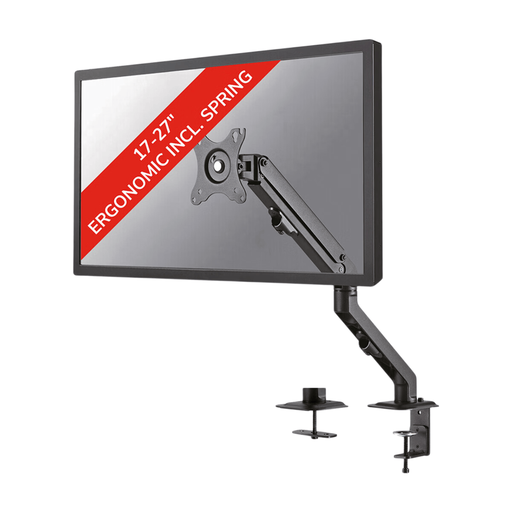
Why it suits this profile: This single monitor arm is suitable for screens from 17 to 27 inches and comes with a desk clamp and grommet mount. That makes it practical for setting up your first permanent workspace.
The specifications state a load capacity of 7 kg and VESA 75 × 75 or 100 × 100 mm. Check these measurements before ordering.
130° tilt, 180° swivel, 360° rotation and integrated cable clips.
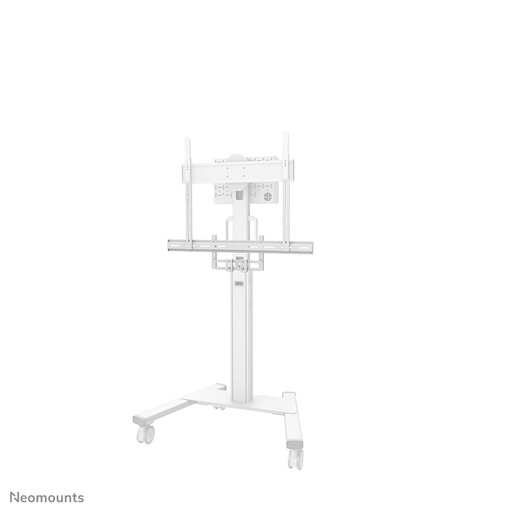
Why it suits this profile: For meeting rooms, presentations and professional AV installations, this videobar mount offers a wide range of mounting options for large screens.
The VESA range runs from 200 × 200 to 800 × 600 mm. The videobar may weigh up to 10 kg; also check the load capacity of the selected wall, floor or ceiling mount.
Suitable for screens from 43 to 110 inches, with adjustable height and positioning above or below the screen.
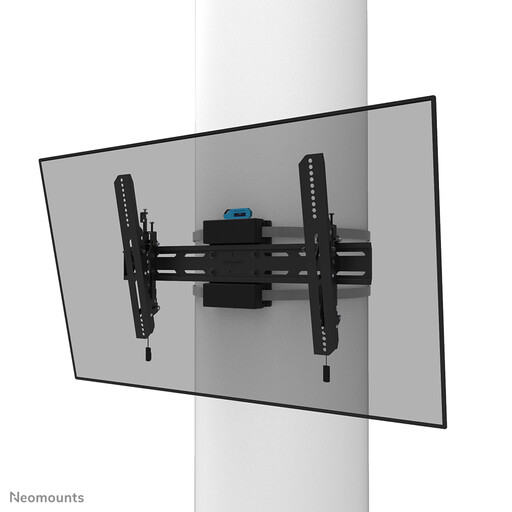
Why it suits this profile: This TV pole mount is designed for installation on round, square or rectangular poles. That makes it suitable for temporary installations, event venues and environments where drilling is not desirable.
The pole diameter, VESA range and maximum load are clearly defined: 25–100 cm, 300 × 100 to 600 × 400 mm and up to 50 kg.
12° tilt range, manual fine adjustment and a fastening strap with ratchet clamp.
We have compiled a complete, up-to-date list of products that fully meet these strict selection criteria and the applicable European safety regulations.
Not every setup requires a fixed TV wall mount. For mobile applications, other features are important:
With accessories containing magnets, such as the Ulanzi MA30, you should check compatibility with your phone or case. According to the product information, this stand is intended for MagSafe-compatible iPhones and MagSafe cases. Keep magnetic accessories away from pacemakers, payment cards and equipment that is sensitive to magnetism.
Read the installation instructions before you begin. Use fastening materials suitable for the type of wall, desk, ceiling or pole. For example, plasterboard requires different fixings from concrete or solid wood.
After installation, check the following:
For large televisions and videobars, installation by two people is advisable. Move an installed monitor arm carefully and check the fixings again if you adjust the position frequently.
No. You need to compare the VESA dimensions, weight and supported screen size with the monitor arm’s specifications. If the mounting holes are not compatible, an adapter plate is required, provided the manufacturer supports that combination.
That depends on your desk and how you use it. A monitor arm saves desk space and often offers greater freedom of movement. A monitor stand is easier to position and usually does not require a clamp or grommet mount. With either option, pay attention to load capacity and stability.
Choose a model with cable management and plan in advance where the power and display cables will run. Leave enough slack with an adjustable arm so that the cables do not become taut when you rotate or tilt the screen.
