
Game organiser sharing a scoreboard
Wants players to be able to see names and scores from different places. So consider the screen size, positioning, reflections and text size in the scoreboard software.


For sharing a scoreboard around the table, choose a screen with enough physical display area. For building and operating it, an adjustable monitor at a desk may be more practical. Test the actual scoreboard display from the intended viewing distance, using enlarged text and sufficient contrast, and check that the connections match your source device. A high resolution won’t automatically make figures larger or easier to read from a distance.
Wants players to be able to see names and scores from different places. So consider the screen size, positioning, reflections and text size in the scoreboard software.
Creates and operates the scoreboard at close range. An adjustable monitor and an interface that remains usable when text is enlarged may be important.
Wants to connect a laptop or another source and needs to check that the video output, monitor connection and any audio output are compatible.
First, try out the display where you plan to use the scoreboard. This will help you decide whether extra screen space or an adjustable workstation matters more for your needs.
| What to consider | What to look for when buying | Who is this important for? |
|---|---|---|
| Sharing scores around the table | View the longest names and scores from the planned viewing distance. Enlarge the text without losing information or access to controls. | If I want other players to read the scores from different seats, I test the full display from those positions. Around 36% of consumers say shared readability is their top requirement. |
| Building and operating it | Check adjustability and available desk space. For web content, the W3C guidelines recommend a contrast ratio of at least 4.5:1 for normal text and 3:1 for large text; this alone does not prove that text will be readable from a distance. | Anyone building and operating the scoreboard at close range will want to position the monitor appropriately and keep the interface usable after enlarging the text. Around 29% of consumers prioritise building and operation. |
| Connecting to the source | Compare your source device’s video output and supported resolution with the inputs on the exact monitor model. Also check that you have the necessary cable, adapter and audio output. | If I want to use my existing laptop or another source, I first check that it can send the picture to the monitor. Around 21% of consumers put source compatibility first. |
| Energy and accessories | Compare the energy labels for the screens in question and check which connection accessories you’ll need. The European Commission uses an energy label scale from A to G for electronic displays. | Anyone particularly concerned about energy use and the connection equipment needed will want to compare these points in advance. Around 14% of consumers make this their main purchasing concern. |
A high resolution won’t automatically make the text in your scoreboard software larger. Small or cut-off names and scores will still be difficult to use, whatever the resolution.
Enlarge the text in the application and test the full layout from the intended viewing distance before weighing up extra display specifications.
An HDMI input on the monitor doesn’t tell you which output or resolution your laptop or other scoreboard source supports.
Check the connections and supported resolutions on both devices, and make sure you have the right cable or adapter. Whether you need one will depend on your existing equipment.
A larger screen takes up more space and doesn’t replace suitable positioning or text settings. Extra screen space won’t automatically make the scores easier to read from a particular spot, either.
Compare the larger-screen option with an adjustable 27-inch monitor where you’ll be building and playing.
The Dell Pro P2725D and P2725H models reviewed are adjustable 27-inch monitors with different resolutions.
According to Philips’ specifications, the Philips 32E1N1800LA/00 is a 31.5-inch 4K option with a VA panel.
The LG 32UN650P-W is a 31.5-inch 4K IPS monitor with height adjustment.
These models are suited to either a larger screen for sharing scores or a monitor for building and operating the scoreboard at a desk. Test for yourself whether the text and scores are easy to read where you plan to use it.
 No image available
A 32-inch screen is one option if you want to share the scoreboard with several players; check that it’s readable from the planned seating positions.
32 inch; IPS panel; 180 Hz.
 No image available
This 32-inch model may suit anyone looking for a larger physical screen area to share scores; check the text yourself from the intended distance.
32 inch; VA panel; 4K UHD, 3840 × 2160 pixels at 60 Hz. Check the full model variant before buying.
 No image available
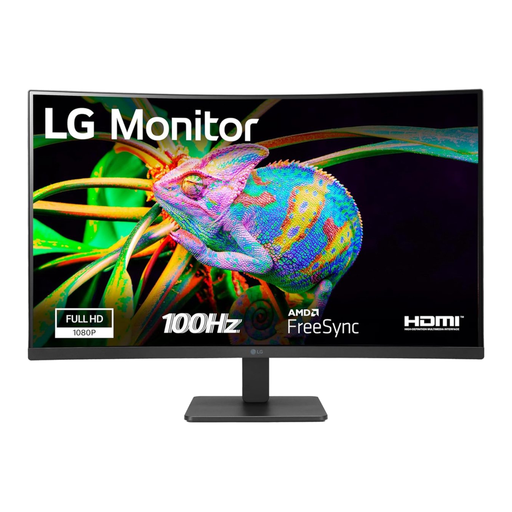
A 32-inch monitor may suit a scoreboard shared with several players; test the display from the seats around the table.
32 inch; Full HD; curved screen; 100 Hz.
 No image available
This larger screen may suit both table use and working on the scoreboard; check that it will fit in your workspace, too.
31.5 inch; 2560 × 1440 pixels.
 No image available
This 27-inch monitor may suit building and operating the scoreboard at a desk; its stated height-adjustable stand lets you change the screen position.
27 inch; IPS panel; 4K UHD, 3840 × 2160 pixels at 60 Hz; height-adjustable stand; HDMI and DisplayPort.
No. Resolution describes how many pixels the screen displays; you’ll need to set the font size and layout in the scoreboard software itself. Check that no information is cut off after enlarging the text, using full names and scores.
Test the actual interface from every planned seat, and consider ambient light and reflections. For web content, the W3C guidelines recommend a minimum contrast ratio of 4.5:1 for normal text and 3:1 for large text; these values don’t prove that text will be readable from every viewing distance.
Compare your scoreboard source’s video output and supported resolution with the input on the exact monitor model. Then check that you have the required cable or adapter and that the audio output meets your needs.
Compare the EU energy labels for the screens in question; the European Commission uses a scale from A to G for electronic displays. When you buy online from a business in the Netherlands, you generally have a 14-day cooling-off period under Dutch government rules; check which exceptions apply to your purchase.
The workplace rule referred to doesn’t automatically apply to private use at a gaming table. Arboportaal states that for employees who work at a screen for more than 2 hours a day, the screen and keyboard must not be attached to each other.