
Vandaag of morgen in huis

Kwaliteit gegarandeerd

Welkomstaanbiedingen ontgrendelen: GRATIS bezorging | Tot 80% korting | Gratis 30 dagen JoyPlus-proefperiode
Download de app
A monitor stand can free up space, raise your screen and keep cables tidier. However, not every monitor arm is suitable for every desk or screen. The wrong VESA size, insufficient load capacity or a weak desk mount can lead to wobbling, misalignment and unnecessary returns.
This buying guide helps homeworkers, office professionals, gamers and content creators choose a monitor stand or monitor arm based on verifiable product specifications.
“Suitable for 32 inches” does not tell you enough. One 32-inch monitor may be heavier than another model with the same diagonal measurement. Therefore, always check the weight without the detachable stand and compare it with the monitor arm’s maximum load capacity.
With a monitor stand for 2 screens, the load capacity usually applies per screen. Two screens weighing 6 kg each require an arm that can support at least 6 kg per arm, as well as a desk that safely supports the construction.
The VESA size is the distance between the mounting holes on the back of the screen. Many monitor arms use VESA 75 × 75 mm or 100 × 100 mm. If your screen has a different or larger spacing, a VESA adapter plate is required.
Check the following before buying:
A monitor desk bracket is often secured with a clamp. This only works when the thickness and strength of the desktop fall within the specified limits. A thin desktop, hollow tabletop or fragile glass surface may be unsuitable.
A through-desk mount using a cable hole can provide additional stability, but it requires a suitable hole and enough space beneath the desktop. Tighten the mounting screws securely, but avoid damaging the desk.
Choose a monitor arm with sufficient margin between the screen weight and the maximum load. For example, an arm for a single screen weighing up to 7 kg is not automatically suitable for a 7 kg ultrawide monitor when the mount is positioned far forwards.
For a 32-inch monitor stand, consider more than just the size:
An adjustable monitor stand can offer height adjustment, tilting, rotation and swivelling. Not every arm provides the same freedom of movement. A model with a vertical pole can position screens one above the other, while a horizontal dual monitor arm is generally suitable for two screens side by side.
Look out for terms such as:
An ergonomic monitor arm can help you position the screen at a suitable height and viewing distance. This is an adjustment option, not a medical guarantee. Adjust the screen so that you look straight ahead and do not have to bend your neck for prolonged periods.
An integrated monitor cable management system keeps power and display cables together along the arm. Check whether the cable channel is wide enough for your cables and whether the cables become taut when the screen is rotated.
Steel arms are often heavier and suitable for a fixed desk mount. Aluminium can make the product lighter. Do not look only at the material; also consider the base, clamp, screw connections and stated load capacity.
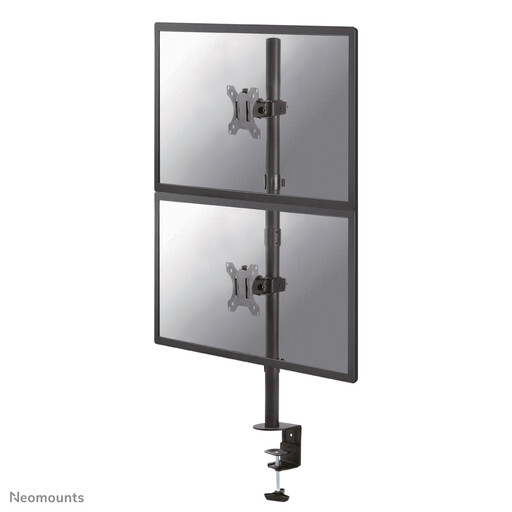
Why it suits this profile: This dual monitor arm is designed for two screens from 10 to 32 inches. The arm can be mounted with a desk clamp or through a cable hole.
The product details specify VESA 75 × 75 and 100 × 100 mm, a maximum load of 6 kg per screen and a suitable desk thickness of 1 to 8.8 cm.
Suitable for two screens, height adjustment from 0 to 880 mm and cable routing along the horizontal arm.
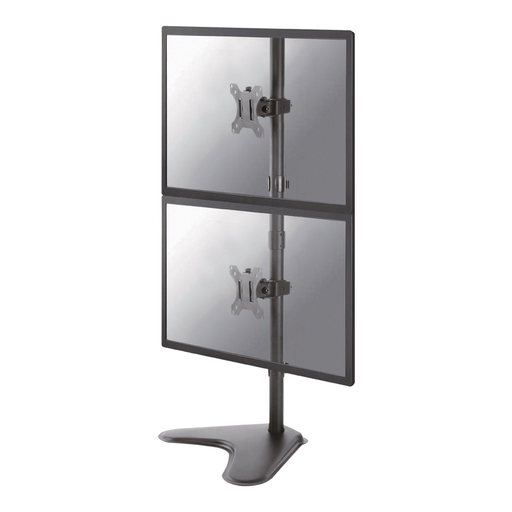
Why it suits this profile: For a fixed workstation with two screens, this monitor stand allows you to tilt, swivel and rotate the screens.
The stated VESA compatibility of 75 × 75 and 100 × 100 mm makes it easy to check compatibility in advance. The product description also mentions that installation materials are included.
Two screens up to 32 inches, rotation up to 360 degrees and cable management for a tidy desk.
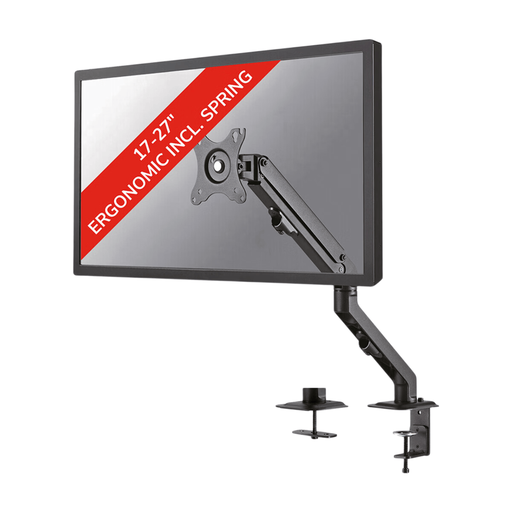
Why it suits this profile: This single ergonomic monitor arm is designed for users who regularly reposition, rotate or adjust their screen to different distances.
The product details specify a load capacity of 7 kg, two pivot points and supplied mounting hardware for a clamp or through-desk mount.
Height adjustment from 11 to 42 cm, depth adjustment up to 49.4 cm, 360-degree rotation and integrated cable clips.
We have compiled a complete, up-to-date list of products that fully meet these strict selection criteria and the applicable European safety regulations.
No. Check the VESA size, weight and screen size. A screen without VESA holes may require a separate adapter. Also check that the arm can support the weight per screen.
That depends on the type of glass and the mounting method. A desk bracket with a clamp can put pressure on the desktop. Consult the desk and monitor arm manuals before mounting. Only use a mount that is suitable for the construction of the desktop.
Its lifespan depends on the material, load, mounting and how often you adjust the arm. Check regularly that the screws and clamps are still secure. Do not exceed the maximum load capacity and prevent cables from pulling on the arm. The statutory guarantee in the European Union is separate from normal wear and tear or damage caused by incorrect mounting.
