
Vandaag of morgen in huis

Kwaliteit gegarandeerd

Welkomstaanbiedingen ontgrendelen: GRATIS bezorging | Tot 80% korting | Gratis 30 dagen JoyPlus-proefperiode
Download de app
A monitor stand can free up desk space, organise cables and raise your screen to a more comfortable viewing height. However, not every monitor arm, monitor holder or monitor bracket is suitable for every workspace. A screen may be too heavy, the mounting method may not fit or the arm may not offer enough room for your desk layout.
This practical guide highlights the specifications that really matter.
A 32-inch monitor will not automatically fit every arm that supports screens “up to 32 inches”. The screen weight is at least as important. A heavy ultrawide monitor can exceed a stand’s load limit, even when its diagonal measurement falls within the stated range.
Always check:
A VESA monitor stand attaches to the screen using screw holes on the back. Many models use 75 × 75 mm or 100 × 100 mm. Larger monitors and televisions may use 200 × 200 mm or 600 × 400 mm, for example.
An adapter plate may sometimes accommodate a different hole pattern, but this is not always included as standard. Measure the distance between the horizontal and vertical screw holes before ordering.
A clamp mount only works when the edge of the desk is sufficiently thick and sturdy. A grommet mount requires a suitable hole in the desktop. Extra care is needed with glass, fragile or unstable surfaces.
The wall structure plays a similar role with a wall bracket or monitor wall bracket. Use suitable wall plugs and do not attach the bracket solely to thin plasterboard. A monitor ceiling mount must be secured to a load-bearing structure.
Choose a model where the screen weight remains well below the limit. For a standard single monitor, 6 to 8 kg may be sufficient. A large curved monitor requires a higher load capacity. According to the product specification, the Neomounts NM-D775BLACKPLUS is suitable for a screen of up to 49 inches and a maximum weight of 18 kg.
For multiple screens, consider the weight per arm as well as the total weight. A monitor stand for 2 screens must therefore be able to support both screens individually. For three screens, you need a triple monitor arm with a sturdy base and clearly stated weight limits.
Do not just look for an “adjustable monitor stand”; check the specific values:
A gas spring monitor arm often makes height and depth adjustments straightforward, but the spring must be correctly set for the screen weight. A mechanical or manually adjustable arm is often simpler if you only adjust the screen occasionally.
A monitor stand with cable management keeps power and display cables routed along the arm or through the base. Check that your cables are long enough for the desired height and depth range.
Also check what is included in the box. Some models are supplied with both a desk clamp and a grommet mount. Suitable wall or ceiling anchors are not always included with wall or ceiling mounting.
The choices below are based on verifiable product specifications such as screen size, load capacity, VESA pattern and adjustment range.
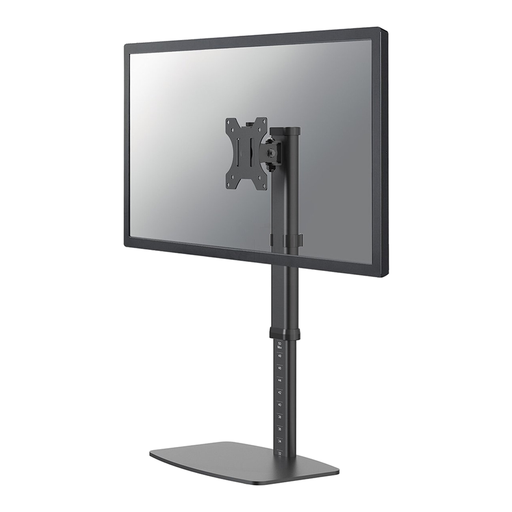
Why it suits this profile: For a single standard monitor, this stand offers a straightforward starting point without complicated gas spring adjustments. It supports screens of up to 30 inches and 6 kg, with VESA 75 × 75 or 100 × 100 mm.
The size and weight limits are clearly stated. However, check that your screen falls within the 30-inch and 6 kg limits.
Height adjustable from 36 to 54 cm; tilts up to 80°, rotates 360° and swivels 60°.

Why it suits this profile: This arm is designed for users who regularly want to move a larger flat or curved screen. The gas spring supports screens from 17 to 35 inches and up to 9 kg.
The product specification states the weight, size and VESA range. The 180° stop helps limit contact with a nearby wall or partition.
Height 21.5–49.5 cm; depth 7–52.5 cm; integrated cable management and top-fix clamp or grommet mount.

Why it suits this profile: For a workspace with three monitors, this triple monitor arm provides a fixed, sturdy base. According to the product specification, each screen may weigh up to 6 kg.
The 6 kg limit per screen prevents you from considering only the total load capacity. Also measure the available desk width, which is approximately 142.4 cm.
Suitable for three screens measuring 10–27 inches; VESA 75 × 75 and 100 × 100 mm; cable management and 180° stop.
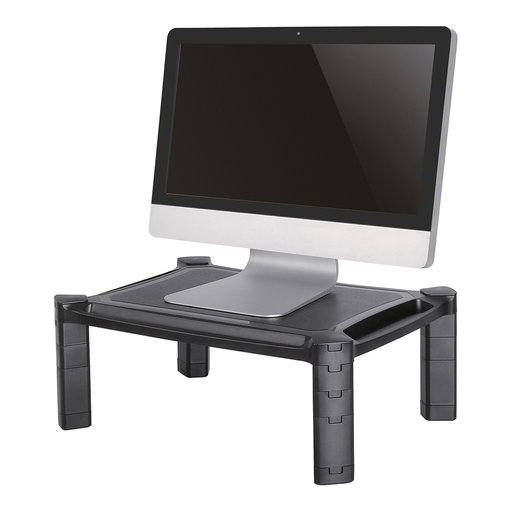
Why it suits this profile: If you do not want to use a clamp or drill a hole, you can place a monitor or laptop on this adjustable riser. The stand is suitable for devices weighing up to 10 kg.
No VESA mounting is required. However, the riser must be placed on a flat, stable desk and the 10 kg load limit must not be exceeded.
Height adjustable from 4.6 to 16.8 cm; suitable for screens measuring 10–32 inches; cable routing and storage space.
We have put together a complete, up-to-date list of products that fully meet these strict selection criteria and the applicable European safety regulations.
No. Check the VESA pattern, screen weight and size. If your monitor does not have suitable VESA holes, you may need an adapter plate. Also check that the adapter is suitable for your monitor’s weight.
That depends on the specified weight range. A gas spring does not automatically make an arm suitable for heavy screens: adjust the arm according to the instructions and stay below the maximum load capacity. If the monitor is too light or too heavy, the arm may move less steadily.
Its lifespan depends on the materials, load, installation and how often you adjust the arm. Regularly check the screws, clamps and pivot points. Stop using the stand if any parts are damaged, and never exceed the stated weight limit.
