
Vandaag of morgen in huis

Kwaliteit gegarandeerd

Welkomstaanbiedingen ontgrendelen: GRATIS bezorging | Tot 80% korting | Gratis 30 dagen JoyPlus-proefperiode
Download de app
A monitor stand can help keep your desk tidy, but choosing the wrong one can quickly lead to wobbly screens, trapped cables or an arm that gradually droops. The differences between models matter more than their appearance, particularly when you work from home, game or use a workstation with two or three screens.
When comparing options, don’t just look at the maximum screen size. Weight capacity, VESA compatibility, adjustment options and desk mounting all determine how well a monitor stand will work in practice.
A monitor stand for two screens isn’t automatically suitable for every combination. Check the following for each screen:
With a monitor stand for three screens, the total width is particularly important. Three 27-inch screens take up considerably more space than three compact monitors. Also check that your desk is deep enough to position the screens at a comfortable viewing distance.
A large screen isn’t always heavy, and a smaller screen can still weigh quite a lot if it has a sturdy casing. For example, an arm for a 32-inch monitor with a weight capacity of 8 kg isn’t suitable for a screen that exceeds that limit.
Allow some leeway when choosing an adjustable monitor stand. An arm that’s used at its maximum load for long periods can be harder to adjust. For models with a gas spring or other spring support, the tension setting must also suit the weight of the screen.
A monitor stand with cable management helps route power and display cables along the arm. This not only keeps your desk tidy, but also prevents strain on the connections when you turn the screen.
Also check the mounting type. A desk monitor mount is usually fitted with a clamp on the desk edge or through a hole in the desktop. A thin, fragile or uneven desk may not be suitable for concentrated clamping pressure.
VESA refers to the distance between the mounting holes on the back of the screen. Many monitor arms use VESA 75 × 75 mm or 100 × 100 mm. Measure this pattern or check your monitor’s manual before ordering.
A VESA monitor stand without matching holes may require an adapter plate. This adds extra cost and another connection.
Height and depth adjustment are useful for everyday work. An arm with tilt, swivel and rotation gives you more flexibility than a fixed stand. Check the specified ranges rather than relying on terms such as “full motion”.
Examples of specifications you can check include:
A gas spring monitor arm can be useful if you regularly switch between sitting and standing, or work with someone else at the same screen. A gas spring doesn’t automatically make a screen suitable for every weight; the stated minimum and maximum weight limits still apply.
Steel arms are generally designed to support more weight than simple plastic or acrylic risers. A separate laptop stand or monitor riser is often enough if you only want to raise your viewing height and don’t need a swivel or rotation function.
Measure the following beforehand:
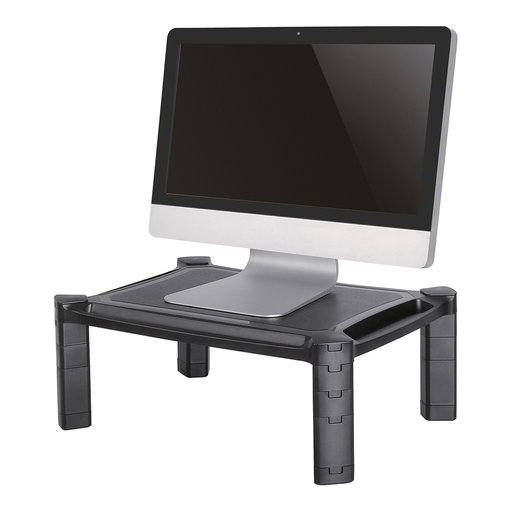
Why it suits this user: This riser is ideal for a simple workstation with one monitor or laptop, with no need to attach anything to the desk.
The specifications state a weight capacity of up to 10 kg and an adjustment range of 4.6 to 16.8 cm. There’s no complicated arm mechanism to adjust.
Adjustable height, storage space at the front and back, and a cable channel at the rear.
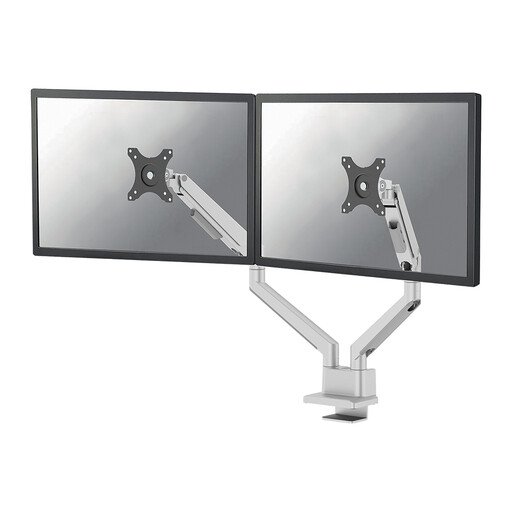
Why it suits this user: For a tidy home office or workplace with two larger screens, this arm offers plenty of adjustment options and can be fitted with a topfix clamp or through-desk mount.
A maximum weight of 9 kg is specified per screen. The 180° stop can help prevent contact with a wall or partition when the arm is positioned close to one.
Suitable for two screens from 17 to 32 inches, with gas spring height adjustment from 21.5 to 49.5 cm and integrated cable management.
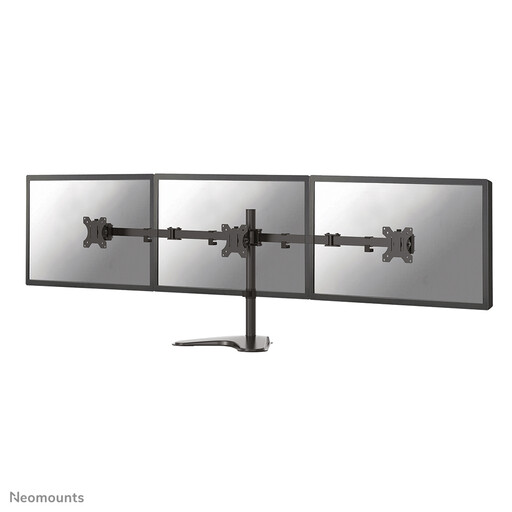
Why it suits this user: This monitor stand for three screens is designed for people who need to view multiple windows at once, such as IT administrators, traders and office professionals who multitask.
The product information states a maximum weight capacity of 6 kg per screen and support for VESA 75 × 75 and 100 × 100 mm. This clearly sets out the key compatibility limits.
Suitable for three screens from 13 to 27 inches, with tilt, swivel, rotation, height adjustment up to 43.2 cm and cable clips.
We’ve put together a complete, up-to-date list of products that meet these strict selection criteria and current European safety regulations.
It depends on how you use it. A monitor arm saves desk space and makes it easier to swivel, tilt and adjust the height. A fixed or freestanding monitor stand is often simpler to set up and doesn’t need to be clamped to the desktop. If you just want to raise your viewing position, a monitor riser may be enough.
Its lifespan depends on the materials, load, installation and how often you move the screen. Check regularly that the screws and clamps are still secure. With an adjustable arm, avoid pulling the cables tight and don’t exceed the stated weight capacity. Some models in the range have a stated warranty period of two or five years; check the details for each product.
A standard monitor stand, monitor arm or monitor mount doesn’t use electricity itself. Only the screen, laptop or connected docking station uses power. A stand with integrated USB ports or lighting may contain additional electronic components, so check the product specifications in that case.
