
Vandaag of morgen in huis

Kwaliteit gegarandeerd

Welkomstaanbiedingen ontgrendelen: GRATIS bezorging | Tot 80% korting | Gratis 30 dagen JoyPlus-proefperiode
Download de app
A monitor stand seems like a straightforward purchase—until your screen starts wobbling, the VESA mount does not fit, or your desk cannot support the load. That is why remote workers, gamers and office professionals look beyond price and appearance. The number of screens, their dimensions, weight and adjustability all determine whether a monitor stand is safe and comfortable to use in practice.
As a Joybuy Product Recommendation Officer, I filter the most important product specifications and set common marketing pitfalls against practical checks.
A monitor stand for 32-inch screens is not automatically suitable for every 32-inch monitor. Also check the weight per screen and the distance between the VESA mounting holes. A heavy ultrawide monitor may exceed the load limit, even when its size falls within the stated range.
The term ergonomic monitor stand says little on its own. Look at the actual adjustment options: height, tilt, rotation and swivel. A fixed riser, for example, can provide additional height but does not offer the functionality of a swivelling monitor stand.
Ergonomic benefits also depend on your desk height, chair and viewing distance. Claims about preventing neck or back pain are not a guarantee for your individual situation.
A monitor arm can free up desk space, but a clamp does not fit every desk. Check the thickness and strength of the desktop. A glass or hollow desk construction may be unsuitable for a heavy monitor stand for 2 or 4 screens.
Cable management is equally important. Loose cables can pull on the arm or restrict adjustment. If you want a tidy workspace, choose a model with cable clips or an integrated cable channel.
VESA refers to the screw holes on the back of your monitor. Many compact models use VESA 75 × 75 mm or 100 × 100 mm. Larger televisions may use patterns such as 200 × 200 mm or 800 × 600 mm.
Before purchasing, note:
If the pattern does not match, a VESA adapter plate may sometimes solve the problem. However, check that the adapter and monitor arm can safely support the combined load.
With a monitor stand for multiple screens, the load capacity usually applies per arm, not just as a total. A model rated for 8 kg per screen, for example, can support two screens weighing up to 8 kg each, provided the desk and mounting hardware remain stable as well.
Allow a safety margin. A monitor operating exactly at the limit may place additional strain on the arm when rotated or tilted. Always follow the installation instructions and never exceed the stated capacity.
Pay attention to the practical dimensions:
A height-adjustable monitor stand is useful when several people share the same desk. A 90° rotation can be practical for text editing or programming. For a wide three- or four-screen setup, the available desk width and the stability of the base or clamp are especially important.
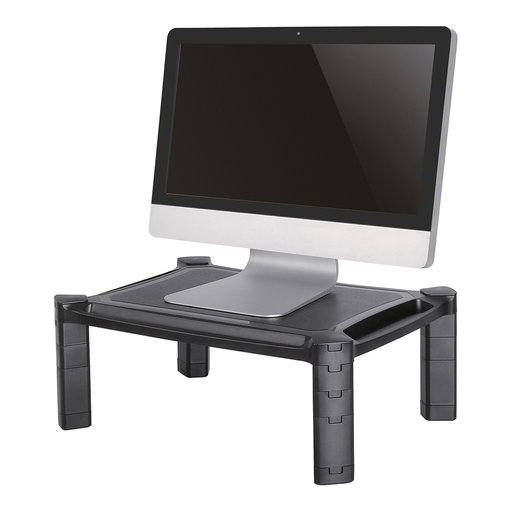
Why it’s a good fit: A practical choice for a home office with one monitor or laptop, without requiring VESA mounting on the back of the screen.
The riser can be adjusted from 4.6 to 16.8 cm in height and has a stated load capacity of 10 kg. However, check that your monitor stands securely on the platform with its original stand attached.
Suitable for screens from 10 to 32 inches, with integrated cable management and storage space at the front and rear.
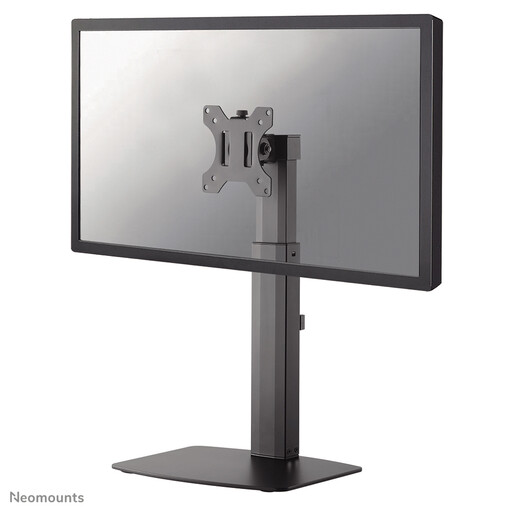
Why it’s a good fit: Ideal for office professionals or content creators who regularly need to position a single screen at a different viewing angle.
The product description specifies VESA dimensions of 75 × 75 and 100 × 100 mm, along with a load capacity of 7 kg. This lets you verify in advance whether your screen is compatible.
Height adjustment from 35.2 to 47.2 cm, 360° rotation, 90° swivel and integrated cable management according to the product specifications.
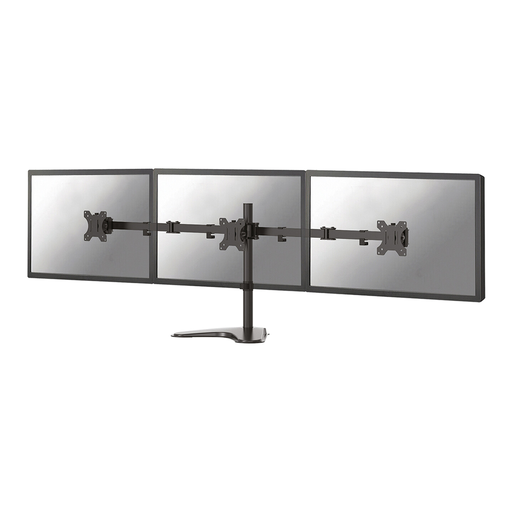
Why it’s a good fit: Designed for multitaskers, traders and gamers who want to place two screens side by side and adjust them regularly.
The arm supports two screens up to 32 inches and weighing up to 8 kg each. Check the desk depth in advance and attach the clamp to a solid, level work surface.
Height adjustment from 0 to 46 cm, depth adjustment from 4 to 40 cm, 360° rotation and cable management; VESA 75 × 75 and 100 × 100 mm.
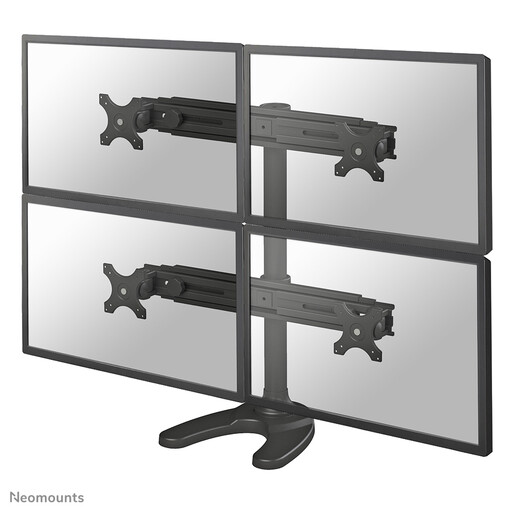
Why it’s a good fit: Suitable for IT users, control rooms and offices that need to display multiple sources of information simultaneously.
According to the product specifications, the model supports four screens from 19 to 30 inches, with a maximum of 8 kg per screen. Use it only on a sturdy desk capable of handling this concentrated load.
Manual height adjustment from 24 to 70 cm, 360° rotation, 180° swivel and cable management. VESA 75 × 75 and 100 × 100 mm.
Browse a current selection of adjustable stands and compare models by screen size, load capacity, VESA compatibility and adjustability.
Not every setup requires a monitor arm. A laptop stand such as the Neomounts DS20-740BL1 is suitable for laptops from 11 to 15 inches, supports up to 5 kg and can be folded flat. It is a good fit for flexible workspaces or use across multiple locations.
A TV stand is a different category altogether. The Neomounts DS45-430BL12 supports screens from 23 to 43 inches, weighing up to 40 kg, and VESA patterns up to 200 × 200 mm. The base offers three height positions and can swivel up to 70°. With a glass base, always check for cracks and place it on a level surface.
A projector stand is primarily designed for flexible presentations or home cinema use. The model mentioned can be adjusted from approximately 60 to 170 cm and uses a 1/4-inch mount. Before purchasing, check your projector or camera’s weight and mounting method.
That depends on your desk and how you use it. A monitor arm frees up the desktop and often provides a greater range of movement. A monitor stand or riser is easier to position and does not require a clamp or drilled mounting hole. With either option, check the load capacity, VESA dimensions and stability.
Its lifespan depends on the materials, load, installation and how often you adjust the arm. Regularly check that the screws, clamps and VESA mounts are still secure. Do not use a stand if you notice cracks, looseness or instability. Warranty periods vary by product; statutory EU consumer guarantees continue to apply in accordance with the applicable consumer protection rules.
A conventional monitor stand, monitor arm or laptop stand does not use electricity. Only motorised systems, such as some TV or floor stands, require power. For these products, pay attention to the supplied controls, cable routing and safe installation instructions.
