
Vandaag of morgen in huis

Kwaliteit gegarandeerd

Welkomstaanbiedingen ontgrendelen: GRATIS bezorging | Tot 80% korting | Gratis 30 dagen JoyPlus-proefperiode
Download de app
A monitor stand can help keep your desk tidy, raise your screen and create space for a keyboard or laptop. However, a quick purchase isn’t always a wise one. A monitor stand that isn’t suitable for your screen’s weight, size or mounting requirements may wobble, offer too few adjustment options or take up more desk space than necessary.
Joybuy Product Recommendation Officer selects products based on verifiable specifications. Before buying a monitor riser, monitor arm or monitor mount, look out for these common pitfalls.
A 27 inch monitor may be within the stated size range but still be too heavy for a particular stand. Always check the maximum load capacity, preferably for each screen. For a stand for 2 monitors or a stand for 3 monitors, the weight supported by each mounting point matters more than the total load capacity alone.
An adjustable monitor stand may only offer height adjustment. You may also need tilt, rotation or swivel adjustments for a different working position. A monitor riser with a fixed top works differently from a monitor arm with VESA mounting. So think about which movements you actually need.
A stand can be sturdy but still leave your desk looking untidy if cables hang behind the screen. Check whether it has a cable channel, cable clips or another form of cable management. This is especially important for a desk monitor stand holding several screens.
Make a note of your monitor, laptop or compact computer’s weight before choosing a model. If you’re placing a device on a monitor riser, remember to include the monitor stand itself in your measurements.
Examples from our range:
Always place a stand on a flat, stable desk and never exceed its stated load capacity.
A VESA monitor stand attaches to the screen using standardised screw holes on the back. Common mounting patterns include 75 × 75 mm and 100 × 100 mm. Check your monitor’s specifications before buying a monitor arm or mount.
The Neomounts FPMA-D700DD3 supports both of these VESA patterns and holds three screens measuring 10 to 27 inch. The maximum load capacity is 8 kg per screen. You can fit it using a desk clamp or through a hole in the desktop.
Measure the depth of your desk and check how much space there is beneath the screen. A simple monitor stand may provide room for a keyboard. The Neomounts NSMONITOR40 has grooves designed for this purpose. The Razer Monitor Stand Chroma has space beneath the platform to store a keyboard and mouse when they’re not in use.
If you’re using several screens, check that your desk is wide enough. An arm for three monitors takes up less desk space at the base, but it does need a sturdy fixing point and the weight must be distributed correctly.
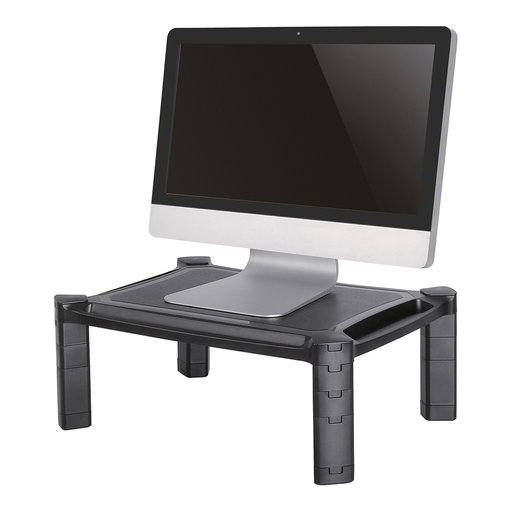
Why it suits this user: This adjustable monitor stand is suitable for a monitor or laptop weighing up to 10 kg and offers a wide height range without VESA mounting.
Its load capacity and adjustment range are clearly stated. Integrated cable management helps keep loose cables behind your desk to a minimum.
Suitable for screens from 10 to 32 inch, adjustable from 4.6 to 16.8 cm and with storage space at the front and back.
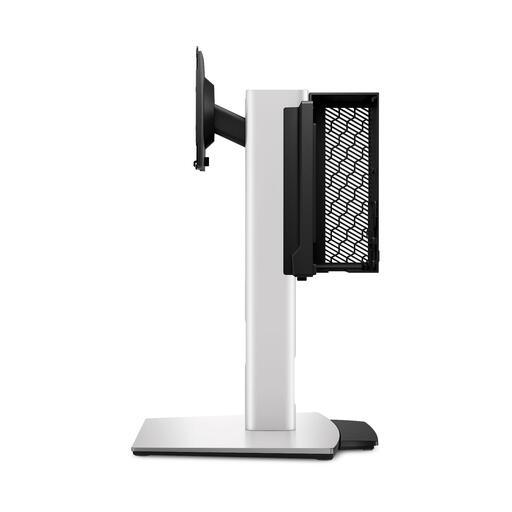
Why it suits this user: This monitor stand is designed for business workspaces with a single VESA monitor and a Dell Precision Compact Workstation.
The product specifications state a supported weight range of 2.18 to 5.81 kg. This makes it clear in advance which screen and computer combinations are suitable.
VESA 100 mm, height adjustment up to 150 mm, tilt and swivel, plus cable management and a retractable carrying handle.
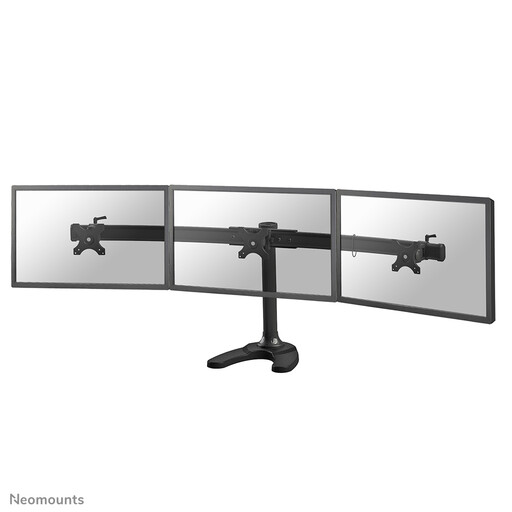
Why it suits this user: Ideal for IT administrators, traders and anyone who wants to position three screens side by side with adjustable viewing angles.
The load capacity is listed for each screen, and the VESA patterns are specified. The cable management solution helps prevent three sets of cables from hanging loose behind the desk.
Suitable for three screens from 10 to 27 inch, with 360° rotation, 45° swivel and manual height adjustment.
Choose a monitor riser or simple monitor stand if you just want to raise a single screen or laptop. This type of solution usually doesn’t need to be attached to your desk and may provide extra storage space.
A monitor arm or monitor mount is a better choice if you regularly want to turn or swivel your screen, or free up space on your desktop. Check the VESA size, weight and mounting method. A monitor arm can save space on a compact desk, but you’ll need a sturdy desk edge or a suitable hole in the desktop.
For a transparent, adjustable riser with a high load capacity, you can also take a look at the Neomounts NSMONITOR40 monitor/laptop riser. This model is 32 cm wide, 26 cm deep and adjustable in 1.5 cm increments.
We’ve put together a full, up-to-date list of products that meet these strict selection criteria and the applicable European safety regulations.
It depends on your chair, desk and screen. Position the screen so you can look straight ahead without tilting your head down for long periods. Choose an adjustable monitor stand if several people share the same workspace.
No. Check your screen’s VESA mounting points, weight and size. For example, a monitor arm with a load capacity of 8 kg per arm won’t necessarily be suitable for a heavier screen or a setup with additional equipment.
Its lifespan depends on the materials, load, mounting and how often you use it. Check regularly that the screws are tight and that there are no visible cracks, bends or looseness. Always follow the maximum load capacity and the manufacturer’s care instructions.
