
Vandaag of morgen in huis

Kwaliteit gegarandeerd

Welkomstaanbiedingen ontgrendelen: GRATIS bezorging | Tot 80% korting | Gratis 30 dagen JoyPlus-proefperiode
Download de app
A monitor stand can free up space, position your screen more comfortably and keep cables tidy. Yet many people buy a model that isn’t right for their monitor, desk or working style. A high load capacity, for example, won’t help if the mount isn’t compatible. And an adjustable monitor stand isn’t automatically suitable for a large or heavy screen.
In this buying guide, you’ll find out what to look for in a monitor stand, monitor arm, monitor riser or laptop stand. We’ve also included some popular options for home workers, students, gamers and office professionals.
A 27-inch monitor may be within the stated size range, but still be too heavy for a particular arm. Always check both the maximum screen size and the maximum weight. With a dual monitor stand, the load capacity is usually specified per screen, not automatically for the combined weight.
A VESA monitor stand uses a standard hole pattern on the back of the screen. Many models support VESA 75 x 75 mm and 100 x 100 mm, but this isn’t universal. Measure the distance between the mounting holes before ordering. A screen without a VESA mount may need an adapter or a standard monitor riser.
A monitor arm can tilt, rotate and swivel, but it also needs space for its clamp or grommet mount. Check the thickness and sturdiness of your desktop, and see how much space the arm takes up. If your desk is close to a wall, a short arm may be more practical than a model with several long joints.
Choose a model with plenty of capacity to spare above your screen’s weight. With a laptop stand or a monitor arm with laptop stand, check the two separate weight limits: one for the monitor and one for the laptop. For example, a monitor arm with a load capacity of 8 kg isn’t automatically suitable for an 8 kg laptop.
Also check:
For a VESA monitor stand, the first things to check are the hole pattern and the weight. Then look at its range of movement. A model with 360° rotation can turn a screen from landscape to portrait, while the tilt range determines how far you can angle the screen forwards or backwards.
A desk monitor stand with a fixed base is easy to position. A monitor arm usually offers more freedom of movement and can keep the desk clear, but it needs to be mounted correctly.
A height-adjustable monitor stand is useful if several people share the same desk or if you switch between working on a laptop and a monitor. A riser with height settings a few centimetres apart is simple to use, while a monitor arm may offer a greater range of adjustment.
Here’s how the different types compare:
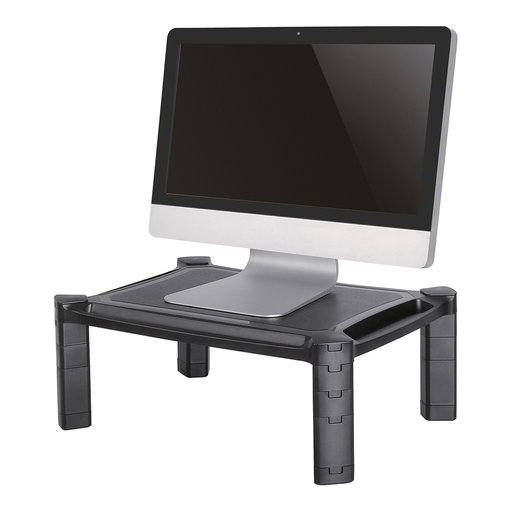
Why it suits this user: This adjustable monitor stand is suitable for a screen or laptop weighing up to 10 kg, and offers an easy way to keep your desk tidier.
The height adjusts from 4,6 to 16,8 cm, and the maximum load of 10 kg is clearly stated. So you don’t have to rely on screen size alone.
Suitable for screens up to 32 inches, with cable management and storage compartments for small accessories.
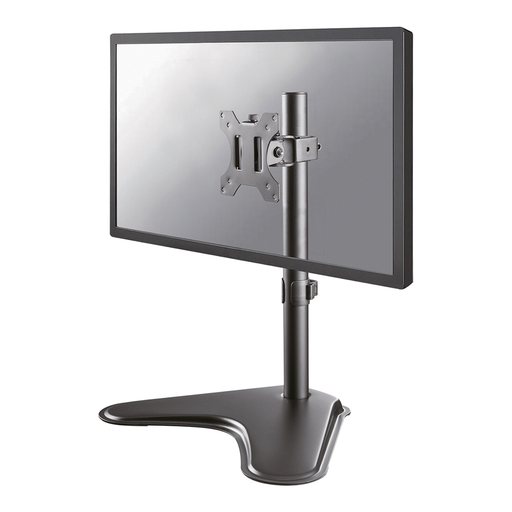
Why it suits this user: Ideal if you want to position a single monitor flexibly and value a sturdy VESA mount with cable management.
The specifications list both VESA 75 x 75 and 100 x 100 mm compatibility and an 8 kg load capacity, making it easy to check compatibility in advance.
Height adjustment from 5,6 to 41,9 cm, plus tilt, rotation and swivel.
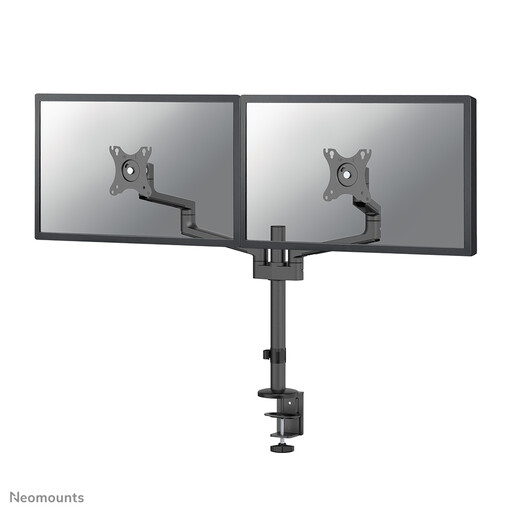
Why it suits this user: This dual monitor stand is designed for a two-screen set-up, with monitors ranging from 17 to 27 inches.
The load capacity is specified as 8 kg per screen. Check that both monitors are no larger than 27 inches and have a VESA pattern of 75 x 75 or 100 x 100 mm.
Suitable for two screens, with cable management and an arm that adjusts in height from 29,5 to 60,7 cm.
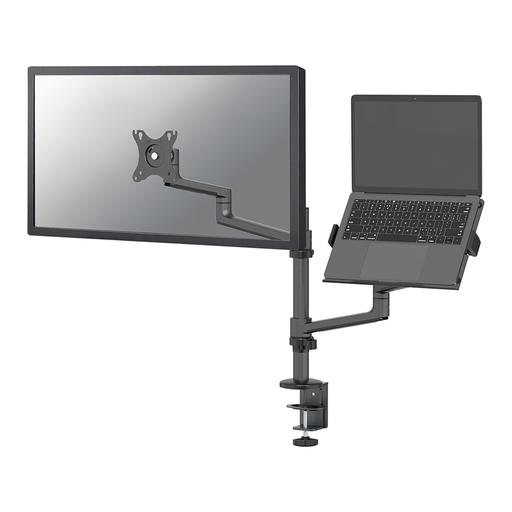
Why it suits this user: A practical combination if you use a monitor and laptop side by side and want to free up desk space.
The load capacities are listed separately: up to 8 kg for the screen and 5 kg for the laptop. It can be mounted with either a clamp or a grommet.
Supports screens up to 27 inches and laptops up to 17,3 inches, with internal cable management.
We’ve put together a complete, up-to-date list of products that meet these strict selection criteria and current European safety regulations.
Place a fixed monitor riser on a flat, stable surface, and make sure its base doesn’t overhang the edge of the desk. Once you’ve fitted a monitor arm, check that the clamp or grommet mount is secure. Never exceed the stated maximum load. Route cables so they don’t get trapped when you rotate or adjust the arm.
Next, adjust your chair and desk before setting the monitor height. Depending on your posture and screen size, the top edge of the screen can sit roughly at eye level. This is a practical adjustment, not a guarantee of any particular physical outcome.
No. With a monitor arm or VESA monitor stand, check the hole pattern, weight and screen size. A monitor riser without a VESA mount usually has fewer compatibility restrictions, but it still needs to be wide and strong enough.
It depends on how you’ll use it. A monitor riser is easy to set up and can provide extra storage space. A monitor arm lets you rotate and swivel the screen, and move it up or down. An adjustable monitor stand is a good option for a flexible workspace; for a simple height boost, a monitor riser is often enough.
Its lifespan depends on the load, how it’s mounted and how it’s used. Check the screws, clamps and moving parts regularly. Stop using the stand if any parts become loose, warped or cracked. The warranty varies by product, so check the product page before ordering.
