
Vandaag of morgen in huis

Kwaliteit gegarandeerd

Welkomstaanbiedingen ontgrendelen: GRATIS bezorging | Tot 80% korting | Gratis 30 dagen JoyPlus-proefperiode
Download de app
A monitor stand can help keep your desk tidy and free up space for a keyboard, notebook or laptop. However, not every model is right for every workspace. A cheap stand, for example, may not have enough load capacity, while a long monitor arm could hit the wall behind your desk.
The main pitfalls to watch out for when buying are:
There are broadly three types of solution:
A riser or laptop stand
This is a platform for placing a monitor or laptop on. You don’t need VESA mounting holes. A riser is a good choice if you mainly want to adjust the screen height and don’t need to turn the monitor regularly.
A monitor arm for one screen
A monitor arm is usually attached to the desk with a clamp or through-desk mount. You can often tilt, swivel and rotate the screen, as well as adjust its height. A VESA monitor stand is particularly practical for a fixed workspace.
A dual monitor arm or stand for 2 screens
A dual arm gives remote workers, IT professionals and multitaskers space for two screens. Always check the maximum weight per screen, not just the total load capacity.
A desk monitor stand with a clamp isn’t automatically suitable for every desk. Check the thickness of the desktop, the available edge space and whether there’s enough room underneath for the mount.
First, note down:
For example, one model may be suitable for screens up to 27 inches and 7 kg, while another supports screens up to 49 inches and 18 kg. There may be a separate limit for curved ultrawide screens. According to the product information, the Neomounts DS70PLUS-450WH1 supports a maximum of 18 kg for a flat screen and 14 kg for a curved screen.
Look out for the difference between:
A height-adjustable monitor stand is useful if several people use the same desk. A gas spring usually makes adjustments easier, but it needs to be set to suit the weight of the screen. According to Neomounts’ product information, a gas spring that isn’t adjusted correctly can move suddenly up or down. Only move the screen once the monitor has been mounted correctly.
A clamp is usually a good choice if you don’t want to make a hole in your desktop. A through-desk mount, also known as a grommet mount, can provide a stable fit if your desk has an opening for it. Check:
Cable management is useful, but it won’t automatically prevent cable damage. Leave enough slack around the joints and check the mount regularly.
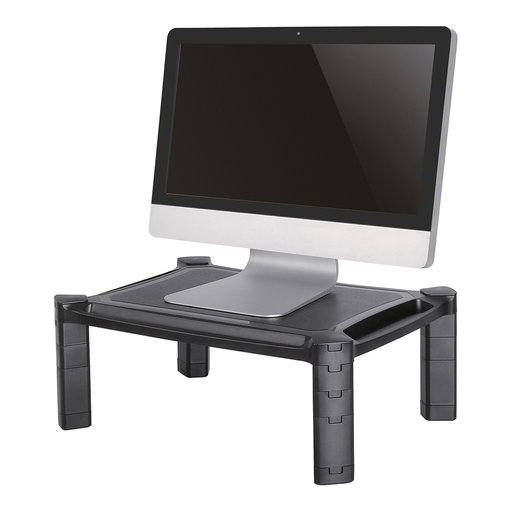
Why it’s a good fit: This riser doesn’t need VESA mounting and is suitable for a monitor or laptop weighing up to 10 kg. Its height can be adjusted from 4,6 to 16,8 cm.
There’s no arm to install, so you’re less likely to choose the wrong VESA mount or find that the desk edge isn’t suitable.
Adjustable height, cable routing at the back and storage space for small desk accessories.

Why it’s a good fit: According to the product specifications, this arm is suitable for screens from 17 to 49 inches and supports up to 18 kg, or 14 kg for curved screens.
The separate limit for curved screens makes the load capacity clearer than a single general maximum figure.
Gas-spring height adjustment from 26,1 to 55,5 cm, a 180° stop and clamp or through-desk mounting.
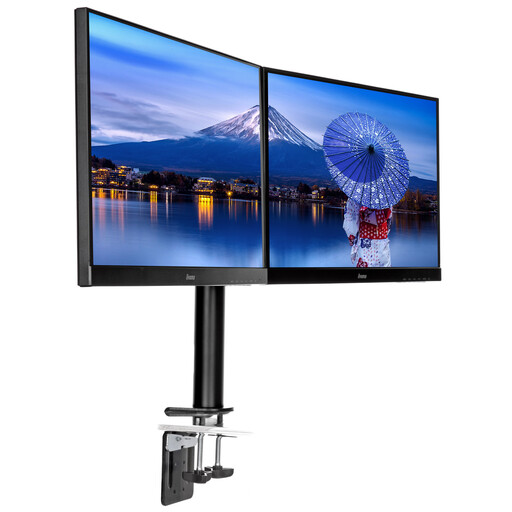
Why it’s a good fit: This dual monitor arm supports two screens up to 30 inches, with a maximum weight of 10 kg per screen. It’s a good choice for workspaces where two windows need to stay side by side.
The load capacity is listed separately for each screen, so you’re not relying on the monitor mount’s total capacity alone.
Height adjustment from 200 to 400 mm, tilting, swivelling, rotation and VESA 75 × 75 and 100 × 100 mm.
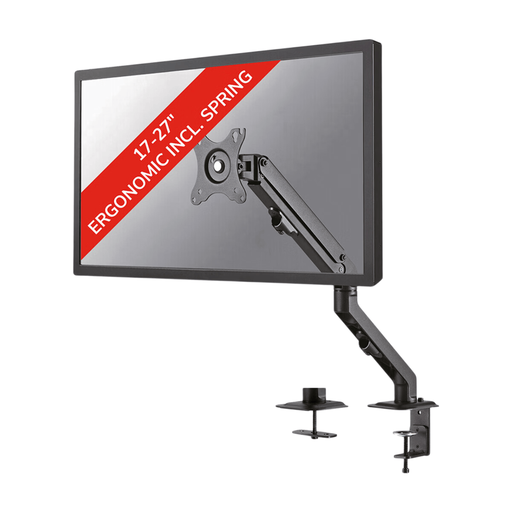
Why it’s a good fit: This arm is designed for one screen from 17 to 27 inches, weighing up to 7 kg. The included clamp and grommet mount give you two installation options.
The specifications list the screen size range, weight limit and VESA patterns, making it easy to check compatibility before you buy.
Height adjustment from 11 to 42 cm, 360° rotation, 180° swivel and cable clips.
We’ve put together a complete, up-to-date list of products that meet these strict selection criteria and the applicable European safety regulations.
No. Check the VESA pattern, weight and screen size. If your monitor doesn’t have VESA holes, choose a riser or check whether a suitable adapter is available.
Position the screen so you can look straight ahead while working normally without having to bend your neck constantly. Adjust the monitor stand’s height, then set up your chair and desk to suit. The right position varies from person to person and depends on the screen size.
How long it lasts depends on the materials, load and installation. Don’t exceed the maximum weight, tighten the screws after installation and regularly check the clamp, VESA screws and moving parts. A warranty period doesn’t guarantee that a product will remain suitable under every load or on every desk.
