
Vandaag of morgen in huis

Kwaliteit gegarandeerd

Welkomstaanbiedingen ontgrendelen: GRATIS bezorging | Tot 80% korting | Gratis 30 dagen JoyPlus-proefperiode
Download de app
A monitor stand may seem like a simple purchase, until your screen wobbles, the base takes up too much desk space or you find it won’t adjust to the height you need. People who work from home, gamers, receptionists and office workers often come up against three common pitfalls:
So don’t focus only on the number of screens or an attractive price. Check the technical specifications, your desk dimensions and how you want to mount your monitor.
A monitor stand for 2 monitors or a monitor stand for 3 monitors needs to support the weight of each screen as well as the combined load. So don’t just look for “suitable for 27 inches”. A larger screen isn’t always heavier, and screen size in inches tells you nothing about the arm’s weight capacity.
Examples from the product specifications:
Leave some headroom between your monitor’s weight and the stand’s maximum capacity. This gives you more confidence when adjusting it and prevents you from putting the stand under too much strain.
A VESA monitor stand or monitor arm typically uses a standardised hole pattern on the back of the screen. This selection mainly includes VESA 75 x 75 mm and 100 x 100 mm.
Before you order, check:
If your monitor doesn’t have VESA holes, a freestanding monitor riser is often more practical. Some screens may need a separate adapter plate, so check the product information.
A height-, depth-, swivel- or tilt-adjustable monitor stand gives you more options than a fixed base. However, check how much desk space the base or clamp will take up.
An adjustable-height monitor stand can be useful if you alternate between sitting and standing while you work. A gas-spring monitor arm is particularly handy if you move your screen regularly. A simple monitor riser is a better choice if you only want to raise your viewing height.
Also check:
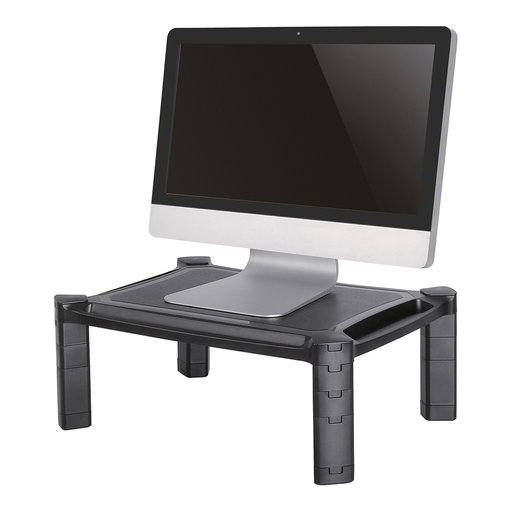
Why it suits this profile: This monitor riser is designed for one monitor or laptop and offers a simple way to adjust screen height without VESA mounting.
The adjustable height, from 4,6 to 16,8 cm, means you aren’t limited to one fixed height. The maximum weight capacity is 10 kg.
Suitable for screens from 10 to 32 inches, with storage space and cable management at the back.
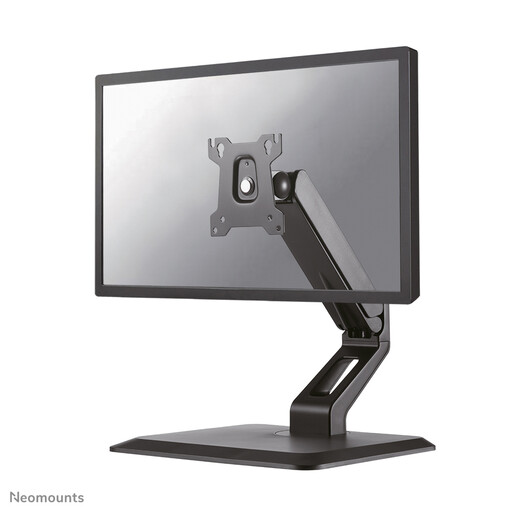
Why it suits this profile: If you regularly adjust a larger screen, this desk-mounted monitor stand has a gas-spring mechanism and supports up to 10 kg.
The height adjusts from 7,5 to 32,5 cm. Check that your screen weighs between 2 and 10 kg.
Suitable for 15- to 32-inch screens, with VESA 75 x 75 and 100 x 100 mm compatibility, plus swivel, tilt and rotation options.
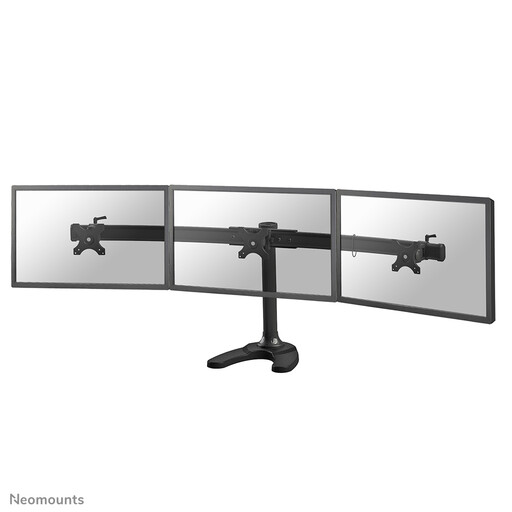
Why it suits this profile: This monitor stand for 3 monitors is a good fit for a workspace where several screens need to be mounted securely and adjusted with ease.
The specifications list a weight capacity of 8 kg per screen and VESA 75 x 75 and 100 x 100 mm compatibility, so you can check compatibility in advance.
Manually adjustable from 32 to 42 cm, with 360° rotation, 45° swivel and cable management.
We’ve put together a complete, up-to-date list of products that meet these strict selection criteria and the applicable European safety regulations.
The terms are often used interchangeably, but the designs differ:
A compact model for one screen may be enough for a reception desk or counter. A two- or three-screen setup may be more useful for gaming, video editing or financial work. Always check the overall width, depth and space for cables.
The top edge of the screen should generally be around eye level when you’re sitting upright. The ideal position varies depending on the person, chair and desk. If possible, choose a model with several height settings or a wide adjustment range.
No. Check the VESA size, screen weight and dimensions. A model without VESA holes won’t fit every monitor arm directly. A freestanding monitor riser may be a simpler alternative.
Its lifespan depends on the materials, load, installation and use. Don’t exceed the stated weight capacity, retighten fixings if needed and regularly check for looseness or damage. Always follow the manufacturer’s installation and safety instructions.
