
Cataloguer working with lots of source files
Wants to consult scans, records and linked documents side by side, so focuses mainly on usable screen space and legibility.


For cataloguing stamps, a monitor with enough usable workspace is helpful if you want to view scans, data and linked sources side by side. If you also assess scan colours, specified colour features and a suitable colour workflow become more relevant. Check the connections, charging capacity and adjustability too, to make sure they suit your computer and workspace. A monitor cannot improve the quality of the original scan file.
Wants to consult scans, records and linked documents side by side, so focuses mainly on usable screen space and legibility.
Compares digitised images and looks beyond resolution alone, considering the colour features and settings that suit their workflow.
Wants to connect the monitor to a laptop too, and checks that the computer supports video output through the chosen connection and can receive enough power for charging.
| What to consider | What should you check? | Who is this important for? |
|---|---|---|
| Workspace for scans, data and sources | Consider the screen size, resolution, desk space and your computer’s scaling settings. Small text should remain comfortable to read. | If I want to view scans, catalogue fields and linked sources at the same time, I look for a practical layout and readable scaling. Around 40% of consumers prioritise workspace for images and data. |
| Colour reproduction in scans | Compare the stated colour gamut and calibration options. The manufacturer’s specifications do not measure the colour reproduction of your individual monitor. | If I compare shades in digitised stamps, I consider the colour settings and my entire workflow. Around 30% of consumers prioritise scan colour. |
| Connection to your computer | Check the video output, the cable required and, for USB-C, whether the laptop supports video and how much power it can receive for charging. | If I want to use the monitor with my existing computer, I first check that video and any power delivery work through the chosen connection. Around 20% of consumers prioritise ease of connection. |
| Workspace adjustability | Check what adjustments the stand offers and whether its base fits your desk and your preferred screen position. | If I need to change the screen position while entering and comparing information, I look at the adjustment options and the space on my desk. Around 10% of consumers prioritise adjustability. |
A monitor specification does not prove that the original scan accurately captures the colours of a stamp.
Assess the entire scanning and viewing workflow. Additional colour features are most relevant if colour-critical comparisons are genuinely part of your task.
A USB-C port on a monitor does not, by itself, confirm that your laptop can output video or receive enough power to charge.
Compare your laptop’s capabilities with the specifications of the exact monitor model, including its supported video function and charging capacity.
If the connections or power requirements are not compatible, you may still need a separate power adapter or a different connection.
The Philips 27E1N1800AE/00 is an example of a 27-inch 4K IPS model with a height-adjustable stand.
The ProArt PA279CV is aimed at those who want to combine 27-inch 4K with stated colour features and USB-C.
According to BenQ, the PD2705U combines a 27-inch 4K screen with colour and connectivity features.
The ColorEdge CS2740 is worth considering if a more advanced colour workflow is part of your work.
The LG 27UP850K-W is a 27-inch 4K IPS model with USB-C.
This selection includes 4K monitors for viewing scans and catalogue data. The product titles also list different screen types, connections and adjustment options. Check which features suit your computer and workspace.
 No image available
The 32-inch 4K format is worth considering if you want to place images and record details side by side.
32 inch; VA; 3840 × 2160 pixels; 60 Hz; 300 cd/m²; 2 HDMI ports and DisplayPort; tilt-adjustable stand; speakers.
 No image available
The 27-inch 4K IPS screen is an option to compare if you’re looking for a monitor for scans and catalogue data.
27 inch; 4K; IPS.
 No image available
The product title lists PIP/PBP and USB-C. Check that these features suit your workflow and the devices you want to connect.
27 inch; 3840 × 2160 pixels; IPS; 120 Hz; USB-C with 90 W Power Delivery; HDMI and DisplayPort; PIP/PBP; height-adjustable.
 No image available
The product title lists USB-C with 65 W and an adjustable stand. Compare these details with your laptop connection and preferred screen position.
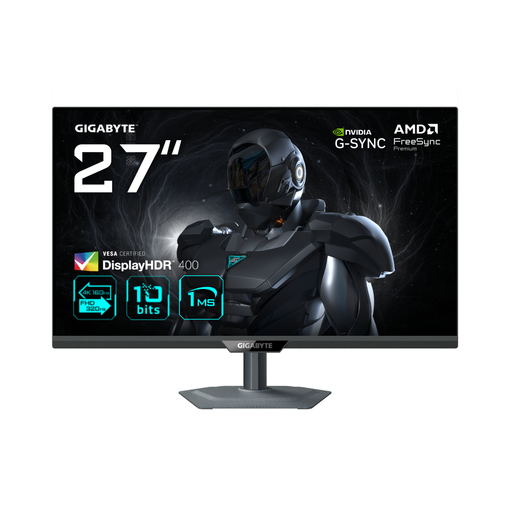
27 inch; 4K 160 Hz or FHD 320 Hz; Fast IPS; USB-C with 65 W; KVM; height, tilt and swivel adjustment.
 No image available
The title lists Dual Mode with two resolution and refresh-rate combinations. Check which setting suits the way you use the monitor.
27 inch; IPS; 4K 160 Hz or FHD 320 Hz; Dual Mode.
No, not if you mainly enter catalogue data. For colour-critical assessment, EIZO lists hardware calibration and 99% Adobe RGB for the ColorEdge CS2740. These manufacturer specifications do not make the original scan more accurate.
First check whether your laptop supports video over USB-C and how much charging power it needs. BenQ lists USB-C with DisplayPort Alt Mode, data and 65 W Power Delivery for the PD2705U, but that monitor specification alone does not confirm that it will work with your laptop.
Hardware calibration is not an established requirement for entering catalogue data. If you compare colours, check the adjustment and calibration options for the exact model. EIZO lists hardware calibration for the ColorEdge CS2740.
ACM ConsuWijzer explains that online product purchases are generally covered by a statutory 14-day cooling-off period, which starts after delivery. Your statutory guarantee rights apply alongside any commercial guarantee; the exact application and duration depend on the circumstances and the product.
The European Commission states that computer monitors have an energy label on a scale from A to G. Compare the label and product information for the exact models: a specification such as 4K does not, by itself, tell you how much energy a monitor uses.