Start with a monitor you can position comfortably whether you’re sitting or standing, and that keeps spreadsheets and formulae easy to read. A 24-inch 16:10 screen can offer plenty of vertical space for a single spreadsheet, while a 27-inch QHD monitor may work better for viewing spreadsheets and answers side by side. USB-C is only useful if the port, cable and laptop all work together. Don’t choose 4K for the resolution alone: check text size, connectivity and how much room you have on your desk.
Who is this choice relevant to?
Sit-stand desk user who changes posture
If you spend long periods creating spreadsheets and switch between sitting and standing, you’ll want to reposition your screen whenever you change posture. Arboportaal recommends placing the screen directly in front of you, slightly below eye level and angled towards your line of sight.
Viewing questions and answers side by side
If you regularly compare spreadsheets with answers or reference material, you’ll benefit from enough usable screen space to keep everything legible without making the text uncomfortably small.
Laptop user with a permanent workstation
If you want fewer cables around your sit-stand desk, compare monitors with USB-C. Just check that both the monitor and laptop ports support video and, if needed, power delivery.
What should you look for?
24-inch 16:10 for a single spreadsheet
Best for: anyone who mainly works on one spreadsheet and wants extra vertical document space. Dell lists the P2425 as having a resolution of 1920 × 1200 pixels.
Bear in mind: Dell says the USB-C port on the P2425 is for data only and delivers up to 15 W; use a suitable video connection.
27-inch QHD for side-by-side windows
Best for: anyone who wants to view spreadsheets alongside answers or reference material. Lenovo lists the ThinkVision T27h-30 as having a resolution of 2560 × 1440 pixels.
Bear in mind: check that the text remains readable at your preferred scaling and that the connections are compatible with your laptop.
27-inch 4K for higher resolution
Best for: anyone who values high pixel density; LG lists the 27UP850K-W as having a resolution of 3840 × 2160 pixels.
Bear in mind: 4K alone doesn’t guarantee a practical advantage for creating spreadsheets. Check readability using your own scaling settings.
| What to consider |
What to check before buying |
Who is this important for? |
| Screen position when sitting and standing |
Check the stand’s adjustment range or whether a monitor arm is suitable, and try the screen in both working positions. |
If I switch between sitting and standing, I want to be able to position the screen comfortably each time. Around 36% of consumers prioritise screen position. |
| Usable space for documents |
Compare screen size and resolution, then view your spreadsheet and a second window with the text at a readable size. |
When comparing a spreadsheet with answers or reference material, I want to be able to read both without making the text uncomfortably small. Around 29% of consumers give document space top priority. |
| Laptop connection |
Check your laptop’s video output and charging requirements, the USB-C features, and the power delivery of the exact monitor model. |
If my laptop is at a permanent workstation, I want to know whether one connection can provide video and, if needed, power. Around 21% of consumers prioritise laptop connectivity. |
| Purchase price and energy use |
Compare the energy label for the exact model and check whether your setup also requires a cable or monitor arm. |
When choosing features I’ll genuinely use, I also want to factor in energy consumption. Around 14% of consumers give purchase price and energy use top priority. |
Common mistakes
-
Assuming every USB-C monitor delivers video and power through one cable
USB-C ports can support different features. Dell says the USB-C port on the P2425 is for data only and delivers up to 15 W.
Before choosing a one-cable setup, check the features of the exact monitor port and your laptop’s port.
You may need a separate cable, adapter or charger for video or charging.
-
Choosing based on resolution alone
More pixels or a larger screen won’t help if the text becomes too small or the monitor doesn’t fit your desk properly.
View your own spreadsheet and, if needed, a second window using the text size you actually work with.
-
Expecting a sit-stand desk to sort out screen positioning automatically
A desk that changes height won’t automatically move the screen into a suitable viewing position. Arboportaal recommends readjusting your workstation when you change posture.
Check the screen position both sitting and standing before deciding what adjustment range you need.
If the stand doesn’t offer enough adjustment, your setup may need a suitable monitor arm.
Brands to compare
Dell
The Dell P2425 is a 24-inch 16:10 option for anyone looking for extra vertical space for a single document.
- Dell lists a resolution of 1920 × 1200 pixels, along with height, tilt, swivel and pivot adjustment.
- Dell says the USB-C port is for data only and delivers up to 15 W; don’t mistake this model for a USB-C hub monitor.
Lenovo
The ThinkVision T27h-30 is a 27-inch QHD option for viewing documents side by side and connecting a laptop.
- Lenovo lists USB-C, Ethernet, a USB hub and DisplayPort output for this model.
- Check whether your laptop, cable and monitor model can deliver the power you need through a single cable.
Philips
The Philips 27E1N5600AE/00 is a 27-inch QHD option for comparing USB-C connectivity with a compatible laptop.
- Philips lists video, data and power delivery via USB-C for compatible devices.
- Check separately whether the stand’s adjustment range suits your sit-stand setup.
LG
The LG 27UP850K-W is a 27-inch 4K option with a height-adjustable stand and pivot.
- LG lists a resolution of 3840 × 2160 pixels and USB-C for this model.
- Higher resolution doesn’t prove that spreadsheets will be quicker to create; check readability at your own scaling settings.
Joybuy products
This selection includes 27-inch QHD and 4K monitors for working on spreadsheets at a sit-stand desk. Check the adjustability, readability and connections of each model to make sure they suit your workstation.
 No image available
Philips 27E1N1800AE/00 27-inch 4K IPS monitor
This 27-inch 4K monitor is an option if you want to view spreadsheets on a larger screen; check that text and formulae remain readable at your preferred scaling.
3840 × 2160 pixels; 60 Hz; 4 ms; HDMI and DisplayPort; height-adjustable stand.
View at Joybuy
 No image available
MSI Modern MD272UPHG 27-inch 4K monitor
The 27-inch 4K resolution and listed display features may suit anyone who wants to view a spreadsheet alongside other material on one screen; check readability at your preferred scaling.
3840 × 2160 pixels; USB-C with DP Alt Mode and 98 W power delivery; KVM and PIP/PBP; height-adjustable stand.
View at Joybuy
 No image available
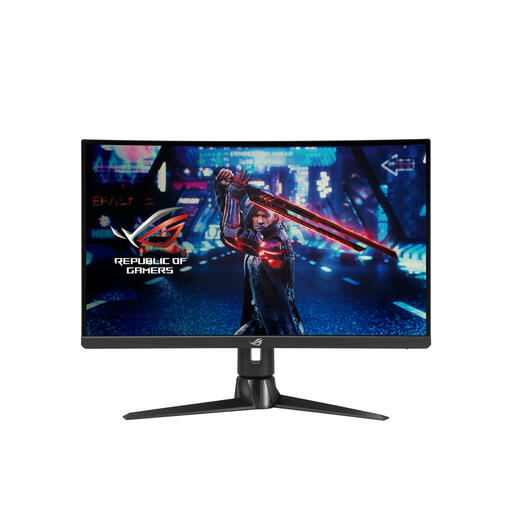
ASUS ROG Swift XG27AQV 27-inch WQHD monitor
This 27-inch WQHD monitor is an option if you want to view spreadsheets and reference material on a larger screen.
2560 × 1440 pixels; height, tilt and swivel adjustment; VESA-compatible.
View at Joybuy
 No image available
ASUS ProArt PA278CV 27-inch QHD monitor
The 27-inch QHD resolution may suit anyone who wants to view a spreadsheet alongside other material; check the text size in your own setup.
2560 × 1440 pixels; USB-C with 65 W power delivery and USB hub; stand with height and tilt adjustment.
View at Joybuy
 No image available
LG 27UQ850V-W 27-inch 4K monitor
This 27-inch 4K monitor is an option if you’re looking for high resolution; check that spreadsheets and formulae are easy to read at your preferred scaling.
3840 × 2160 pixels; USB-C with 90 W power delivery; height, tilt and swivel adjustment.
View at Joybuy
Frequently asked questions
Should you keep the screen at the same height when using a sit-stand desk?
No, readjust your workstation when you change posture. Arboportaal recommends placing the screen directly in front of you, with the top slightly below eye level, and angling it towards your line of sight.
Is a USB-C port enough to provide video and power to your laptop through one cable?
No, check the features of the exact port and the compatibility of your laptop and cable. Dell says the USB-C port on the P2425 is for data only, while Philips lists video, data and power delivery via USB-C for compatible devices on the 27E1N5600AE/00.
How do you compare the energy use of monitors?
Compare the EU energy label and the information for the exact model. The European Commission describes an A-to-G label scale for electronic displays; your actual costs also depend on energy use, how long you use the monitor and your electricity tariff.
Does the legal guarantee in the Netherlands always end after two years?
No, ACM ConsuWijzer explains that there is no fixed term for the legal guarantee in the Netherlands. With normal use, it depends on what you can reasonably expect from the product; the retailer is your point of contact. This is separate from any manufacturer’s warranty.


