If your PC game supports ultrawide properly and you have enough desk space, 21:9 is a sensible place to start. It gives you more horizontal space than 16:9 without going straight to the size of a 32:9 display. Choose 16:9 if compatibility and centrally positioned, easy-to-read instruments matter more, or consider 32:9 if a wider view is your priority. No aspect ratio guarantees that your game’s cockpit interface will be well positioned or make docking easier.
Who is this choice for?
Single-screen cockpit player
Wants to see both the surroundings and the cockpit while docking, so is comparing 21:9 with 32:9. A wider monitor only helps if the PC game supports the aspect ratio properly. RTINGS discusses ultrawide monitors primarily as an option for PC gaming.
Instrument-focused pilot
Prioritises cockpit readability and might compare a 16:9 4K screen with a 21:9 model. The LG 34WR50QC-B and Philips Evnia 32M1N5800A/00 illustrate different aspect ratios and resolutions, according to their manufacturers.
Player with limited desk or PC space
Needs a screen that fits physically and whose resolution and refresh rate suit their setup. Microsoft says Windows displays the active resolution and refresh rate for the selected screen.
What should you consider when choosing?
16:9
Choose this aspect ratio when: centrally positioned instruments, a more compact viewing layout or compatibility matter more than extra width.
Trade-off: you won’t get the extra horizontal space of 21:9 or 32:9. Also check whether your PC can handle the desired frame rate at 4K.
21:9
Choose this aspect ratio when: you want a wider view around the cockpit on a single screen, and your PC game displays the aspect ratio and interface as you want.
Trade-off: the extra pixels of, for example, 3440 × 1440 put more demand on your PC than 2560 × 1440, and the position of HUD elements depends on the game.
32:9
Choose this aspect ratio when: the widest possible view matters more than a compact screen, and your desk and PC can accommodate it.
Trade-off: a 49-inch screen takes up a lot of space, and extra width doesn’t guarantee a well-positioned HUD. RTINGS notes that game consoles don’t support ultrawide aspect ratios.
| What to consider |
What should you check? |
Who is this most important for? |
| View of your surroundings |
Check the model’s aspect ratio and resolution, the space on your desk and how your game displays the image. |
I want to see both the surroundings and the cockpit while docking, so I weigh extra width against the HUD’s position; around 33% of consumers prioritise seeing their surroundings when making this choice. |
| Instrument readability |
Compare the screen size and vertical resolution. If possible, view the HUD and text at the intended resolution in your own game. |
I want to read important cockpit information without choosing solely for maximum width; around 27% of consumers prioritise instrument readability. |
| Smooth motion |
Check the maximum refresh rate at your desired resolution and connection, then check the active setting in Windows once connected. |
If smooth motion matters more to me than extra width when manoeuvring, I check what my PC can support; around 20% of consumers prioritise smooth motion. |
| Placement and long-term use |
Measure the available desk space. For OLED, read the care instructions and warranty terms for the exact model. |
I want the monitor to fit on my desk, and if I use a fixed cockpit layout, I take model-specific OLED use into account; around 20% of consumers prioritise placement and long-term use. |
Things to watch out for when buying
-
Assuming a wider screen automatically gives you a better view of the docking point
A monitor’s aspect ratio doesn’t determine how a particular game arranges the cockpit and HUD.
Check which resolutions and aspect ratios your game supports, and where the important information appears.
-
Confusing the stated Hz rating with the frame rate in your game
The monitor has a maximum refresh rate, but the active combination of resolution, connection and PC output must support it too.
Check your PC output, connection and settings before choosing a monitor based on a higher Hz rating.
-
Choosing a large screen without considering its position and fixed cockpit displays
A 49-inch monitor needs more desk space than a 32- or 34-inch model. With OLED, images that remain unchanged for long periods are worth considering.
Measure the available space, and read the care instructions and warranty terms for your chosen OLED model.
Monitor brands to consider
LG
The LG 34WR50QC-B is an example of a 34-inch 21:9 VA monitor with 3440 × 1440 resolution and a refresh rate of up to 100 Hz.
- Its stated combination of screen size, resolution and refresh rate makes it possible to compare width and speed.
- LG lists tilt adjustment only for this model; this doesn’t necessarily apply to other LG monitors.
Samsung
The Odyssey G9 G91F is an example of a 49-inch 32:9 monitor with Dual QHD resolution and a refresh rate of up to 144 Hz.
- Its stated specifications provide plenty of horizontal screen space on a single monitor.
- The specifications don’t prove that a particular game’s HUD will display well; also measure the available desk space.
Dell Alienware
The AW3425DW is an example of a 34-inch 21:9 QD-OLED monitor with 3440 × 1440 resolution and a refresh rate of up to 240 Hz.
- For this model, Dell specifies QD-OLED and a maximum refresh rate of 240 Hz.
- If cockpit displays remain visible for long periods, check the care instructions and warranty terms for the exact model.
Philips Evnia
The 32M1N5800A/00 is an example of a 32-inch 4K IPS monitor with a 144 Hz refresh rate; the 34M2C6500/00 is a separate 34-inch ultrawide QD-OLED monitor.
- These models show that the Evnia range includes different aspect ratios and panel types.
- Specifications for one model don’t necessarily apply to another; compare the exact model variant.
ASUS ROG
ASUS specifies a 34-inch QD-OLED monitor for the PG34WCDN, with 3440 × 1440 resolution and a refresh rate of up to 360 Hz.
- The stated maximum refresh rate is relevant if your PC and game can deliver the desired frame rate.
- These specifications don’t confirm how a particular space simulator’s interface will be displayed.
Joybuy monitors for this choice
This selection includes ultrawide gaming monitors in different screen sizes and aspect ratios. Check that your game supports your chosen layout properly.
 No image available
LG 45GX900A-B 44.5-inch OLED monitor
An option if you’re looking for a large OLED screen in one place; check how your game displays your chosen ultrawide layout.
44.5 inches; 3440 × 1440; OLED.
View at Joybuy
 No image available
Philips Evnia 49M2C8900/00 49-inch DQHD QD-OLED monitor
For anyone considering an extra-wide view on a single monitor; check your available desk space and how the image looks in your game first.
49 inches; DQHD; QD-OLED; up to 240 Hz; FreeSync Premium Pro; curved.
View at Joybuy
 No image available
MSI MAG 342CQRF E20 34-inch UWQHD VA monitor
A 34-inch ultrawide option if your game supports the aspect ratio; check the interface and your preferred PC settings.
VA; 21:9; UWQHD; up to 200 Hz; 1500R; 300 cd/m²; 0.5 ms.
View at Joybuy
 No image available
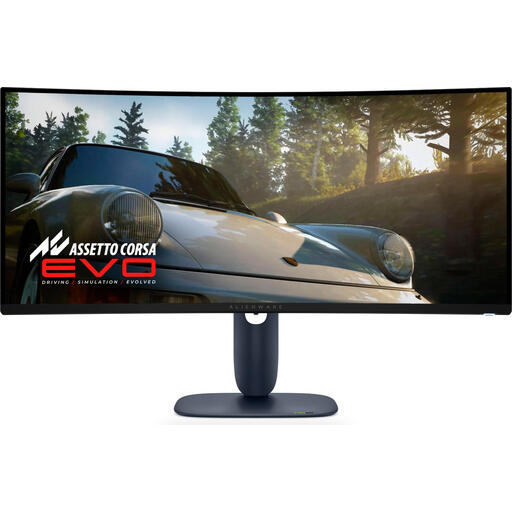
Alienware AW3425DW 34-inch QD-OLED monitor
A 21:9 option if you’re looking for extra width and a high stated refresh rate; check your game’s interface and the model-specific OLED terms.
34 inches; 3440 × 1440; QD-OLED; up to 240 Hz.
View at Joybuy
 No image available
MSI MAG 341CQP 34-inch QD-OLED monitor
A 34-inch QD-OLED option if you’re considering an ultrawide screen; check the aspect ratio and HUD display in your own game.
34 inches; 3440 × 1440; QD-OLED.
View at Joybuy
Frequently asked questions
Will an ultrawide monitor automatically work well with my space simulator?
No, it depends on the game. Before counting extra width as an advantage, check which resolutions and aspect ratios are supported and where the cockpit information appears.
How can I check whether my desired Hz setting is active?
In Windows, go to Settings > System > Display > Advanced display to see the current resolution and refresh rate. Microsoft says the available combinations depend on the screen.
Should I consider cockpit displays that remain visible for a long time when choosing OLED?
Read the care instructions for the exact OLED model and use the recommended protection features. Dell warns about images that remain unchanged for long periods on specific Alienware OLED models; this warning doesn’t predict damage for every monitor or gaming session.
If I buy a monitor online in the Netherlands, do I have a cooling-off period?
According to ACM ConsuWijzer, online purchases of products generally come with a statutory cooling-off period of up to 14 days after delivery. Check whether a statutory exception applies.
Does a paid extended warranty replace my statutory warranty?
No. ACM ConsuWijzer distinguishes between commercial or seller warranties and statutory warranty rights. If a fault is covered by those statutory rights, the seller is responsible for providing an appropriate solution at no cost.


