
Writer with limited desk space
You want an external screen but need to leave room for a keyboard and writing materials, too. MediaMarkt Netherlands recommends checking the screen’s width and depth as well as its diagonal measurement.


Start by measuring the usable width and depth of your desk, leaving room for your keyboard and writing materials. Screen size alone won’t tell you whether your setup will fit. Next, choose a screen that displays text comfortably and check that its connections are compatible with your computer. A compact 21.5-inch screen, an adjustable 23.8-inch model and a portable screen each suit different needs.
You want an external screen but need to leave room for a keyboard and writing materials, too. MediaMarkt Netherlands recommends checking the screen’s width and depth as well as its diagonal measurement.
You spend long stretches reading and editing text, so readability, reflections and an adjustable working position matter. Arboportaal lists small text, glare and poor ambient lighting among the factors that can make text harder to read.
You want to connect an external screen easily and check that your laptop’s video output is compatible with the monitor’s inputs.
First, measure how much room you’ll have left beside your keyboard and writing materials. Then compare the display, adjustment options and connections with what you need.
| What to consider | What should you look for? | Who is this important for? |
|---|---|---|
| Desk space | Measure the available width and depth, then compare them with the monitor’s dimensions, including the stand. The screen’s diagonal measurement won’t tell you how much space the stand takes up. | I want to keep using my keyboard and writing materials without the monitor setup getting in the way. Around 36% of consumers say physical fit is their top priority. |
| Readable text | Consider text size at your usual viewing distance, reflections and adjustable brightness. If necessary, try it with your own writing software. | When editing long pieces, I want text to be easy to read and distracting reflections kept to a minimum. Around 29% of consumers say text readability is their top priority. |
| Adjustable working position | Check whether the model offers height adjustment and tilt, and whether it supports VESA mounting if you need it. Also consider how much space the stand takes up. | I want to adjust the screen to suit where I’m sitting, especially during longer writing sessions. Around 21% of consumers say an adjustable working position is their top priority. |
| Laptop connection | Compare your computer’s video output with the screen’s inputs. For USB-C, check separately whether your laptop supports video and whether the power output is sufficient for charging. | I want to connect my laptop easily and know in advance whether I’ll need an adapter or a separate cable. Around 14% of consumers say simple laptop cabling is their top priority. |
A small screen doesn’t guarantee a space-saving stand. The setup could leave too little room for your keyboard or writing materials.
Measure the available space on your desk and compare it with the exact model’s width and depth, including the stand.
A reading mode or anti-glare surface is a feature, not proof that it prevents discomfort. Text size, reflections and ambient light can also affect readability.
Check which settings you can adjust, and consider the lighting and screen position, too.
USB-C capabilities vary by model and need to match what your laptop supports. You may still need a separate video or power cable.
Check video support on both devices and make sure the specific screen’s power output is suitable for your laptop.
According to Dell Netherlands, the Dell P2226H is a 21.5-inch Full HD monitor with an IPS panel and a stand that adjusts for height and tilt.
Lenovo describes the ThinkVision T22i-30 as a 21.5-inch Full HD screen with an adjustable stand and connections including HDMI and DisplayPort.
According to ASUS, the VA24DQSB is a 23.8-inch Full HD model with an anti-glare surface, height adjustment and several video inputs.
BenQ lists the GW2490T as a 23.8-inch Full HD screen with an ePaper mode, anti-glare coating and height adjustment.
Philips describes the 24E1N1300AE/01 as a 23.8-inch Full HD screen with a USB-C connection that can power a compatible device.
These Joybuy products include portable screens and desktop monitors for writing and editing in a limited workspace. Before choosing, check the dimensions and required connections, and make sure there’s enough room left for your keyboard.
 No image available
A portable external screen for a workspace where room is limited.
15.6 inches; Full HD; built-in speakers. Check that your computer’s connections are compatible with this model.
 No image available
A portable screen for viewing text in a limited workspace.
15.6 inches; 1920 × 1080 pixels; Full HD LCD. Check which connection your laptop needs to use this screen.
 No image available
A 14-inch portable screen could be worth considering if a large desktop monitor takes up too much room.
14 inches; Full HD 1080p. Before buying, check that the connection is compatible with your computer.
 No image available
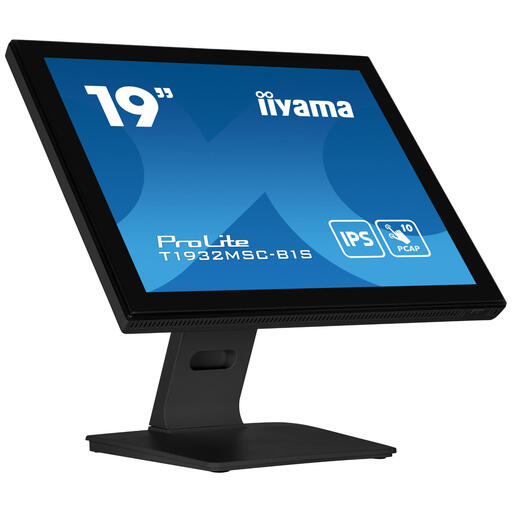
A 19-inch desktop monitor to consider if you’re looking for a smaller screen.
19 inches; 1280 × 1024 pixels; touchscreen. Consider whether this resolution suits the way you want to display your manuscript text.
 No image available
This larger model could suit you if you want more screen space, as long as it fits within the space available on your desk.
24.1 inches; 1920 × 1200 pixels; WUXGA. Measure your desk and check which connections your computer uses.
First, measure the available width and depth after setting aside space for your keyboard and other items. Compare those measurements with the exact model’s dimensions, including the stand. The screen’s diagonal measurement won’t tell you how much room the stand takes up.
A reading mode is an adjustable setting, not a guarantee against discomfort. Arboportaal lists small text, glare and poor ambient lighting among the factors that can make text harder to read, so consider text size, lighting and screen position, too.
Only if your laptop supports the required video output over USB-C and, if you also want to charge it, the specific screen provides enough power. Philips describes this option for the 24E1N1300AE/01 with a compatible device; check the connections on your own laptop.
When you buy as a consumer, you’re entitled to a product that works properly, and the seller is your point of contact if something is wrong. According to the Dutch government, the Netherlands has no fixed general statutory warranty period. ACM ConsuWijzer says that online purchases usually come with a statutory cooling-off period of up to 14 days after delivery, subject to applicable exceptions.
The guidance described by Arboportaal is aimed at employers and employees and isn’t presented here as a legal requirement for a hobby writer. For employees who spend more than two hours a day working at a screen, Arboportaal describes additional workplace requirements, including using a separate screen or keyboard when working on a laptop.