
Student with a crowded desk
Wants to keep space free for books, paper maps and notes. Compare the stand and the full setup, not just the screen size; Dell and iiyama describe models with adjustable stands.


On a small desk, the stand matters just as much as the screen size, so measure the full setup before you choose. If extra vertical space for maps and long source texts is a priority, a 16:10 model is worth considering: Dell specifies 1920 × 1200 pixels for the P2425, compared with 1920 × 1080 pixels for the Philips 24E1N1100A/00, according to Philips. For a compact 16:9 setup or a USB-C connection, the stand’s dimensions and compatibility with your laptop also matter.
Wants to keep space free for books, paper maps and notes. Compare the stand and the full setup, not just the screen size; Dell and iiyama describe models with adjustable stands.
Switches between digital maps, legends and long texts. Extra vertical screen space may be useful: Dell specifies a 16:10 aspect ratio for the P2425, while Philips describes an EasyRead mode for the 24E1N1100A/00.
Wants to adjust the screen position and checks which connections their laptop supports. LG specifies USB-C with 65 W Power Delivery for the 24BA750-B; check that this connection is compatible with your laptop.
First, measure the space available for the monitor, stand and study materials. Then decide how much source material you need to see at once, and finally check the adjustment options and laptop connections.
| What to consider | What to look for | Who should pay particular attention? |
|---|---|---|
| Desk space and setup | Measure the available width and depth, allowing for the full setup, including the stand and cable space. Don’t rely on the screen size alone. | I need to leave room on my crowded desk for books and notes, so the stand matters too. Around 36% of consumers put available desk space first. |
| Maps and long texts | Compare the resolution and aspect ratio. Dell specifies 1920 × 1200 pixels for the P2425; Philips specifies 1920 × 1080 pixels for the 24E1N1100A/00. | When I study maps with legends alongside long texts, I want to see enough information at once. Around 29% of consumers put source material on screen first. |
| Adjustability | Check the height adjustment and tilt, and consider how much space you need to position the monitor properly. Dell and LG list height adjustment for the P2425 and 24BA750-B respectively. | During long study sessions, I want to be able to adjust the screen position, without assuming that an adjustable stand automatically guarantees a comfortable posture. Around 21% of consumers put adjustability first. |
| Laptop connections | Check which video output your laptop supports and whether the power delivery is suitable. LG specifies USB-C with 65 W Power Delivery for the 24BA750-B. | When I study using my laptop, a compatible video and power connection matters more than other connections. Around 14% of consumers put laptop connections first. |
The screen size doesn’t tell you how much space the complete monitor setup will take up, and you may also need room on the desk for maps, books and a keyboard.
Before buying, compare the dimensions of the full setup with the space available on your desk.
A USB-C port on the monitor doesn’t automatically mean that your laptop can output video through it or receive enough power.
Check the capabilities of both devices and which cables are included before relying on a single connection.
Depending on the connections, you may also need a suitable cable or adapter, or you may need to power your laptop separately.
The P2425 is a 16:10 model in the 24-inch class for anyone considering extra vertical space for documents.
The 24BA750-B is a Full HD model for laptop users comparing USB-C connectivity and an adjustable stand.
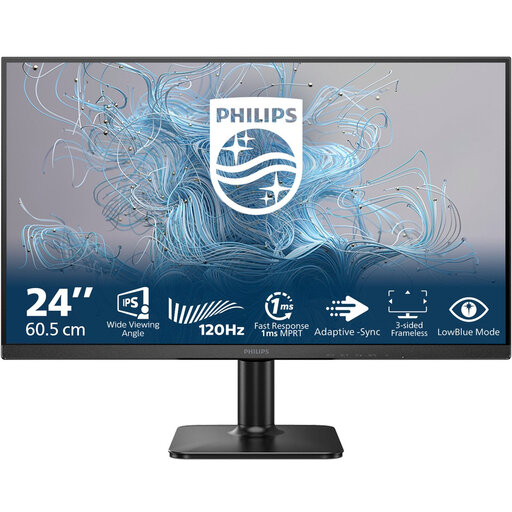
The 24E1N1100A/00 is a 23.8-inch Full HD model with reading and mounting features described by Philips.
The ProLite XUB2493HS-B6 is a Full HD model with a height-adjustable stand and swivel function.
This Joybuy selection includes Full HD monitors for studying and laptop use, including portable screens. Compare each model’s stand dimensions and connections with your workspace and laptop.
 No image available
For anyone looking for a Full HD screen for computer use or working from home.
1920 × 1080 pixels; HDMI and VGA. The product description notes that the power adapter must be purchased separately.
 No image available
For anyone looking for a portable 16-inch screen for laptop use and comparing a smaller screen size for their workspace.
FHD, 16:10 aspect ratio, two USB-C ports, Mini HDMI and a built-in kickstand.
 No image available
For anyone comparing a 24-inch Full HD monitor for everyday computer and office tasks.
1920 × 1080 pixels, 16:9 aspect ratio, VA panel and 100 Hz.
 No image available
For anyone looking for a portable screen for laptop use and comparing touchscreen controls.
1920 × 1080 pixels, USB-C and Mini HDMI. The description lists an adjustable smart cover as a stand.
 No image available
For anyone comparing a Full HD monitor for studying and everyday computer use.
1920 × 1080 pixels, IPS, EasyRead and an adjustable tilt stand. The description lists a 100 × 100 mm VESA mounting interface.
If extra vertical space for documents matters, 1920 × 1200 pixels gives you 120 more vertical pixels than 1920 × 1080. Dell specifies the first resolution for the P2425; Philips lists the second for the 24E1N1100A/00. Usability also depends on the display scaling and the space available on your desk.
Measure the monitor stand and leave room for work materials and cables. Then check whether you can adjust the height and viewing angle, and whether the setup causes reflections. Arboportaal guidance for display screen work applies to relevant employee work and doesn’t automatically apply to every private situation.
No. LG specifies USB-C with 65 W Power Delivery for the 24BA750-B, but also check that your laptop supports video through that connection and that 65 W is enough for your laptop.
For an applicable online consumer purchase from a business, you generally have a 14-day cancellation period, with some exceptions. You’re also entitled to a product that meets the required standards. The Dutch Government states that the Netherlands has no fixed statutory warranty period and that you should contact the seller if there’s a fault.
According to the European Commission, computer monitors are covered by the European energy label for electronic displays, with a scale from A to G. Compare the labels and product information for the models you’re considering.