
Manuscript editor with limited desk space
You mainly work with long texts and want to see more lines at once, while still leaving room for your keyboard and notes. Dell and Lenovo offer examples with 1920 × 1200 pixels and a 16:10 aspect ratio.


Start by measuring the space available for your desk and monitor stand. Then decide whether you need more vertical room for documents, extra pixels for text and sources, or a simple laptop connection. A 16:10 WUXGA monitor offers more vertical pixels than 1920 × 1080; a QHD model may suit side-by-side windows, but check the text scaling and connections you need. Measure the stand too, and check each model’s adjustability and exact port capabilities.
You mainly work with long texts and want to see more lines at once, while still leaving room for your keyboard and notes. Dell and Lenovo offer examples with 1920 × 1200 pixels and a 16:10 aspect ratio.
You often compare passages with photos or travel notes and want more pixels on a modest-sized screen. Dell describes the P2425DE as a 23.8-inch QHD monitor with a USB-C hub.
You connect your laptop and want an adjustable monitor that fits your desk. Check whether each model supports video and sufficient charging power over USB-C; the presence of a USB-C port alone doesn’t guarantee this.
First work out how much physical space you have, then choose a screen layout and connections to suit the way you work.
| What to consider | What should you check? | Who is this important for? |
|---|---|---|
| Document space | Compare 16:10 WUXGA with 16:9 Full HD, and measure both the monitor and its stand on your desk. | If you edit long chapters and also need room for your keyboard and notes, having more lines in view can make a difference. Around 36% of consumers give document space top priority. |
| Ergonomics and fit | Check the height adjustment, stand depth and whether you can position the screen comfortably at your workstation. | If your desk is shallow or you want to adjust the screen position, both the stand dimensions and adjustability matter. Around 29% of consumers put fit and ergonomics first. |
| Sharpness and windows | Compare the resolution at the screen size you’re considering, and assess the text scaling too. | If you want to view your manuscript, photos or sources side by side, the number of pixels may be a factor; the final text size also depends on the scaling setting. Around 21% of consumers prioritise sharpness and viewing multiple windows at once. |
| Laptop connection | Check video over USB-C, charging power and your laptop’s connections separately. | If you connect your laptop often and want to keep cables to a minimum in your small workspace, the monitor needs to support your laptop’s capabilities. Around 14% of consumers put a simple laptop connection first. |
According to Dell, the USB-C downstream port on the Dell P2425 is for data only and delivers up to 15 W. It doesn’t provide video or charge your laptop.
Check the full model number and find out what each port supports, which way the connection works and how much charging power is available.
Without a suitable video connection, you may still need a separate video cable, adapter or laptop charger.
The screen size doesn’t tell you how much desk space the stand will take up. BenQ lists the GW2490T as having a depth of 241 mm including the stand.
Measure your available desk depth and the stand. If you’re considering a monitor arm, check its mounting compatibility and load capacity too.
According to the Dutch government, you’re entitled to a product that meets reasonable expectations, and the retailer is your point of contact if there’s a problem. An additional warranty isn’t the same as this statutory right.
Before you buy, compare any additional cover on offer and what it adds to your statutory rights.
The P2425 and P2425DE offer different options for text work: 16:10 WUXGA or QHD with a USB-C hub.
The ThinkVision T24d-30 is a 24-inch 16:10 option for text work.
The GW2490T is a 23.8-inch Full HD option for anyone who usually edits one document at a time.
According to Philips, the Business Monitor 24B2U3301D/00 has a 24.1-inch WUXGA screen with a 16:10 aspect ratio.
These models include 16:10 WUXGA options for working with documents, QHD models with more pixels and Full HD monitors for a compact text-work setup.
 No image available
The 16:10 aspect ratio and 1920 × 1200 pixels make this a good fit for long documents when you want more vertical screen space.
Resolution: 1920 × 1200 pixels. Screen size: 24.1 inches.
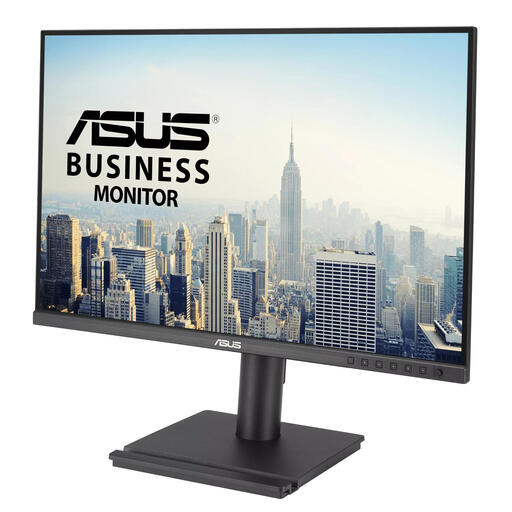 No image available
This model suits anyone looking for a WUXGA screen for long chapters; check that its adjustment options work for your workspace.
Resolution: 1920 × 1200 pixels. Screen size: 24.1 inches.
 No image available
QHD resolution may suit you if you want to view your manuscript and sources side by side; check that your preferred text scaling is comfortable to read.
Resolution: 2560 × 1440 pixels. Dell describes the P2425DE as a USB-C hub monitor with 90 W power delivery.
 No image available
The specified QHD resolution is worth considering if you want more pixels for your manuscript and supporting source material.
Resolution: 2560 × 1440 pixels. Screen size: 24 inches.
 No image available
A Full HD screen may suit you if you’re looking for a compact display for text work and usually edit one document at a time.
Full HD. Refresh rate: 100 Hz. IPS panel.
The 1920 × 1080 resolution has fewer vertical pixels than WUXGA at 1920 × 1200 pixels.
For continuous text, 1920 × 1200 gives you 120 extra vertical pixels compared with 1920 × 1080 at the same horizontal resolution. This can show more lines, although how many you actually see also depends on your zoom or scaling setting.
Before buying, measure the stand depth and leave room for your keyboard and notes. Then adjust the height and tilt to suit your workspace. Arboportaal outlines additional requirements for employees who work at a screen for more than two hours a day; these aren’t automatically a legal requirement for personal use.
No. Dell specifies that the P2425 has a USB-C downstream port for data only, delivering up to 15 W. For a one-cable setup, check that both your laptop and monitor support USB-C video and that the charging power is suitable for your laptop.
For a standard online purchase from a business, you generally have a 14-day cooling-off period. You’re also entitled to a product that meets reasonable expectations; according to the Dutch government, there’s no fixed statutory warranty period in the Netherlands, and the retailer is your point of contact if something goes wrong. Check any additional manufacturer’s warranty separately.
The European Commission says that energy labelling rules also cover computer monitors, subject to applicable exceptions. Check the label and product information for the model you choose; the European scale runs from A to G.