If you mainly edit long texts and have limited desk space, start with an adjustable monitor that makes text comfortable to read. A larger QHD screen gives you a different layout, with your manuscript and reference material side by side; 4K is most relevant if you also review travel photos. On a shared desk, always check the connections on the different laptops and whether the monitor can be adjusted to suit each user.
Who is this buying guide for?
Text editor working with long chapters
You want to read long texts comfortably, make the most of vertical document space and adjust the screen to suit your viewing position. Arboportaal, Dell and BenQ offer relevant workplace guidance and model specifications.
Writer working with a manuscript and reference material
You want to view notes, travel research or a second document alongside your manuscript while editing. Arboportaal and Dell outline considerations for readability and relevant monitor options.
Writer who also reviews travel photos
You want to consider detail and stated colour features as well as text, without mistaking a manufacturer's specifications for a measurement of your screen's colour accuracy. LG and Dell list relevant 4K models and features.
What should you look for when choosing?
First, work out how much physical space you have on the shared desk and how you want to view text and reference material side by side. Then choose the connections and any photo features that suit your laptops and tasks.
Compact monitor for documents
Best for: editing mainly long texts and needing more vertical document space on a limited desk. Dell lists the P2425 as having a 16:10 screen with a resolution of 1920 × 1200 pixels.
Consider: Dell specifies that the P2425's USB-C port is a downstream port for data and up to 15 W of power, not a laptop video input.
27-inch QHD
Best for: viewing a manuscript alongside notes or reference material. Dell lists the S2725DC as having QHD resolution and USB-C.
Consider: allow for the space it takes up and check that your laptop can output video through the connection you choose and supports the required power delivery.
27-inch 4K
Best for: reviewing travel photos as well as text and looking for a higher resolution. LG lists the 27UP850K-W as having a resolution of 3840 × 2160 pixels and USB-C up to 96 W; Dell lists a 4K hub model.
Consider: check that text remains comfortable to read from your laptop. LG notes that the software for the hardware calibration feature is not included.
Larger 3:2 screen
Best for: prioritising vertical space for chapters and when your desk can accommodate a larger screen. BenQ lists the RD280U as having a 28.2-inch screen, a 3:2 aspect ratio and a resolution of 3840 × 2560 pixels.
Consider: BenQ positions the RD280U as a programming monitor; its coding modes are not a proven advantage for editing a travel story. Check the space you need, including the stand.
| What to consider |
What to check before buying |
Who is this most important to? |
| Readable text and document space |
Compare the aspect ratio and resolution; check that the text size, height adjustment and reflections work for you. |
When I'm reading long chapters, I want text at a comfortable size and enough vertical space. Around 36% of consumers put readability and document space first. |
| Space and adjustability |
Measure the available width and depth, including the stand; check the height and tilt adjustments. |
At a shared desk, I want the monitor to fit and adjust to suit different viewing positions. Available space comes first for around 21% of consumers. |
| Connecting and switching between laptops |
Check each laptop's video output, what the monitor port is for and how much charging power is needed. |
When several people connect their laptops, I want to know which cables and connections each device needs. Around 29% of consumers prioritise being able to switch easily between laptops. |
| Photo detail and colour |
Check the exact resolution and colour features; see whether calibration software is included if you need it. |
When I'm reviewing travel photos alongside my text, I also look at detail and colour features. Photo detail is the top priority for around 14% of consumers. |
Common buying mistakes
-
Assuming every USB-C port works as a laptop dock
A USB-C connection may not offer the features or charging power your laptop needs. Dell specifies that the P2425 has a downstream port for data and up to 15 W of power; it is not a laptop video input.
Check what the specific port does and what each laptop used at the desk requires.
Depending on the laptop, you may also need a separate video connection, adapter or laptop charger.
-
Comparing screen size alone
A larger screen takes up more desk space; the aspect ratio and resolution also affect how much document space is available.
Measure the space, including the stand, and compare the aspect ratio, resolution and adjustment options for the way you use your manuscript and reference material.
-
Relying on a retailer's description without checking the model
A description may give important connection or resolution details differently from the manufacturer's information for the full model number.
Before buying, check the full model number and the key connection and screen specifications against the manufacturer's information.
Brands worth considering
Dell
The Dell models listed range from a compact monitor for documents to QHD and 4K models with USB-C.
- Dell lists the P2425 as having a resolution of 1920 × 1200 pixels, a 16:10 aspect ratio and an adjustable stand.
- Dell specifies that the P2425's USB-C downstream port is for data and up to 15 W of power, not for laptop video.
- Dell lists the S2725DC as QHD and the P2725QE as a 4K model with a USB-C hub.
LG
The 27UP850K-W is a 27-inch 4K option for writing and reviewing travel photos.
- LG lists a resolution of 3840 × 2160 pixels, USB-C up to 96 W and stated colour coverage of 95% DCI-P3.
- LG notes that the software for the hardware calibration feature is not included. Stated colour coverage is not a measurement of an individual screen's colour accuracy.
BenQ
The RD280U is a larger 3:2 option if vertical document space is a priority.
- BenQ lists a 28.2-inch screen, a resolution of 3840 × 2560 pixels and height adjustment.
- BenQ positions this model as a programming monitor; its coding modes are not a proven advantage for editing manuscripts.
Philips
The Philips 24E1N5300AE/00 listed here is a compact 23.8-inch Full HD option with USB-C.
- Philips lists picture, data and charging over a single USB-C cable for compatible devices.
- The resolution is 1920 × 1080 pixels; also check the ergonomic specifications of the exact model variant.
Joybuy monitors for writing and photos
This selection includes 27-inch QHD and 4K monitors, as well as more compact Full HD models for editing text, viewing photos and working at a shared desk. For each laptop, check that the connections and charging power suit your set-up.
 No image available
INNOCN CB27U1 27-inch 4K UHD monitor
A 27-inch model for writing when you also want to view travel photos at a higher resolution.
3840 × 2160 pixels; IPS; 120 Hz; HDR500; USB-C with 90 W Power Delivery; HDMI and DisplayPort; height-adjustable.
The product name also lists FreeSync and PIP/PBP split-screen features. Check that the connection and features suit the laptop you use.
View at Joybuy
 No image available
ASUS ProArt PA278CV 27-inch QHD monitor
A 27-inch QHD option for viewing a manuscript alongside reference material, if you have enough desk space.
2560 × 1440 pixels; USB-C with 65 W Power Delivery; stand adjusts for height and tilt.
Check that your laptop supports video through the connection you choose and that the charging power suits your needs.
View at Joybuy
 No image available
LG 27UQ850V-W 27-inch 4K monitor
A 27-inch 4K model for writing with extra screen space and viewing travel photos.
3840 × 2160 pixels; USB-C with 90 W Power Delivery; stand adjusts for height, tilt and swivel.
Check that the text size and USB-C connection suit your laptop and workspace.
View at Joybuy
 No image available
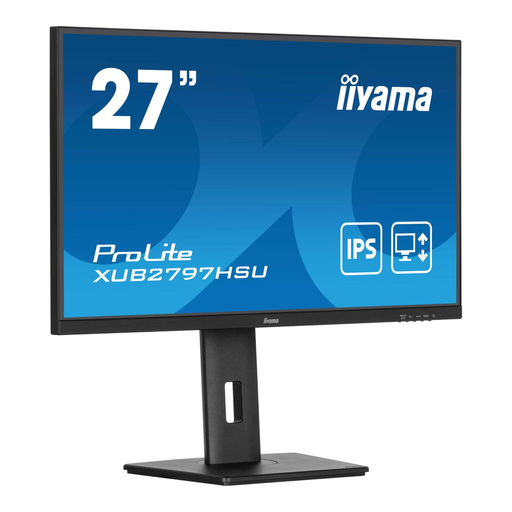
iiyama ProLite 27-inch IPS monitor
A 27-inch option for everyday editing; the adjustable stand can help when users change their viewing position.
Full HD; 100 Hz; USB hub; height-adjustable stand.
Check that the resolution suits the level of detail you want when viewing travel photos.
View at Joybuy
 No image available
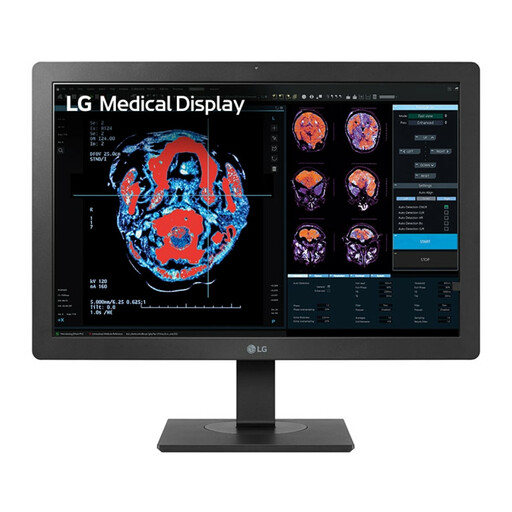
LG 24HR513C-B 24-inch Full HD monitor
A more compact option for writing when desk space is limited.
1920 × 1080 pixels; height-adjustable and tiltable stand; USB hub.
Check that the vertical resolution is sufficient for your documents and text size.
View at Joybuy
Frequently asked questions
How do I set up a monitor when different people share the same desk?
Adjust the viewing position for each user and pay attention to readable text size, reflections and lighting. Arboportaal highlights these considerations for screen work; it also outlines workplace requirements for employees who work with screens for more than two hours a day.
Can any USB-C monitor connect to and charge my laptop with a single cable?
No, it depends on the features of the specific port and the laptop. Dell specifies that the P2425 has a USB-C downstream port for data and up to 15 W of power; LG lists picture, data and power delivery up to 96 W over USB-C for the 27UP850K-W.
What rules apply to prolonged screen work and online purchases?
Arboportaal outlines employers' obligations, including workplace requirements when an employee works with screens for more than two hours a day; this is not a general requirement for every monitor bought for personal use. According to the Dutch government, online purchases from a business often come with a 14-day cooling-off period. Consumer products are covered by a legal guarantee, with no fixed statutory guarantee period.
How do I compare monitors' energy consumption?
Compare the information on the energy label and in EPREL for the exact model. Actual consumption also depends on how you use the monitor; the label alone won't tell you how much it will use in your particular situation. Your Europe explains the European information on energy labels.
Do the same energy-label rules apply to every monitor?
EU rules for electronic displays cover monitors, but some types of display are exempt. EUR-Lex explains the scope of the rules; check the information for the exact model and don't treat the rules as a universal minimum energy class for buyers.


