Who is this choice relevant to?

Screenwriter with limited desk space

Wants to read a script without the screen and stand taking up room needed for a keyboard and notes. Measure your whole workspace and check whether the monitor is adjustable. The Arboportaal recommends placing the screen directly in front of you.

Writer who revises extensively

Switches between script pages and notes, and needs to choose between more vertical space and a higher resolution. The Dell P2425 has 1920 × 1200 pixels, while the Dell P2425D has 2560 × 1440 pixels, according to Dell Netherlands.

Laptop writer looking to reduce cables

Wants a tidy desk and needs to check whether the monitor’s USB-C connection is compatible with their laptop and supplies the power it needs. Philips describes USB-C power delivery for the 24E1N1300AE/00; check your own laptop’s requirements.

What should you look for when choosing?

23.8-inch Full HD

Choose this if: you have limited desk space and usually work in a single writing window.

The trade-off: 1920 × 1080 gives you fewer vertical pixels than the 1920 × 1200 and 2560 × 1440 options reviewed. The screen’s diagonal measurement doesn’t tell you how much space the stand takes up.

24-inch 16:10

Choose this if: you’d rather see more of a script page in one window while revising. The Dell P2425 has 1920 × 1200 pixels and an adjustable stand, according to Dell Netherlands.

The trade-off: measure the stand and check your laptop connection. According to Dell, the P2425’s USB-C downstream port is for data only and supplies a maximum of 15 W.

23.8-inch QHD

Choose this if: you regularly want to view your script alongside your outline or research, and your computer can handle your chosen text scaling. The Dell P2425D has 2560 × 1440 pixels, according to Dell Netherlands.

The trade-off: more pixels alone don’t guarantee a comfortable text size. Try adjusting the text scaling, and don’t confuse the P2425D with the separate P2425DE hub model.

Full HD with USB-C for a laptop

Choose this if: using one cable for the picture and laptop power matters more to you than having extra vertical pixels. Philips describes USB-C power delivery for the 24E1N1300AE/00.

The trade-off: check that your laptop, port and cable are compatible. The product description doesn’t confirm compatibility with every laptop.

What to consider What should you check? Who is this important for?
Desk space Measure the available width and depth, then compare them with the monitor’s dimensions, including the stand. Also decide where your keyboard and notes will go. If I’m sharing a small desk with my keyboard and notes, I want to know how much desk space the monitor stand will take up. Around 36% of consumers in this situation prioritise desk space.
Readability and adjustment Check the height and tilt adjustments, text size on your own computer, and how light sources affect the screen. When I write for long periods, I want to be able to set the screen at a suitable height and read text comfortably. Around 29% of consumers prioritise adjustability and readability.
Room for scripts and notes Try your usual window layout and text scaling. Compare Full HD, 1920 × 1200 and QHD without confusing resolution with screen size. If I often switch between my script, outline and research, I want to know what I can fit on screen without making the text too small. Around 21% of consumers prioritise this window and page space.
USB-C and laptop power Compare your laptop’s video output and charging requirements with the exact monitor port. Also check which cable is included. When I want as few cables as possible on my desk, I want to know whether the monitor can connect to and power my laptop through a suitable single connection. Around 14% of consumers prioritise this type of connection.

Pitfalls to avoid

  • Measuring only the screen diagonal

    A screen may fit within the available width, but its stand could take up too much depth for your keyboard or notes.

    Measure the available width and depth, then compare them with the monitor’s dimensions, including the stand. Assess a monitor arm separately for its mounting requirements and load capacity.

    If the stand takes up too much workspace, you may need a different stand or a monitor arm.

  • Assuming every USB-C port works as a laptop dock

    According to Dell, the Dell P2425’s USB-C downstream port is for data only and supplies a maximum of 15 W. Philips describes USB-C power delivery for the 24E1N1300AE/00; how well it works depends on your laptop and connection.

    Check the video input, charging capacity and cable for the exact model and port.

    If your existing connection isn’t suitable, you may need an extra cable or a separate laptop power supply.

  • Treating an eye-comfort claim as a guarantee against discomfort

    BenQ describes its own Eye-Care features, but a manufacturer’s mode is not proof that a monitor prevents discomfort. Screen position, lighting and changes in posture also play a part.

    Assess the text and settings for your own workspace, and arrange your whole desk to suit you. Don’t assume a screen mode has a medical benefit.

Brands to consider

Dell

The models reviewed offer different options for working with text: the P2425 is a 24-inch 16:10 model with 1920 × 1200 pixels, while the P2425D is a 23.8-inch QHD model with 2560 × 1440 pixels.

  • Dell lists height, tilt, swivel and pivot adjustment for the P2425.
  • The P2425’s USB-C downstream port is for data only and supplies a maximum of 15 W. It’s not the same as the separate P2425DE hub model.

LG

The 24BA550-B is a 23.8-inch Full HD monitor with 1920 × 1080 pixels, according to LG Netherlands.

  • LG lists height, tilt, swivel and pivot adjustment, as well as built-in speakers, for this model.
  • Its resolution is Full HD, rather than the 2560 × 1440 pixels of the Dell P2425D reviewed.

Philips

The 24E1N1300AE/00 is a Full HD option to consider if using a laptop and reducing the number of separate cables are important to you.

  • Philips lists USB-C 3.2 with power delivery as a product feature.
  • Check that the port, cable and charging capacity suit your specific laptop. The connection alone doesn’t confirm this.

BenQ

The GW2490T is a 23.8-inch Full HD home monitor that BenQ describes as having text-focused display modes.

  • BenQ mentions an ePaper mode and its own Eye-Care technologies.
  • These manufacturer descriptions are not independent proof that the monitor prevents eye discomfort.

Joybuy monitors for a compact writing setup

This Joybuy selection includes compact Full HD monitors and portable 16-inch models. Compare their available workspace, resolution, stand and connections with your own desk and laptop.
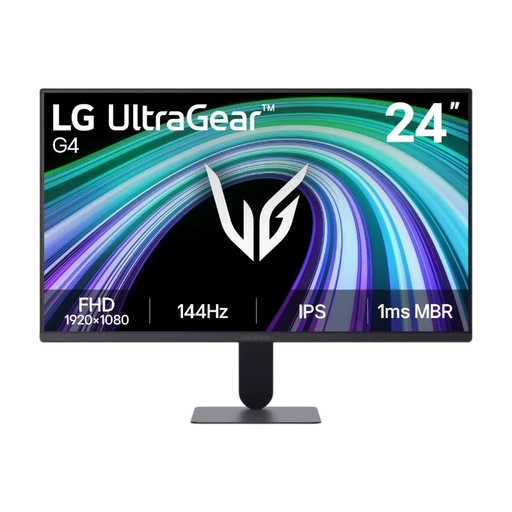
LG 24G411B-B 23.8-inch monitor

LG 24G411B-B 23.8-inch monitor

A compact Full HD option to compare if you plan to use a single writing window at your desk.

23.8-inch IPS screen with 1920 × 1080 pixels and an adjustable tilt stand.

View at Joybuy

TECLAST V16H 16-inch portable monitor

TECLAST V16H 16-inch portable monitor

A portable screen to consider if a smaller display would suit your writing space better.

16-inch Full HD screen with a 16:10 aspect ratio, 144 Hz and IPS. The title lists two USB-C ports and Mini HDMI; check which connection is right for your computer.

View at Joybuy

TECLAST V16Q 16-inch portable monitor

TECLAST V16Q 16-inch portable monitor

A portable option to compare if you want to view text and other material on one screen.

16-inch 16:10 screen with 2560 × 1600 pixels, IPS and 144 Hz. The product information lists two USB-C ports and Mini HDMI; check your computer’s connection.

View at Joybuy

iiyama ProLite XB2497HSN-B1 24-inch monitor

iiyama ProLite XB2497HSN-B1 24-inch monitor

A Full HD option to consider if you’re looking for an adjustable stand and USB-C for a laptop.

23.8-inch 1920 × 1080 IPS screen with 100 Hz. The product description lists height, tilt, swivel and pivot adjustment, plus USB-C power delivery of up to 65 W for compatible laptops.

View at Joybuy

Philips 1000 Series 24E2N1100LB/00 24-inch monitor

Philips 1000 Series 24E2N1100LB/00 24-inch monitor

An approximately 24-inch screen to compare for everyday reading and computer work.

Full HD with 1920 × 1080 pixels, a VA panel and 100 Hz.

View at Joybuy

Frequently asked questions

Should a screenwriter buy a second or larger screen?

Not necessarily. Start by choosing the window layout you actually use and measuring the available space. The models reviewed offer different resolutions in roughly the 24-inch screen class; a larger screen doesn’t replace a workspace that’s set up to suit you.

How should I set up my monitor for long writing sessions?

Place the screen directly in front of you, with the top just below eye level. The Arboportaal also recommends changing your posture regularly. Adjust the text size and lighting to suit your workspace too.

Does every USB-C monitor charge my laptop?

No. Philips describes USB-C power delivery for the 24E1N1300AE/00, while according to Dell, the Dell P2425’s USB-C downstream port is for data only and supplies a maximum of 15 W. Check the functions of the exact port, your laptop’s requirements and the cable.

What are my rights in the Netherlands when buying online or if a product is faulty?

For an online product purchase, you generally have 14 days from delivery to change your mind, subject to applicable exceptions, according to ACM ConsuWijzer. This is separate from the statutory guarantee: if a product used normally doesn’t meet what you could reasonably expect, the seller must put things right in accordance with the applicable terms.

Do Dutch rules on screen work apply to every screenwriter working privately?

No. The legal obligations described by the Arboportaal apply to employers and employees. For employees who work with screens for more than 2 hours a day, the Arboportaal sets out specific workplace requirements; these are not general product specifications for all buyers. The setup advice can also be useful outside an employment relationship.
