What should you look for when choosing?
Portable USB-C monitor
Choose this option: if you want an extra screen without necessarily needing a separate monitor socket, and your laptop can provide video and enough power over USB-C.
Trade-off: a compact screen offers less workspace than a large desktop monitor. Power pass-through doesn’t prove that every model will work without a mains adapter.
27-inch 4K USB-C monitor
Choose this option: if you have a power socket for the monitor and want a larger workspace for scans and tools.
Trade-off: connecting to your laptop with a single USB-C cable doesn’t mean the monitor can work without mains power. Check its charging capacity too.
Monitor for colour-critical work
Choose this option: if you assess scans for print colour as well as checking for dust.
Trade-off: colour features don’t replace checking the power supply and connections. Claims about screen-to-print results remain manufacturer claims.
First compare power requirements and USB-C compatibility, then screen size, and finally any colour features. The percentages below show which need is the top priority for consumers making this choice.
| What to consider |
What should you check? |
Who is this important for? |
| Power and sockets |
Check whether the monitor needs its own power socket and whether your laptop supports USB-C video and provides enough power. |
I don’t want to need an extra monitor plug and want to know in advance whether my laptop provides the right USB-C connection. Around 34% of consumers put power supply first. |
| Checking for dust |
Compare screen size and resolution. Adobe explains that at 100% zoom, one image pixel corresponds to one monitor pixel. |
When checking small areas of a scan, I want to know how much detail I can see on screen. Around 33% of consumers give detail for spotting dust top priority. |
| Colour for print |
If colour-critical print work is part of your task, check the colour modes and calibration options of the specific model. |
I also assess scans for print, so I want to consider colour management as well as sharpness. Around 20% of consumers put print colour first. |
| Working posture |
Check the height and tilt adjustments, and whether the screen will fit in the space available on your desk. |
For longer retouching sessions, I want to position the screen comfortably without overcrowding my workspace. Around 13% of consumers give posture and positioning top priority. |
Joybuy products
This selection includes portable USB-C monitors and larger screens for a fixed workstation. Check the power requirements for each model and make sure its USB-C connection is suitable for your laptop.
 No image available
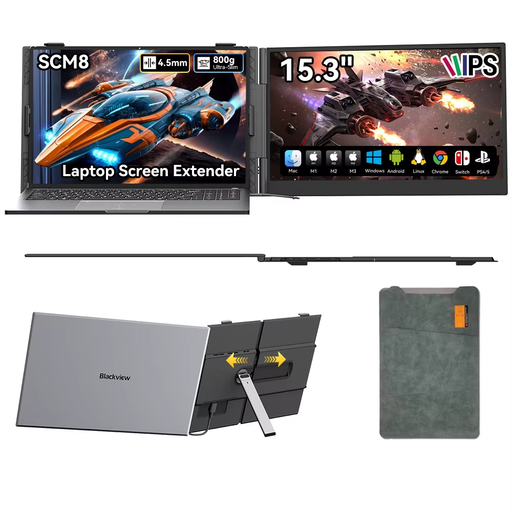
Blackview SCM8 15.3-inch portable monitor
This portable design may suit a workspace where you want to use an extra screen; check that your laptop supports the stated USB-C connection.
The product description mentions video and power over a single USB-C cable, a 180° adjustable stand and an included protective case.
The product description recommends keeping a distance of at least 15 cm from medical implants.
View at Joybuy
 No image available
KTC M27P6 27-inch 4K MiniLED monitor, Dual Mode White
The 27-inch 4K format is an option for a fixed workstation where you want to view scans and tools on a larger screen.
The product title lists Type-C 65 W PD and a stand with height, tilt and swivel adjustment. Check what power supply the monitor itself needs.
View at Joybuy
 No image available
MSI Modern MD272UPHG 27-inch 4K monitor
This fixed screen may suit scan retouching at a desk with a power socket available for the monitor.
The product information lists 3840 × 2160 pixels, USB-C with 98 W Power Delivery, factory calibration, colour modes and an adjustable stand.
According to the product information, the monitor needs to be plugged into a power socket using a power cable.
View at Joybuy
 No image available
INNOCN CB27U1 27-inch 4K UHD monitor
This 27-inch 4K model is designed for a fixed workstation; check that it will fit your available space and connections.
The product information lists USB-C with 90 W Power Delivery, a power adapter and a height-adjustable stand.
View at Joybuy
 No image available
INNOCN 40C1U 40-inch ultrawide monitor
The wide screen may suit a desk where you want to place a scan and additional windows side by side.
The product title lists 5120 × 2160 pixels and USB-C PD 65 W. The product information mentions a built-in power supply, so the monitor itself needs a power connection; PIP and PBP are also listed.
View at Joybuy
Frequently asked questions
Does a monitor remove dust from a scan?
No, a monitor displays the scan; retouching is done in image-editing software. Adobe explains that at 100% zoom, each image pixel is displayed as one monitor pixel.
Can you use any USB-C monitor without an extra power socket?
No, it varies by model. Check whether the monitor itself needs to be connected to the mains and whether your laptop can provide video and enough power via USB-C.
How should you position a monitor for longer retouching sessions?
Before buying, check its adjustability and the space available on your desk. HP lists height adjustment, tilt, swivel and pivot among the features of the E27k G5; these features don’t automatically apply to other monitors.
What happens in the Netherlands if a monitor bought online doesn’t work properly?
In many cases, consumers have a 14-day cooling-off period when buying online from a business. If a product doesn’t work properly because of a fault, you can ask the seller for a solution; the Dutch government states that there is no fixed two-year statutory guarantee period for every product.
Where can I find information about energy use and EU rules?
The European Commission describes an A to G energy label for electronic displays. For products covered by the rules, the energy label and product information sheet must also be shown when sold online; compare the details for the exact model.


