Start with your window layout: a 27-inch QHD monitor gives you a different amount of screen space from a compact Full HD monitor, while an ultrawide screen is best suited to viewing several windows at once, if you have the room for it. Also check the adjustability and laptop connections of the exact model. A monitor won’t detect or remove duplicate listings; you’ll need a checking process and suitable software for that.
Who is this choice relevant to?
Comparing reviews alongside a register
You regularly keep text and an index open at the same time to check listings. In this case, your window layout matters at least as much as the screen size; Microsoft Support explains how to snap windows into place.
Reading review text for long periods
You read and check a lot of text in one sitting and want to position the screen comfortably. Your workplace setup is also important; Arboportaal provides information about working with display screens.
Working with a laptop in different locations
You want to know whether the monitor provides the laptop connections and power you need, without choosing a screen that won’t fit your desk. Features vary by exact model, so check the specifications of the version you’re considering.
What should you look for?
First decide how many windows you want to see at once and how much space you have on your desk. Then consider readability, adjustability and the connections your laptop needs.
| What to consider |
What should you look for? |
Who is this important for? |
| Side-by-side windows |
Try your usual review and register side by side at your preferred text size. Compare resolution, aspect ratio and screen width. |
If I want to check reviews and a register at the same time, a practical window layout matters most. Around 33% of consumers prioritise having a clear overview when comparing. |
| Reading and screen position |
Check the height adjustment, reflections and readability at your usual viewing distance and text size. |
When reading for long periods, I want to position the screen comfortably and check text with ease. Around 27% of consumers say readability and positioning are their main concerns. |
| Connecting a laptop |
Check that your laptop and cable support video over USB-C, and compare the power your laptop needs with the monitor’s output. |
If I want to handle display and power from my workstation, the connections need to suit my laptop. Around 20% of consumers prioritise the laptop connection. |
| Size and features |
Measure the space available on your desk and consider whether you usually view one document or several windows. |
On a smaller desk, I mainly want a screen that fits, without paying for features I don’t need. Around 20% of consumers value a compact size without unnecessary features most. |
Common buying mistakes
-
Assuming a wider screen will remove duplicates
A monitor displays data, but it won’t automatically identify duplicate listings. Microsoft Support explains that in Excel you can either temporarily filter duplicate values or permanently remove them.
Decide which details make a review unique, check any suspected duplicates and save a copy before deleting data.
Checking takes extra time, and accidentally deleted data may also need to be restored.
-
Comparing screen size alone
A 27-inch QHD monitor and an ultrawide monitor also differ in resolution, aspect ratio and the amount of space they take up. Screen size alone doesn’t tell you how many of your documents will fit side by side.
Before choosing a size, compare your usual window layout and text size with the width of your desk.
-
Assuming every USB-C monitor can fully power a laptop through a single cable
USB-C video and power output need to be suitable for both your laptop and the cable. Dell lists up to 90 W of USB-C power delivery for the P2725DE; BenQ and LG list 65 W for the GW2790QT and 34WR55QC-B discussed here.
Before buying, check your laptop’s video capabilities and power requirements, then compare them with the specifications of the exact monitor model.
Depending on your laptop, you may still need a separate power adapter or another cable.
Brands and specific models
Dell
The Dell Pro 27 Plus P2725DE is a 27-inch QHD option for anyone who wants to connect a laptop and peripherals at their desk.
- Dell lists a resolution of 2560 × 1440 pixels, height adjustment, up to 90 W of USB-C power delivery and an RJ45 connection for this model.
- Check that the connections and power output suit your laptop; these specifications don’t automatically apply to other Dell monitors.
LG
The LG 34WR55QC-B is an ultrawide option if you want to view several text windows side by side.
- For this model, LG lists a resolution of 3440 × 1440 pixels, a width of 809 mm with the stand and 65 W of USB-C power delivery.
- Check that the screen fits on your desk and that its power output suits your laptop.
BenQ
The BenQ GW2790QT is a 27-inch QHD option for text-based work where adjustability and USB-C matter.
- For this model, BenQ lists an anti-glare coating, 110 mm of height adjustment and USB-C with DisplayPort Alt Mode and 65 W power delivery.
- The eye-care features listed are product specifications; they don’t prove that the monitor prevents health problems.
Philips
Philips offers two different sizes here: a compact Full HD model and a 27-inch QHD model.
- Philips lists a 23.8-inch screen diagonal, a resolution of 1920 × 1080 pixels and height adjustment for the 241B8QJEB/00. For the 27B2G5500/00, Philips lists a 27-inch screen and a resolution of 2560 × 1440 pixels.
- Compare the specifications of each exact model; the features of these versions aren’t interchangeable.
Monitors at Joybuy
These monitors are options for viewing reviews and registers side by side, with a range of screen sizes and resolutions.
 No image available
INNOCN CB27U1 27-inch 4K UHD monitor
A 27-inch model for anyone who wants to view a review and register on one screen.
Specifications in the product name: 3840 × 2160 pixels, 120 Hz and USB-C with 90 W PD.
A monitor won’t detect or remove duplicate listings; use a checking process or suitable software for that.
View at Joybuy
 No image available
Dell Pro Plus P2725DE 27-inch QHD monitor
A 27-inch QHD option for viewing a review and register side by side.
Specifications in the product name: 2560 × 1440 pixels.
A monitor won’t detect or remove duplicate listings; use a checking process or suitable software for that.
View at Joybuy
 No image available
Dell Pro Plus P2425D 24-inch QHD monitor
A QHD option with a 24-inch screen diagonal for anyone looking for a more compact setup.
Specifications in the product name: 2560 × 1440 pixels.
A monitor won’t detect or remove duplicate listings; use a checking process or suitable software for that.
View at Joybuy
 No image available
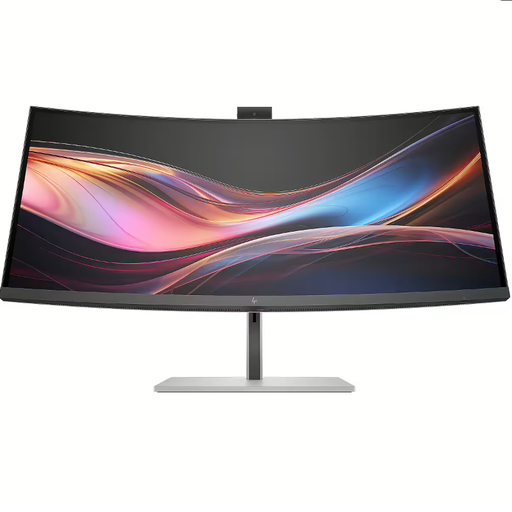
HP Series 7 Pro 734pm 34-inch WQHD monitor
A 34-inch WQHD option for anyone who wants to view several text windows side by side.
The product name specifies a 34-inch WQHD monitor.
A monitor won’t detect or remove duplicate listings; use a checking process or suitable software for that.
View at Joybuy
 No image available
Philips 49B2U6903CH/00 49-inch monitor
A monitor with a 49-inch screen diagonal and 5120 × 1440 pixels for anyone looking for plenty of screen space for several windows.
Specifications in the product name: 5120 × 1440 pixels.
The listed width with the stand is 1193 mm; check that you have enough room for it in your workspace. A monitor won’t detect or remove duplicate listings.
View at Joybuy
Frequently asked questions
Does a monitor remove duplicate review listings?
No, a monitor displays data but doesn’t remove duplicates. You’ll need a checking process or suitable software for that. In Excel, filtering temporarily hides duplicate values, while removing them deletes them permanently. Microsoft Support therefore recommends deciding first which values count as duplicates.
How do I place a review and an index side by side?
In Windows, you can use Snap to place windows side by side and adjust their relative widths. Microsoft Support explains this window feature. Try the layout at your usual text size before deciding how much screen space you need.
Is a USB-C cable enough for video and charging my laptop?
Only if your laptop and cable support the video function you need and the monitor supplies enough power. Dell lists up to 90 W of USB-C power delivery for the P2725DE; BenQ and LG list 65 W for the GW2790QT and 34WR55QC-B respectively. Compare this with your own laptop’s requirements.
What can I do if the monitor doesn’t work properly?
For a consumer purchase in the Netherlands, you’re entitled to a legal guarantee if the product doesn’t perform as you could reasonably expect under normal use; the retailer is your point of contact. Online consumer purchases generally also come with a cooling-off period that ends 14 days after delivery, subject to applicable exceptions. Check the terms of any additional warranty.
Are there Dutch rules for this display-screen workstation?
For employees, Arboportaal outlines employers’ responsibilities for healthy display-screen work and workplace setup. The requirement for a separate screen and keyboard applies to employees who work with display screens for more than 2 hours a day; it isn’t a general product specification for every private buyer.


