Who is this buying guide for?

Designer with limited desk space

You want to lay out a page while keeping your book, keyboard and mouse on the same small desk. So look beyond the screen size and check the stand dimensions and adjustability too. The Arboportaal also highlights the importance of legibility and a well-designed workspace.

Designer working with text and images

You review recipes, captions and photos, and want to see the details clearly. Compare the resolution and text display as well as the screen size; Dell, for example, lists different resolutions and aspect ratios for the P2425 and P2425DE.

Creator of a printed recipe book

You want to assess how food photography and page colours will translate to print. Choosing a suitable monitor is just one part of the process: EIZO and Adobe describe colour management and calibration as parts of a managed workflow.

What should you look for?

Compact 16:10 workspace

Choose this when: You want extra vertical space for a portrait page without moving up to a larger screen. Dell lists a resolution of 1920 × 1200 for the 24.1-inch P2425.

Trade-off: The P2425 has fewer pixels than a QHD screen. Dell describes its USB-C port as a data downstream port of up to 15 W, not as a confirmed laptop dock that provides video and power through a single cable.

Compact QHD screen with laptop dock

Choose this when: Fine text and images matter, and you want to connect your laptop via USB-C. The Dell P2425DE has a 23.8-inch QHD screen with 2560 × 1440 pixels.

Trade-off: Its 16:9 screen doesn’t offer the extra page height of 16:10. Check that your laptop’s video output and charging requirements are compatible with the monitor.

Colour-critical print preparation

Choose this when: The colours of your food photography and pages are important for print. EIZO lists a resolution of 1920 × 1200 and more than 99% Adobe RGB for the 24.1-inch ColorEdge CS2400S.

Trade-off: A stated colour gamut doesn’t guarantee a match with the printed result. Calibration, ambient lighting, paper and the print shop’s profile all matter too.

Larger 27-inch workspace

Choose this when: You have enough room after measuring your desk and prefer a larger working area on screen. LG lists a QHD resolution of 2560 × 1440 and a height-adjustable stand for the 27BA45QB-B.

Trade-off: A larger screen isn’t automatically suitable for a small desk. Check the dimensions, including the stand.

Consideration What should you check? Who is this important for?
Desk space Measure the available width and depth, then compare them with the screen’s dimensions, including the stand. Also check that your book and input devices will fit alongside it. If I want to keep my recipe book, keyboard and mouse on the same small desk, physical fit is my top priority. Around 36% of consumers put desk space first.
Legibility and page workspace Compare the Dell P2425 at 1920 × 1200 pixels with the P2425DE at 2560 × 1440 pixels. Also assess text size and scaling at your usual viewing distance. When I want to review recipes, captions and page details, I compare both vertical space and sharpness. Around 29% of consumers prioritise a legible layout.
Colour for print Ask the print shop about its output profile and check the colour gamut and calibration options of the exact model. EIZO lists more than 99% Adobe RGB for the CS2400S; Adobe also identifies calibration, lighting, paper and colour management as relevant factors. If my recipe book is going to be printed, I want to match the colour display carefully to the printing process. Around 21% of consumers prioritise colour assessment for print.
Connecting a laptop Dell lists a USB-C data downstream port of up to 15 W for the P2425. Check the video function and power delivery of the exact model, and compare them with your laptop’s connections and charging requirements. If I want to reduce the number of cables on my desk, I check whether a single connection can really provide video and enough power for my laptop. Around 14% of consumers prioritise an easy laptop connection.

Common buying mistakes

  • Choosing a screen by size without measuring the stand

    The screen size doesn’t tell you how much desk space the stand takes up. On a small desk, you’ll also need room for your book and controls.

    Measure the available width and depth, then compare them with the dimensions of the exact model, including its stand.

    You may need to rearrange your setup or use a suitable monitor arm.

  • Assuming every USB-C port connects a laptop with video and power

    A USB-C connection may have a different function from a hub that combines a video signal and laptop power. Dell lists a data downstream port of up to 15 W for the P2425.

    Check the monitor’s USB-C functionality as well as your laptop’s video and power requirements.

    If the connection isn’t suitable, you may need extra cables or a separate laptop charger.

  • Assuming a stated colour gamut guarantees the printed result

    A colour gamut alone doesn’t guarantee a match between the screen and the print. Calibration, ambient lighting, paper and colour management all play a part.

    Agree the colour profile with the print shop and use a proof print where necessary.

    A managed colour workflow may require calibration equipment and proof prints.

Brands to compare

Dell

Dell offers a compact 16:10 option and a compact QHD hub monitor in this range.

  • According to Dell, the P2425 has a 24.1-inch screen with 1920 × 1200 pixels, while the P2425DE has a 23.8-inch screen with 2560 × 1440 pixels.
  • Dell describes the P2425’s USB-C port as a data downstream port of up to 15 W. Don’t assume this model has the hub functionality of the P2425DE.

EIZO

The ColorEdge CS2400S is a 24.1-inch option for graphic design and colour-critical work.

  • EIZO lists a resolution of 1920 × 1200 pixels and more than 99% Adobe RGB for this model.
  • Its stated colour space doesn’t guarantee a match with print; a calibrated workflow and suitable colour management are still essential.

Samsung

The ViewFinity S6 S60UD LS24D600UAUXEN is a compact QHD model to compare with other 24-inch options.

  • Samsung lists a 24-inch screen, QHD and 100 Hz for this specific model.
  • Check the connections and stand on the version you choose; these details can’t be inferred from the screen specifications alone.

Philips

The Business Monitor 243S1/00 is a Full HD option for anyone who values a USB-C dock.

  • Philips says this specific model can provide video and power to a laptop through a single USB-C cable.
  • Its stated resolution of 1920 × 1080 pixels offers fewer vertical pixels than the 16:10 and QHD models discussed here. Check that the power delivery suits your laptop.

LG

The LG 27BA45QB-B is a larger QHD alternative if it fits your desk after measuring.

  • LG lists a 27-inch screen, 2560 × 1440 pixels, an IPS panel and a height-adjustable stand for this model.
  • A larger screen isn’t automatically suitable for a small desk; check the physical fit separately.

Joybuy products for recipe layout

This selection includes portable screens and compact 24-inch models to compare for page layout. Choose according to the screen space you need, and check the connections and physical dimensions of the exact model.

TECLAST V16Q portable monitor

TECLAST V16Q portable monitor

This portable model with a built-in stand is worth comparing if you’re looking for a screen you can move around; measure the available space first.

16:10 aspect ratio and 2560 × 1600 pixels; the product name also lists 2.5K, 144 Hz and IPS.

View at Joybuy

Dell Pro Plus P2425DE computer monitor

Dell Pro Plus P2425DE

For anyone looking for a compact QHD screen and a USB-C connection for their laptop; check that the video function and charging requirements are compatible with your laptop and the model you choose.

23.8 inches, QHD 2560 × 1440 pixels and 16:9. The product information lists USB-C with 90 W Power Delivery for video, data and charging.

View at Joybuy

Dell Pro Plus P2425D computer monitor

Dell Pro Plus P2425D

A QHD model to compare if you want to view text and images on a compact screen; check that the stand fits your desk.

24 inches and 2560 × 1440 pixels. The product information lists 100 Hz and a stand that adjusts for height, tilt, swivel and pivot.

View at Joybuy
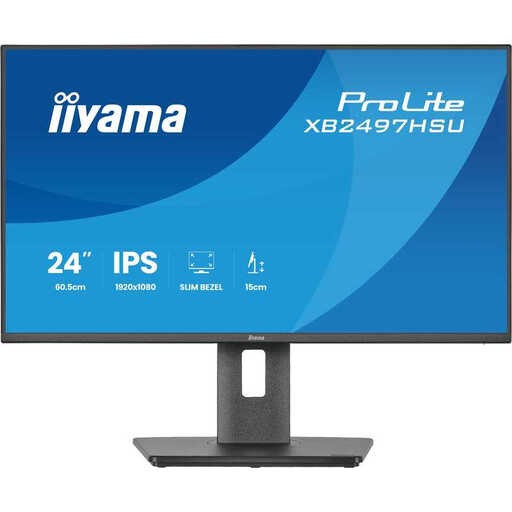
Iiyama ProLite XB2497HSU-B1 monitor

Iiyama ProLite XB2497HSU-B1

This monitor is worth comparing if you’re looking for an adjustable workspace; check the stand dimensions and whether Full HD provides the level of detail you need.

23.8 inches, Full HD 1920 × 1080 pixels, IPS and 120 Hz. The product information lists a stand with height, tilt, swivel and pivot adjustment.

View at Joybuy

MSI PRO MP165 E6 portable USB-C monitor

MSI PRO MP165 E6 portable monitor

The portable 15.6-inch size is worth comparing if you’re looking for a small screen you can move around; consider whether it offers enough workspace for your pages.

Full HD 1920 × 1080 pixels and IPS. The product information lists two USB-C ports with DisplayPort Alt Mode and 15 W Power Delivery; check compatibility with your laptop.

View at Joybuy

Frequently asked questions

Is 16:10 or QHD more useful for laying out a recipe page?

It depends on what you need: the Dell P2425 offers 1920 × 1200 pixels and more vertical pixels than Full HD, while the 23.8-inch Dell P2425DE offers more pixels for fine detail, at 2560 × 1440. Assess both using the text size you actually work with too.

Is a monitor with a wide colour gamut enough to check print colours?

No. A stated colour gamut alone isn’t enough to predict the printed result. EIZO lists more than 99% Adobe RGB for the CS2400S; Adobe also describes calibration, ambient lighting, paper and colour management as parts of a managed workflow. Ask the print shop for the relevant profile and check a proof print where necessary.

How can I set up for long periods of screen work at a small desk?

Consider the screen’s position, legible text, reflections and lighting. The Arboportaal explains how an unsuitable workspace and poor legibility can affect strain. If you’re an employee, your employer also has obligations relating to safe screen work; these aren’t general legal specifications for every monitor used at home.

What are my rights when I buy a monitor online?

According to the Dutch government, distance purchases come with a 14-day cooling-off period in many cases. You’re also entitled to a product that works as it should; if there’s a fault, contact the seller. Check the terms that apply to your specific purchase.

How can I compare monitors’ power consumption?

Compare the energy label and product information for the exact models. The European Commission states that computer monitors carry an energy-efficiency label on a scale from A to G; don’t estimate consumption or running costs from screen size alone.
