
Writers who need larger text
You want to view your script at a comfortable size while checking how many lines remain on screen. Microsoft Support explains how to adjust text size in Windows.


Start by choosing a text size that’s comfortable to read, then check how many lines of your script and notes you can see at once. A more compact screen may be enough for a single document; if you often work with several windows side by side, you may benefit from more screen space. Resolution won’t make text larger by itself, so check the scaling settings, adjustability and connection to your computer too.
You want to view your script at a comfortable size while checking how many lines remain on screen. Microsoft Support explains how to adjust text size in Windows.
You want to keep an eye on several windows while editing, and weigh the extra workspace against the desk space the screen takes up. Samsung UK explains how to choose between monitor sizes.
You connect your laptop and consider the screen position and the connection between the two devices. Also check that your laptop’s ports support the monitor features you need.
Start with the text size you’ll actually use for writing, then consider how much room you need for your script and notes. This lets you assess screen size and resolution based on your own window layout, rather than relying on a specification alone.
| What to consider | What should you check? | Who is this important for? |
|---|---|---|
| Readability of large text | Try your writing software at your preferred text size or scaling level, and see how many lines of your script fit on screen. | If your main priority is keeping your script easy to read, check how many lines are visible with your chosen text setting. Around 33% of consumers say readability of large text is their top priority. |
| Room for your script and notes | Measure the desk space available and try your preferred window layout with enlarged text. | If you want to see your script and notes at the same time while writing, usable screen space matters as well as the physical space on your desk. Around 27% of consumers say having several writing windows open is their top priority. |
| An adjustable writing setup | Check whether the stand is height-adjustable and whether you can position the screen comfortably in your workspace. | For long writing sessions, being able to adjust the screen position may be important. Around 20% of consumers say adjustability is their top priority. |
| Connecting to your laptop | Compare your laptop’s video output and any USB-C video and power support with the specifications of the exact monitor model. | If you want to connect the laptop you already use for writing, check that the ports on both devices are compatible. Around 20% of consumers say connecting to a laptop is their top priority. |
Resolution and text scaling are separate settings. A higher resolution doesn’t guarantee that your script text will appear larger.
Set your preferred text size or screen scaling, then check how much of your script and notes remains visible.
A USB-C port on the monitor doesn’t prove that your laptop’s port can output video or provide the power required.
Compare your laptop’s capabilities with the connections and power specifications of the exact monitor model.
Depending on your devices, you may need a separate power or video connection as well as the USB-C cable.
According to the Dutch government, there is no fixed statutory period for the legal guarantee in the Netherlands. A manufacturer’s warranty therefore doesn’t automatically replace your rights if a product is faulty.
Check what any additional warranty covers, and contact the retailer if your product is faulty.
The Philips 27E1N1600AE/00 is a 27-inch QHD monitor with USB-C, described as suitable for document work and connecting to a laptop.
The Dell P2725QE is a 27-inch 4K USB-C hub monitor, making it a model to consider for resolution, connectivity and adjustability.
The LG 27UP850K-W is a 27-inch 4K monitor with USB-C and an adjustable stand.
Samsung UK discusses screen sizes for tasks including document work and multitasking.
This Joybuy selection includes monitors for viewing a single writing document, as well as models with extra resolution or screen space for several windows. Compare screen size, your preferred text settings and the desk space available with your own workspace.
 No image available
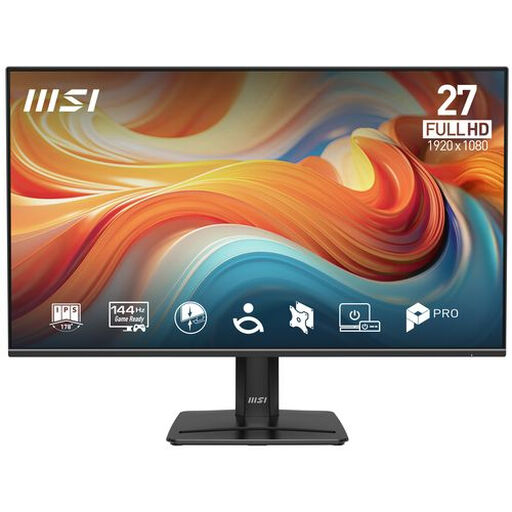
A 27-inch Full HD monitor described as suitable for work and reading text. Check how many lines of your script remain visible at your preferred text size.
1920 × 1080 (FHD), IPS, 144 Hz, HDR Ready and Adaptive-Sync.
 No image available
The 27-inch 4K resolution and height-adjustable stand are worth comparing if you’re looking for an adaptable desk setup. You can adjust text size separately.
3840 × 2160 pixels, 60 Hz, 4 ms, HDMI and DisplayPort.
 No image available
If you want to assess your script and notes at a particular scaling setting, the product information lists this model as having a 27-inch 4K screen.
3840 × 2160 pixels, 120 Hz, QD-OLED and USB-C.
 No image available
The QHD resolution and adjustable stand may be worth considering if you want to assess both your window layout and screen position.
2560 × 1440 pixels, 240 Hz and a stand adjustable for height, tilt, swivel and pivot.
 No image available
The product information describes an ultrawide screen for working with windows side by side. Bear in mind that a 34-inch screen takes up more desk space than a more compact model.
21:9 aspect ratio, 3440 × 1440 pixels (WQHD), 100 Hz, Reader Mode and Flicker Safe.
No. Set the text size or screen scaling separately. Microsoft Support explains that Windows has separate settings to enlarge text only, or to make apps and images larger too.
To change text size only, Microsoft Support directs you to Settings > Accessibility > Text size. To enlarge the interface, you can adjust Display > Scale. Then view your script at your preferred size.
That depends on the connections and capabilities of both devices. Check whether your laptop’s USB-C port can output video, and compare the charging power required with the specifications of the exact monitor model.
Arboportaal outlines employers’ obligations in certain circumstances. For employees who work with screens for more than 2 hours a day, it mentions requirements including a separate screen or keyboard when using a laptop, as well as rules on setting up the workstation. This is not a general legal minimum requirement for every personal monitor purchase.
According to the Dutch government, when buying from a business at a distance, you will often have a 14-day cooling-off period. In the Netherlands, the legal guarantee also has no fixed statutory period; if a product is faulty, contact the retailer. Check the terms and conditions for your particular purchase.