First, choose a monitor whose screen, stand and the rest of your workspace will all fit on your desk. Then decide whether you mainly view one puzzle page, use several windows side by side or check colours for print. The resolution, connections and adjustability you need will depend on your laptop and how you work.
Who is this choice for?
Creator with limited desk space
You create puzzle pages alongside your keyboard and paper, and want to know whether the screen and stand will fit. BenQ lists the GW2491’s overall width and depth, including the stand, as 542 × 182 mm. Check the dimensions of the exact model.
Puzzle editor who uses several windows
You want to view a puzzle page alongside clues, answers or layout tools. Dell describes the P2425 as having a 16:10 screen with 1920 × 1200 pixels, and the P2425DE as QHD with 2560 × 1440 pixels.
Creator of colourful print files
As well as puzzles, you check illustrations or a coloured cover. BenQ positions the SW242Q for screen-to-print work. That’s a different consideration from a monitor used only for text and grids.
What should you look for when buying?
First, measure the space needed for your entire desk setup. Then choose the screen layout, adjustability and any colour features you genuinely need.
| What to consider |
What should you check? |
Who is this important for? |
| Space for the monitor and paper |
Measure the available width and depth with your keyboard and paper in place. BenQ gives the GW2491’s overall width and depth, including the stand, as 542 × 182 mm. |
If I want to create my puzzle page alongside paper and a keyboard, the whole setup needs to fit. Around 36% of consumers say desk space is their main concern when buying. |
| Page alongside other windows |
Compare your preferred layout and text size: Dell lists the P2425 as having 1920 × 1200 pixels in 16:10, and the P2425DE as having 2560 × 1440 pixels in QHD. |
When I want to see clues or answers alongside my puzzle, I consider both the workspace and whether the text is comfortable to read. Around 29% of consumers put this combination first. |
| Working posture and connection |
Check the monitor’s adjustability and whether your laptop can output video through the port you’ve chosen and supports enough charging power. Dell lists USB-C power delivery up to 90 W for the P2425DE; check your laptop’s requirements. |
If I want to adjust my screen position and laptop connection to suit my workspace, I need to know which features will actually work together. Around 21% of consumers say working posture and connectivity are their main concerns when buying. |
| Colour for print |
Decide whether you’ll be checking colour-critical illustrations or a cover. BenQ describes the SW242Q as being for screen-to-print work; assess your workflow with the intended printer and paper type too. |
When colour matters in my cover or illustrations, I want to be able to assess the print properly. Around 14% of consumers put colour checking for print first. |
Common mistakes
-
Measuring only the screen diagonal
The screen may fit width-wise, while its stand competes for space with paper and other work supplies.
Measure the available width and depth, then compare them with the exact model’s external dimensions, including the stand. Consider alternative mounting only if it’s suitable for both the screen and your desk.
-
Assuming every USB-C port supports video and laptop charging
On the Dell P2425, USB-C is a downstream data port; the P2425DE has a different USB-C hub function. Features therefore vary by model.
Compare the monitor’s port specifications with your laptop’s video and charging capabilities. If they aren’t compatible, you may need a separate adapter or charging solution.
-
Choosing a colour-focused screen for every puzzle book
BenQ positions the SW242Q for screen-to-print work. These features are a different consideration from the readability of a black-and-white puzzle.
First decide whether your illustrations or cover are colour-critical. For colour work, also check a proof print using the printer and paper type you intend to use.
-
Assuming there’s a fixed statutory two-year warranty
The Dutch government explains that the Netherlands has no fixed statutory warranty period; what you can reasonably expect from a product is also taken into account.
Keep your purchase and product information, and contact the retailer if the product is faulty.
Brands to compare
Dell
The models reviewed offer different workspace layouts: the P2425 has a 16:10 screen, while the P2425DE is QHD and includes a USB-C hub.
- Dell Netherlands lists the P2425 as having 1920 × 1200 pixels and an adjustable stand.
- The P2425’s USB-C port is a downstream data port, not the same laptop-docking function as the P2425DE, for which Dell lists USB-C power delivery up to 90 W.
BenQ
The GW2490T reviewed is designed for adjustable everyday use; the SW242Q is a separate option for creators who assess colour and print output.
- BenQ lists height, swivel and pivot adjustment for the GW2490T.
- The screen-to-print features BenQ describes for the SW242Q don’t guarantee a match with a particular printer and paper type, and aren’t automatically needed for a black-and-white puzzle book.
Philips
The 24E1N1300AE/01 reviewed is a 23.8-inch Full HD monitor with USB-C for a compatible notebook.
- Philips describes video, data and power over a single cable when used with a compatible device.
- Check your laptop’s connection and charging requirements; a single cable won’t automatically work with every notebook.
LG
The LG 24BA750-B reviewed is a 23.8-inch Full HD business monitor with connectivity and adjustability for a workspace.
- LG lists 65 W USB-C Power Delivery, RJ45 and pivot adjustment for this model.
- The usefulness of these connections depends on your laptop and workspace; these are model specifications, not features of the entire LG range.
Joybuy products
The selection ranges from portable screens to larger monitors for using windows side by side. If you have a small desk, it’s important to allow for the space needed by the entire screen and stand.
 No image available
TECLAST V16Q portable monitor
A portable monitor for anyone who wants to use an extra screen with a laptop.
2.5K, 16:10, 144 Hz and IPS, with two USB-C ports and Mini HDMI.
Joybuy
 No image available
Dell Pro Plus P2425DE
Ideal if you want to view a puzzle page alongside other windows; check that your chosen text size is comfortable to read.
24 inches, 2560 × 1440 pixels and USB-C power delivery up to 90 W, according to Dell Netherlands. Check that your laptop supports the required USB-C video and charging features.
Joybuy
 No image available
Dell Pro Plus P2425D
A QHD screen for anyone who wants to work on a puzzle page alongside other windows.
24 inches and 2560 × 1440 pixels.
Joybuy
 No image available
ASUS ProArt Display PA24ACRV
An option for anyone who wants to view a puzzle page alongside other windows.
23.8 inches and 2560 × 1440 pixels.
Joybuy
 No image available
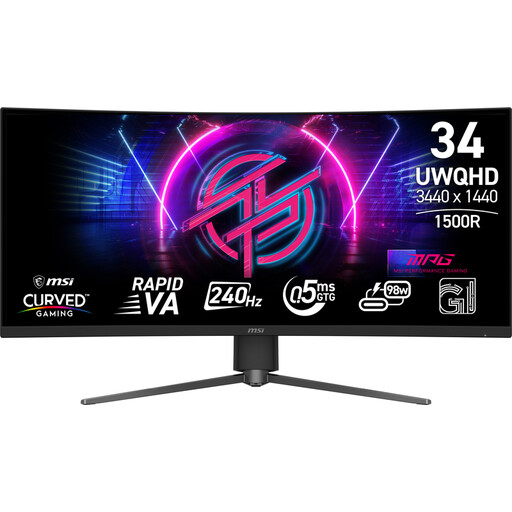
MSI MPG 346CQRF X24
For anyone looking for plenty of horizontal space for multiple windows; measure your desk first to make sure the screen will fit.
34 inches and 3440 × 1440 pixels.
Joybuy
Frequently asked questions
Is QHD necessary for laying out a puzzle book?
No, QHD isn’t necessary for every puzzle book layout. Choose based on how many pages and windows you want to see at once, and set the text size so that clues remain comfortable to read.
Can any USB-C monitor connect to and charge my laptop with a single cable?
No, features vary between laptops and monitors. Check whether your laptop outputs video via USB-C, how much charging power it needs and what the monitor’s exact port supports. For example, Dell lists a downstream data port for the P2425 and power delivery up to 90 W for the P2425DE.
How should I set up a monitor for longer working sessions?
Set the text to a comfortable size, avoid reflections and take breaks from screen work. Arboportaal gives this advice for setting up a workspace; any employer obligations apply under their own conditions and aren’t general product specifications for every home user.
What are my rights when buying a monitor online in the Netherlands?
When you buy from a business online, you generally have a statutory cooling-off period of up to 14 days after delivery, subject to legal exceptions, as ACM ConsuWijzer explains. You’re also entitled to a product of satisfactory quality; according to the Dutch government, the Netherlands has no fixed statutory warranty period of exactly two years. If a product is faulty, contact the retailer.
Do computer monitors have an energy label in the Netherlands?
Computer monitors covered by the applicable EU rules have an energy label on a scale from A to G. The European Commission lists EPREL as a source of model information; check the label and information for the exact model.


