Who is this choice relevant to?

Poster designer with a small desk

If there’s limited space for your laptop, keyboard and design materials, compare the monitor’s dimensions with the stand included and check whether its height is adjustable. The Dutch Arboportaal recommends adjusting screen furniture to suit the user.

Designer of a printed poster

If you’re assessing colours and fine details, remember that what you see on screen may differ from the final printed result. Adobe describes soft proofing as a way to get a better idea of how a print might look.

Student working at different laptop setups

If you regularly connect and disconnect your monitor, check whether your laptop supports video over USB-C and whether the monitor provides enough power to charge it. The ASUS and Dell models in this comparison list different USB-C and charging capabilities.

What should you look for when buying?

16:10 for extra vertical space

Choose this if: you want extra vertical space for your poster and tool panels on a narrow desk. ASUS lists the PA248QV as having 1920 × 1200 pixels and a stand depth of 21.10 cm.

The trade-off: according to ASUS, the PA248QV doesn’t have a USB-C video connection and offers fewer pixels than the QHD option in this comparison.

QHD for fine details

Choose this if: you want to assess small text and details on screen and have room for the stand. BenQ lists the 25-inch PD2506Q as having 2560 × 1440 pixels, USB-C with 65 W and a stand depth of 25.69 cm.

The trade-off: the stand needs more desk depth than the one on the PA248QV in this comparison. BenQ’s colour gamut and calibration figures don’t guarantee that a print will match the colours on screen.

Full HD for a USB-C setup

Choose this if: easy connectivity and fewer cables matter more than extra pixels. ASUS lists the PA247CV as providing 65 W via USB-C; Dell lists 90 W power delivery for the U2424HE.

The trade-off: both models have 1920 × 1080 pixels, fewer than the 16:10 and QHD options in this comparison. Check that the USB-C video output and charging power are compatible with your laptop.

What to consider What should you check? Who does this matter most to?
Desk space Measure the available width and depth, including the stand. ASUS lists the PA248QV as having a stand depth of 21.10 cm; BenQ lists the PD2506Q at 25.69 cm. If I need room beside my screen for my laptop and sketching materials, I look at the stand and adjustability; around 31% of consumers prioritise how well it fits on the desk.
Colour and design details Compare the resolution and colour specifications. ASUS lists the PA248QV as having 1920 × 1200 pixels and 100% sRGB; BenQ lists the PD2506Q as having 2560 × 1440 pixels and 100% sRGB. If I want to assess small text and areas of colour on my poster, I look at the details on screen and check the print separately; around 31% of consumers prioritise colour and design details.
Practical features without unnecessary extras Decide which resolution and connections you actually need. Compare Full HD with 16:10 and QHD, without counting extra features you won’t use. If I mainly need a practical screen for my poster, I don’t want to pay for features I won’t use; around 23% of consumers prioritise having the essentials.
Connecting and charging your laptop Check the USB-C video capabilities and charging power of both your laptop and monitor. ASUS lists DP Alt Mode and 65 W for the PA247CV; Dell lists 90 W for the U2424HE. If I want to connect my laptop quickly and use as few separate cables as possible, I check its video output and charging requirements; around 15% of consumers prioritise a suitable laptop connection.

Common buying mistakes

  • Measuring only the screen diagonal

    The stand takes up space too. According to ASUS and BenQ, the ASUS PA248QV and BenQ PD2506Q in this comparison have different stand depths: 21.10 and 25.69 cm respectively.

    Measure the available desk depth and allow for your keyboard and viewing distance. Before choosing a monitor arm, check that it meets the relevant mounting specifications.

    You may need to rearrange your setup or use a suitable monitor arm.

  • Assuming a colour claim guarantees a matching print

    A quoted colour gamut describes a feature of the screen; it doesn’t automatically tell you what the result will look like on a particular printer and paper.

    Ask the printer for the required output specifications and, for colour-critical work, consider checking a proof. Adobe describes soft proofing as a way to assess the expected print more accurately.

  • Assuming every USB-C port provides video and enough power

    The monitors in this comparison list different connections and charging power. Your laptop must support the video function being used, and the charging power must be suitable for your laptop.

    Compare your laptop’s video output and charging requirements with the specifications of the exact monitor you’re considering. Otherwise, you may need an extra cable, adapter or laptop charger.

Relevant brands to compare

ASUS

The ProArt PA248QV and PA247CV offer different compact options for poster design.

  • ASUS lists 100% sRGB and factory-focused colour features for both models. The PA248QV has 1920 × 1200 pixels; the PA247CV has Full HD and USB-C with 65 W.
  • The PA248QV’s listed connections don’t include USB-C video. Manufacturer specifications aren’t an independent measurement of colour reproduction.

BenQ

The DesignVue PD2506Q is a 25-inch QHD model to consider if you’re looking for more screen pixels and USB-C.

  • BenQ lists 2560 × 1440 pixels, 100% sRGB, a factory calibration report and USB-C with 65 W.
  • The listed stand depth is 25.69 cm. The manufacturer’s figures don’t guarantee that a print will have the same colours as the screen.

Dell

The UltraSharp U2424HE is a 23.8-inch Full HD hub monitor for a laptop-focused setup.

  • Dell lists an integrated USB hub, height adjustment and 90 W power delivery.
  • Full HD has fewer pixels than the 16:10 and QHD options in this comparison. Dell’s description of viewing comfort is a manufacturer claim.

Philips

The Business Monitor 243S1/00 is a 23.8-inch Full HD alternative with a USB-C dock.

  • Philips describes video, data, laptop charging and peripherals via the dock, provided your laptop is compatible.
  • Its 1920 × 1080-pixel resolution offers fewer pixels than the 16:10 and QHD options in this comparison. Eye comfort claims are made by the manufacturer.

LG

The 24BA560-B is a 23.8-inch Full HD option if adjustability matters more to you than a built-in USB-C dock.

  • LG lists an IPS panel, 1920 × 1080 pixels and a stand that adjusts in several directions.
  • Check the connections separately; the available specifications don’t confirm USB-C docking for this model.

Joybuy monitors for poster design

These Joybuy monitors offer options for poster design in a compact workspace, including QHD and Full HD models.

Dell Pro Plus P2425DE monitor

Dell Pro Plus P2425DE 24-inch QHD monitor

A QHD option for assessing poster details and connecting a laptop via USB-C.

Resolution: 2560 × 1440 pixels. USB-C Power Delivery: 90 W. Adjustable stand.

Joybuy

Dell Pro Plus P2425D monitor

Dell Pro Plus P2425D 24-inch QHD monitor

A QHD option if you want to assess details and adjust the screen position.

Resolution: 2560 × 1440 pixels. IPS panel. Height, swivel and pivot adjustment.

Joybuy

ASUS ProArt Display PA24ACRV monitor

ASUS ProArt Display PA24ACRV 23.8-inch QHD monitor

A compact QHD option if you want to compare colour and design details on screen.

Resolution: 2560 × 1440 pixels. The product description lists 95% DCI-P3, factory calibration and USB-C with 90 W; these figures alone can’t predict the printed result.

Joybuy

Acer SA242YH1 Full HD monitor

Acer SA242YH1 24-inch Full HD monitor

A Full HD option if you’re looking for a monitor with HDMI or VGA connections for your workspace.

The product name lists 100 Hz and 1 ms; the product description lists HDMI and VGA.

Joybuy
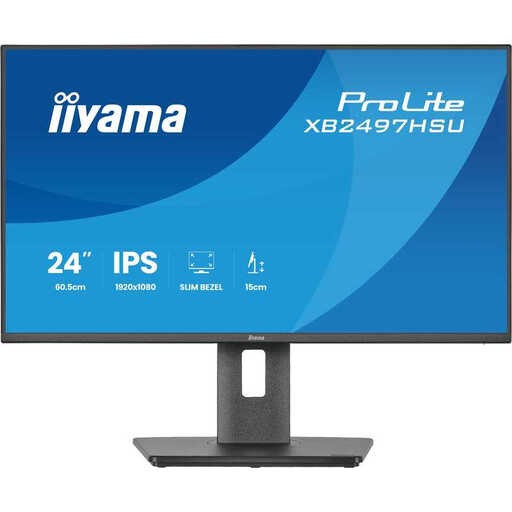
Iiyama ProLite XB2497HSU-B1 monitor

Iiyama ProLite XB2497HSU-B1 23.8-inch Full HD monitor

A Full HD option with an adjustable stand if you want to change the screen position at your workstation.

IPS panel and 120 Hz. The product description lists a USB hub and height, swivel and pivot adjustment.

Joybuy

Frequently asked questions

Is 100% sRGB enough to know what my printed poster will look like?

No. The quoted colour gamut describes a feature of the monitor, not the result you’ll get from a printer, paper and colour management. Ask the printer for the output specifications and, if needed, check a proof.

Can my laptop display video and charge over a single USB-C cable?

Only if your laptop has a suitable USB-C video output and the monitor provides enough power to charge it. ASUS lists DP Alt Mode and 65 W Power Delivery for the PA247CV; Dell lists 90 W power delivery for the U2424HE. Check your laptop’s specifications before choosing.

How should I set up a monitor on a small desk?

Measure the stand depth and adjust the monitor to suit your workspace. The Dutch Arboportaal recommends adjusting screen furniture to suit the user and, when working at a screen for long periods, changing posture and taking short breaks.

What are my rights when I buy a monitor online?

For eligible distance purchases in the Netherlands, you’ll often have a 14-day cooling-off period, according to the Dutch government. There’s no standard general statutory warranty period; if a product is faulty, contact the seller. Check the terms that apply to your specific purchase, and don’t confuse an extra paid-for warranty with your statutory rights.
