Who is this relevant to?

Detail comparer

You compare small visible features in plant photos and want to view the image alongside your notes. Research by Nisar Ahmed, Hafiz Muhammad Shahzad Asif and Gulshan Saleem describes colour and texture features used to classify leaf images.

Colour-conscious reviewer

You look for subtle colour differences in a managed image workflow. A suitable colour mode or calibration may be more relevant than a wide colour gamut on its own.

Long-hours home worker

You switch between reviewing photos and office work, so you also want to consider screen position, reflections and how your work laptop connects. The Arboportaal highlights adjustability and avoiding reflections when working with screens.

What should you look for when choosing?

What to consider What should you check? Who might this matter more to?
Fine detail Compare the resolution and screen size. Also assess how easy photos and controls are to see from your usual viewing distance. If I want to compare small features alongside notes, I prioritise sharpness and usable screen space. Around 28% of consumers put detail first when making this choice.
Colour consistency Match the colour mode to your image files, and check whether calibration is needed and suits your workflow. When subtle colour differences matter, I want to know whether the display suits my image files and colour workflow. Around 22% of consumers give colour consistency top priority.
Workspace setup Check how adjustable the monitor is and where it will sit in relation to windows and other potential sources of reflections. If I spend long hours working at a screen every day, I want to be able to adjust its position and reduce distracting reflections. Around 22% of consumers put workspace setup first.
Connecting a laptop Compare your laptop’s video output and power requirements with the monitor’s connections and power delivery. If I want to connect my work laptop to the monitor, I want to know in advance whether the video and power requirements are compatible. Around 17% of consumers give laptop connectivity top priority.
Purchase and running costs Check whether you need extra calibration equipment and compare the energy label for the exact model. If I want to avoid unnecessary equipment and running costs, I need to know what my colour workflow actually requires. Around 11% of consumers prioritise purchase and running costs.

Common buying mistakes

  • Assuming a wide colour gamut means accurate colour reproduction

    A wide colour gamut doesn’t automatically mean that colour reproduction is right for your image files. LG specifies a typical DCI-P3 coverage of 95% for the 27UP850K-W, while EIZO lists 99% Adobe RGB and hardware calibration for the CS2740. These are different features, and neither replaces choosing a suitable colour mode.

    Choose your colour workflow first, then check which colour mode and calibration options are suitable for it.

    For certain calibration workflows, EIZO lists a measuring device as an optional accessory. LG says the calibration software for the 27UP850K-W is not included.

  • Assuming every USB-C monitor fully supports a laptop with a single cable

    A USB-C connection doesn’t prove that your laptop supports video through that port or that the power delivery is sufficient. BenQ specifies DisplayPort Alt Mode and 65 W Power Delivery for the PD2705U; LG lists power delivery of up to 96 W for the 27UP850K-W.

    Check your own laptop’s video output and power requirements against the specifications for the exact monitor model.

  • Confusing the manufacturer’s warranty with your full statutory rights

    ACM ConsuWijzer distinguishes between a manufacturer’s or seller’s warranty and the statutory guarantee: a product must meet what you can reasonably expect from it.

    Keep your purchase and model details, and assess any fault in light of your statutory rights too.

Brands to consider

BenQ

According to BenQ Netherlands’ specifications, the PD2705U is a 27-inch 4K model for an sRGB workflow and a USB-C laptop setup.

  • BenQ lists 99% sRGB, a factory test report and 65 W USB-C power delivery for this model.
  • These are manufacturer specifications; they don’t guarantee colour accuracy in every setup. Check that your laptop supports DisplayPort Alt Mode and that 65 W is sufficient.

Philips

Philips says the 27E1N1800AE/00 combines a 27-inch 4K IPS screen with a height-adjustable stand.

  • The version reviewed lists HDMI and DisplayPort; the adjustable stand can help you find a suitable screen position.
  • Don’t expect this version to power a laptop through a single USB-C cable. The stated screen specifications don’t prove that the display is colour-calibrated.

LG

LG positions the 27UP850K-W for 4K work, with USB-C and a wide colour gamut.

  • LG specifies a typical DCI-P3 coverage of 95%, USB-C power delivery of up to 96 W and hardware calibration support for this model.
  • A wide colour gamut doesn’t replace a suitable colour mode. LG says the calibration software isn’t included, so check what else your colour workflow requires.

EIZO

According to EIZO Netherlands, the ColorEdge CS2740 is a 27-inch 4K model for a managed photographic colour workflow.

  • EIZO specifies 99% Adobe RGB and hardware calibration for this model.
  • EIZO lists a measuring device as an optional accessory and USB-C power delivery of up to 60 W. These specialist features aren’t necessary for every plant-sorting task.

Joybuy monitors

This selection includes monitors whose product titles mention 4K, for anyone who wants to review plant photos on a larger screen. Check the relevant connections, screen adjustments and colour options for each model.

Dell UltraSharp U3226Q 32-inch 4K UHD 120Hz QD-OLED monitor

Dell UltraSharp U3226Q 32-inch 4K UHD 120Hz QD-OLED monitor

Suited to anyone who wants to view plant photos on a large 4K screen; check that the size suits your desk.

The product title lists 32 inches, 4K UHD, 120 Hz and QD-OLED.

Joybuy

Philips 27E1N1800AE/00 27-inch 4K UHD IPS monitor

Philips 27E1N1800AE/00 27-inch 4K UHD IPS monitor

Suited to anyone who wants to view details and adjust the screen height to suit their home workspace.

The product title lists 3840 × 2160, 60 Hz, 4 ms and a height-adjustable stand. Philips specifies an IPS panel for this model; the version reviewed lists HDMI and DisplayPort. Don’t assume it can power a laptop through a single USB-C cable.

Joybuy

KTC M27P6 27-inch 4K MiniLED monitor, Dual Mode White

KTC M27P6 27-inch 4K MiniLED monitor, Dual Mode White

Suited to anyone looking for a 27-inch monitor with a stated 4K mode; check which mode you want to use.

The product title lists 4K 160 Hz and FHD 320 Hz, as well as Type-C 65 W. The stated resolution and refresh rate depend on the mode selected.

Joybuy
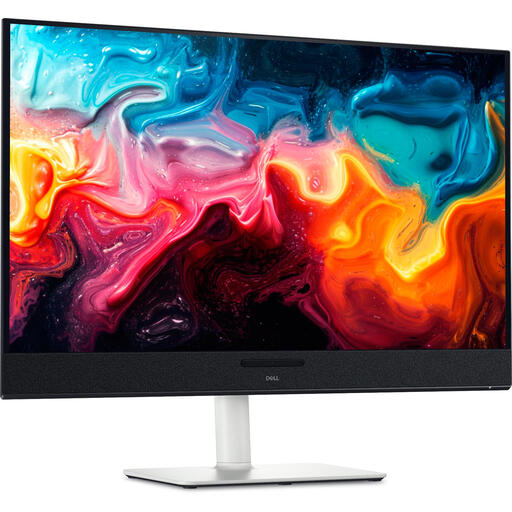
Dell Plus S3225QC 31.6-inch 4K Ultra HD QD-OLED monitor

Dell Plus S3225QC 31.6-inch 4K Ultra HD QD-OLED monitor

Suited to anyone who wants to view plant photos on a large 4K screen; consider how much desk space the monitor will take up.

The product title lists 31.6 inches, 3840 × 2160 pixels and a QD-OLED panel.

Joybuy

Dell Plus S2725QC 27-inch 4K Ultra HD LCD monitor

Dell Plus S2725QC 27-inch 4K Ultra HD LCD monitor

Suited to anyone who wants to view details on a 27-inch 4K screen; check which connections and adjustments your workspace requires.

The product title lists 3840 × 2160 pixels, 4K Ultra HD and an LCD panel.

Joybuy

Frequently asked questions

Can a better monitor tell you what is wrong with a plant?

No. A monitor cannot diagnose a plant or restore information missing from the image. Research by Nisar Ahmed, Hafiz Muhammad Shahzad Asif and Gulshan Saleem describes colour and texture features in leaf images used for classification.

How should I set up a screen for long hours of working from home?

Adjust the screen position and reduce distracting reflections. For employees, the Arboportaal also highlights the employer’s role in providing a safe home-working environment. If this applies to you, discuss your setup with your employer.

What should I check if I want to use one USB-C cable for video and charging?

Check whether your laptop’s USB-C port supports video, and compare its power requirements with the monitor’s power delivery. BenQ lists DisplayPort Alt Mode and 65 W Power Delivery for the PD2705U; LG lists power delivery of up to 96 W for the 27UP850K-W.

Does a monitor need an energy label in the Netherlands?

The European Commission says energy labelling rules also cover electronic displays such as computer monitors, subject to applicable exemptions. Check the label for the exact model; the scale runs from A to G.

Are a manufacturer’s warranty and the statutory guarantee the same, and can I cancel an online purchase?

No. ACM ConsuWijzer distinguishes between a manufacturer’s or seller’s warranty and the statutory guarantee that a product meets what you can reasonably expect. For a standard online consumer purchase, you generally have a statutory cooling-off period of up to 14 days after delivery, subject to the exceptions outlined by ACM.
