
Vandaag of morgen in huis

Kwaliteit gegarandeerd

Welkomstaanbiedingen ontgrendelen: GRATIS bezorging | Tot 80% korting | Gratis 30 dagen JoyPlus-proefperiode
Download de app
A monitor arm that slowly drops after a few weeks, a phone holder that comes loose at the first speed bump or a clamp that does not fit your desk: these are common problems with monitor and phone holders. Product photos often show a tidy workspace or a stable smartphone, but important details are usually found in the specifications.
Pay particular attention to these three pitfalls:
Compare your monitor’s weight with the maximum load capacity of the monitor arm. Take accessories attached to the screen into account, such as a webcam or soundbar. With multiple screens, the load capacity usually applies per screen, but also check the total load capacity of the base and clamp.
Examples from the product specifications:
Also measure the space behind your desk. An arm with a wide depth range can be useful, but it needs enough clear space to move properly.
A VESA monitor arm attaches the screen using screw holes on the back. Many models use VESA 75 x 75 mm or 100 x 100 mm. If your screen’s dimensions are not listed, you may need an adapter plate.
Check:
A VESA connection says nothing about the stability of your desk. A thin or fragile desktop may need extra reinforcement, particularly with a monitor arm for 2 screens or a monitor arm for 3 screens.
A desk mount is usually secured with a clamp on the edge or with a grommet mount through a cable hole. A top-fix clamp can be practical when you want to secure the mount from above.
An adjustable monitor arm generally allows you to adjust the height and depth, as well as tilt, rotate and swivel the screen. This is useful when several people use the same workstation. A 180° stop can prevent the arm from moving into a wall or partition, but it does not replace a secure mounting system.
A similar choice applies to phone holders:
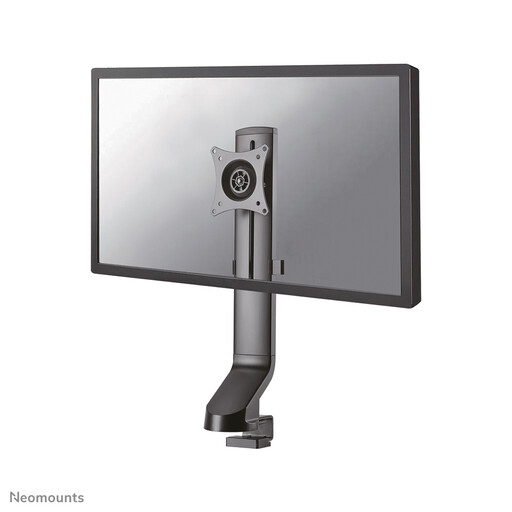
Why it suits this profile: For a home office with one standard monitor, this model provides a straightforward setup without unnecessary features.
The product specifications state a load capacity of 8 kg, support for VESA 75 x 75 and 100 x 100 mm, and manual height adjustment from 26 to 45 cm.
Suitable for screens from 10 to 32 inches; tilts, rotates and swivels; clamp and mounting hardware included.

Why it suits this profile: A suitable choice for anyone who regularly wants to adjust a single flat or curved monitor, whether in an office or home workspace.
The arm has a stated maximum weight of 9 kg, a 180° stop mechanism and a top-fix clamp or grommet for mounting.
Gas-spring height adjustment from 21.5 to 49.5 cm; suitable for 17 to 35 inches; integrated cable management.

Why it suits this profile: Designed for gamers, IT professionals and multitaskers who want to position three screens side by side.
The load limit is specified as 6 kg per screen. VESA 75 x 75 and 100 x 100 mm, cable management and a 180° stop are also listed.
Supports three screens from 10 to 27 inches; quick-release system; each screen tilts, rotates and swivels.
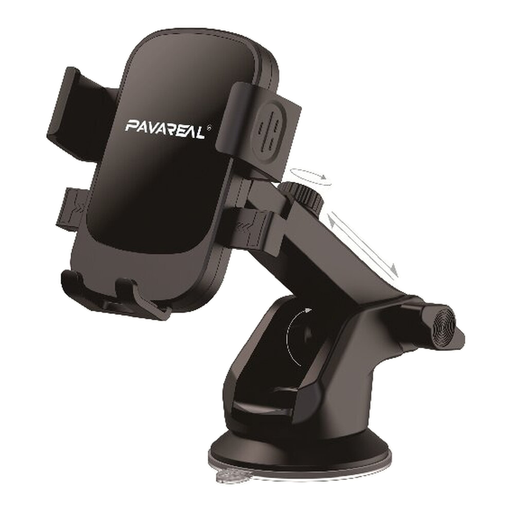
Why it suits this profile: Handy for anyone who wants to move a dashboard or windscreen phone holder between different cars.
There are two mounting methods: a suction cup for the windscreen or a mount that attaches to the mirror. The surface must be clean, and the telescopic arm adjusts from 10 to 15 cm.
Rotates 360°; one-handed operation; according to the product listing, suitable for cars with windscreen or mirror mounting.
We have put together a complete, up-to-date list of products that fully meet these strict selection criteria and the applicable European safety regulations.
A monitor stand may be sufficient if you do not want to drill or use clamps. For an ultrawide monitor, a monitor arm for an ultrawide monitor is the more logical choice, as it lets you adjust the depth and viewing angle more precisely. With a curved screen, check that the arm is suitable for it; according to the product information, the Neomounts NM-D775BLACKPLUS is designed for curved screens up to 49 inches and 18 kg.
If you want to lift your PC case off the floor, look for a CPU holder for under the desk. The Neomounts CPU-M100BLACK is adjustable for computers from 12 to 21 cm wide and has four wheels, two of which can be locked. For heavier cases, the CPU-D025BLACK has a stated maximum load capacity of 20 kg and an adjustable range from 3 to 60 cm. Always check the ventilation openings and attach the holder to a suitable desktop.
No. Check the screen weight, maximum screen size and VESA pattern. A screen without VESA holes may require a separate adapter. The desk must also be sturdy enough to support the combined weight of the arm and monitor.
The number of mounting points and the total load capacity differ. With two or three screens, you also need to consider the width of the desk, viewing distance and cable positioning. Check that each screen falls within the specified weight limit.
Clean the surface first and choose a mounting method that suits your car. A suction cup generally works on a smooth surface; a phone holder for an air vent depends on the shape and strength of the slats. With magnetic models, the phone case must be compatible. Set up the holder before you start driving and do not operate your smartphone while driving.
