
Vandaag of morgen in huis

Kwaliteit gegarandeerd

Welkomstaanbiedingen ontgrendelen: GRATIS bezorging | Tot 80% korting | Gratis 30 dagen JoyPlus-proefperiode
Download de app
A monitor on its own stand, a PC on the floor and cables disappearing behind the desk: many people working from home and in offices will recognise this problem. Monitor and PC mounts can free up desk space, keep devices stable and make cables easier to manage. However, not every monitor arm, PC mount or monitor stand is right for every workspace.
When buying, look out for these three common pitfalls:
A VESA mount uses standardised mounting holes on the back of a monitor. Many mounts support VESA 75 × 75 mm and 100 × 100 mm. Check the monitor itself or its manual before buying a monitor arm or monitor mount.
Also check how the mount attaches to the desk:
Compare your device’s weight with the mount’s maximum load. A dual monitor arm, for example, may specify a limit for each screen. According to the product specifications, the iiyama DS1002C-B1 supports a maximum of 10 kg per monitor, while the Neomounts FPMA-D650BLACK supports up to 7 kg and screens measuring 17 to 27 inches.
With a PC mount, weight isn’t the only thing to consider. Measure the width and depth of the computer case too. A mount with an adjustable range of 12 to 21 cm won’t necessarily fit around a wider tower PC. Keep ventilation openings clear and check that the mount can support the case’s weight over time.
An adjustable monitor stand lets you change the height without fitting an arm. A monitor arm usually offers more freedom of movement, with options to tilt, turn, swivel and rotate. Check the following:
For a laptop, a laptop stand with non-slip pads and an open design is practical. Check the maximum laptop size and weight. A mount that supports 15-inch laptops on paper won’t necessarily be suitable for a heavier workstation laptop.
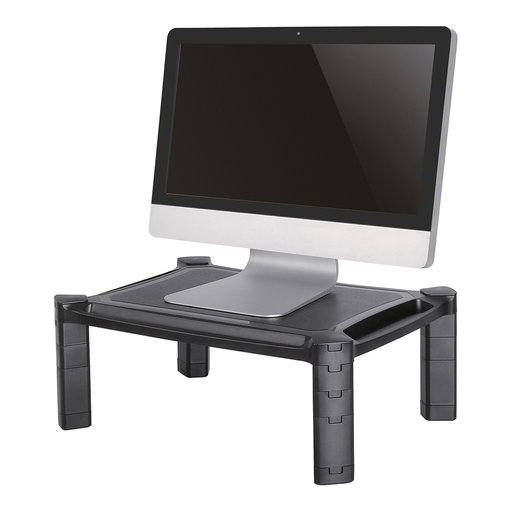
Why it’s a good fit: This freestanding monitor stand is ideal for a simple workspace where you don’t want to attach anything to the desk.
The stand has a specified load capacity of 10 kg and an adjustable height range of 4.6 to 16.8 cm. So you don’t have to rely on screen size alone.
Suitable for screens up to 32 inches, with cable management and storage at the front and back.
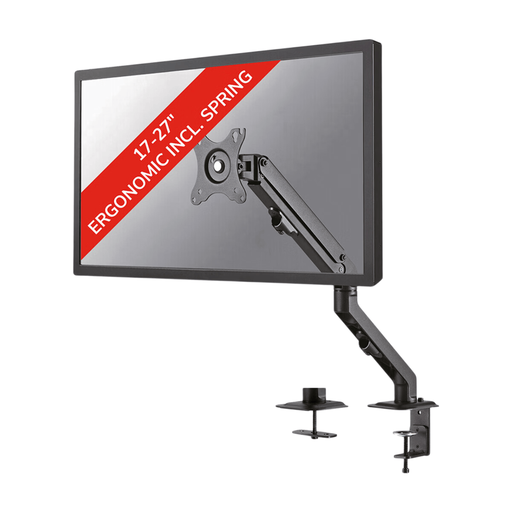
Why it’s a good fit: A monitor arm with several adjustment options is ideal for professionals who regularly change their viewing angle.
Compatibility is clearly defined: VESA 75 × 75 and 100 × 100 mm, a maximum load of 7 kg and screens measuring 17 to 27 inches.
Height adjustment from 11 to 42 cm, 360° rotation, 180° swivel and both clamp and grommet mounting options.
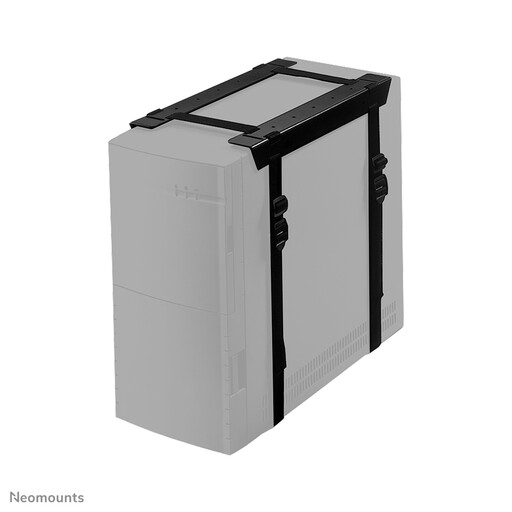
Why it’s a good fit: Suitable for offices and home workspaces where a desktop PC needs to be mounted under the desk.
The mount has a maximum load capacity of 20 kg and is adjustable in both width and depth. Be sure to check the dimensions of your computer case first.
Suitable for horizontal or vertical positioning, with a height range of 3 to 60 cm and a steel construction.
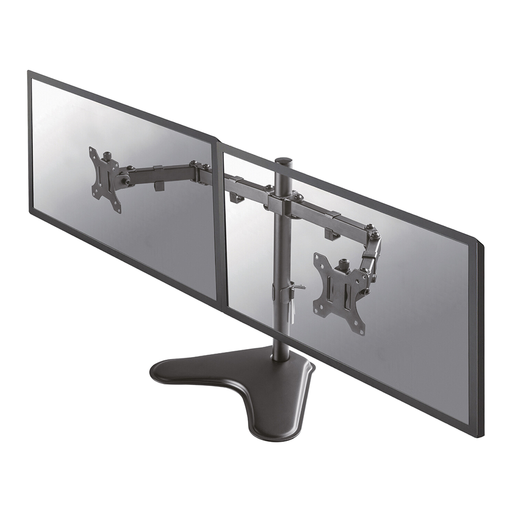
Why it’s a good fit: Handy for a workspace with one monitor and a laptop that needs to sit beside or below the screen.
The product specifications list separate limits: up to 8 kg for the screen and 4.5 kg for the laptop. This makes it easier to compare.
Suitable for monitors up to 32 inches and laptops up to 15.6 inches, with height adjustment up to 44 cm and integrated cable management.
We’ve put together a complete, up-to-date list of products that meet these strict selection criteria and comply with current European safety regulations.
No. Check the VESA pattern, screen weight and maximum screen size. Many models support 75 × 75 mm and 100 × 100 mm, but an unusual pattern may require a separate VESA adapter.
It depends on your desk and how you use it. A monitor arm keeps most of the desktop clear and often offers height, swivel and tilt adjustments. A monitor stand is easier to set up and doesn’t need a clamp or grommet mount, but it takes up desk space.
Its lifespan depends on the load, installation and use. Keep the device within the specified limit, tighten the mounting points securely and check regularly for looseness or damage. With a PC mount, keep ventilation openings clear and make sure the case isn’t hanging unstably.
