
Comparing maps and field notes
You want to view several sources on one screen at the same time, so you’ll want to consider width and window layout first.


When you want to view notes, maps and sources on one screen, your choice depends on what needs to remain readable at the same time. An ultrawide gives you more room side by side, while a 3:2 screen offers relatively more height for long documents. A 27-inch QHD monitor is a more compact option; a 31.5-inch 4K model may suit you if map or image detail matters too. Also check that it fits on your desk, the text remains easy to read and the connections work with your computer.
You want to view several sources on one screen at the same time, so you’ll want to consider width and window layout first.
You mainly work with long notes or reports, so readable text and plenty of screen height are important.
You view maps or images as well as text, so you’ll want to compare resolution, workspace and display settings.
Start with what you want to view at the same time: side-by-side windows need width, long notes need extra height, and a higher resolution may be useful for detailed maps. Then compare the dimensions, text size and connections with your own workspace and computer.
| What to consider | What to look for when buying | Who this matters to |
|---|---|---|
| Sources side by side | Compare the screen width and resolution with the window layout you use, and bear in mind the space available on your desk. | If you want to keep notes, a map and source material open at the same time, space for side-by-side windows matters most. Around 36% of consumers give comparing sources top priority. |
| Long documents | Consider the screen aspect ratio and height, and check whether the text remains easy to read at a comfortable size. | If you mainly work with long field notes or reports, extra vertical space may be more important than extra width. Around 29% of consumers prioritise space for reading documents. |
| Maps and images | Check the resolution and text size, and make sure your computer supports the resolution you want through the connection you’ve chosen. | If you want to review maps or images alongside your notes, consider both detail and window layout. Around 21% of consumers give map and image detail top priority. |
| Connections and setup | Check the exact video connection, whether laptop charging is supported, which cables you’ll need and how adjustable each model is. | If your monitor needs to work with your computer and desk setup, check in advance which ports and settings you’ll need. Around 14% of consumers prioritise connectivity and workspace setup. |
An ultrawide, a 4K screen and a 3:2 screen distribute their pixels differently across the width and height. Screen size alone therefore doesn’t tell you how much room you’ll have for side-by-side windows or long documents.
Choose a screen shape based on what you want to read at the same time, and check both the resolution and the physical dimensions.
The models reviewed list different connection features. A USB hub on its own doesn’t prove that a monitor can receive video over USB-C or provide enough power to charge a laptop.
Compare the exact port specifications for your monitor and computer, and check which cable you’ll need. Depending on the connections, you may also need a separate connection or laptop charger.
According to Arboportaal, small text and glare are among the factors that can make text harder to read. A higher pixel count alone doesn’t determine whether text is comfortable to read.
Check text size, screen position and lighting in your own workspace; don’t choose 4K or 3:2 based on pixel count alone.
The Pro Plus P2725DE reviewed here is a 27-inch QHD option with USB-C connectivity.
The Business 34B2U5600C/00 reviewed here offers a wide screen layout for viewing sources side by side.
The UltraFine 32UQ850V-W reviewed here is a 31.5-inch 4K option for viewing text and images on one screen.
The RD280U reviewed here has a 3:2 screen, offering relatively generous vertical space.
The Q27P4U reviewed here is a 27-inch QHD option with an integrated USB hub.
These Joybuy products focus on 4K display and wide ultrawide layouts, for viewing notes alongside maps or other sources on one screen.
 No image available
A 27-inch 4K option for viewing notes and map details on one screen.
3840 × 2160 pixels, IPS panel, 120 Hz, USB-C with 90 W Power Delivery, PIP and PBP; the title also mentions a height-adjustable stand.
 No image available
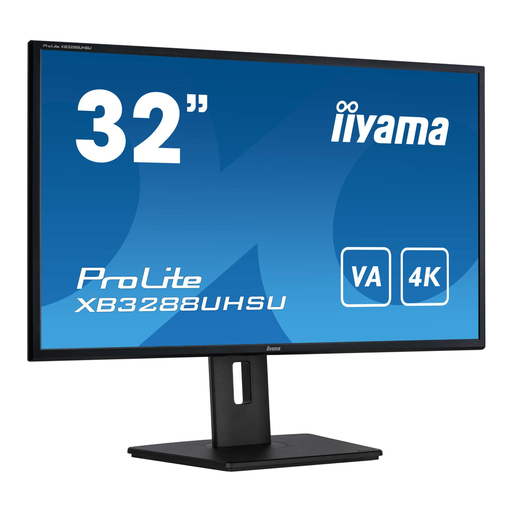
A 32-inch 4K option for viewing notes alongside visual material on one screen.
The product title lists a VA panel and 4K resolution.
 No image available
An ultrawide option for arranging notes and sources side by side across a wide screen.
The product title lists a webcam, USB-C hub, 100 Hz and 90 W Power Delivery.
 No image available
A wide screen layout for viewing notes and source material side by side.
The product title lists a USB-C dock, LAN, KVM switch and a stand with 15 cm of height adjustment.
 No image available
A 34-inch option for placing several notes and sources side by side.
The product title lists 3440 × 1440 pixels and an LCD screen.
If you use Windows, Snap lets you arrange windows side by side. Try different text sizes and window widths with your own files; the screen specifications alone don’t determine whether everything is comfortable to read.
Adjust the screen height, text size and lighting so that text is easy to read and distracting glare is reduced. Take breaks from prolonged screen work; Arboportaal distinguishes between workplace regulations for employees and general usage tips.
No. ACM ConsuWijzer explains that your statutory guarantee exists alongside a manufacturer’s or seller’s warranty. If a product doesn’t meet reasonable expectations under normal use, the seller is responsible for providing an appropriate solution.
For a standard online consumer purchase, ACM ConsuWijzer says you generally have a statutory cooling-off period of up to 14 days after delivery. Check the applicable exceptions and the conditions for handling the product.
The European Commission states that computer monitors are covered by the energy label for electronic displays, which uses a scale from A to G. Compare the label and product information for each model; don’t assign an energy class to a model mentioned here without checking its own label.