For local development work, QHD is a sensible choice if you want to view code, local data and an app preview at the same time. A compact Full HD screen may be a better fit for a smaller desk. Then choose based on adjustability and your computer’s specific video and USB-C capabilities: a monitor won’t make development tools or the app itself work offline.
Which monitor is right for you?
Developer working with multiple windows
You want to view code, data and an app preview at the same time. Consider the resolution and usable screen space; Lenovo Netherlands lists QHD (2560 × 1440) as an option that gives you more room for multiple windows.
Developer with a compact desk
You want a screen that fits your available workspace and can be adjusted easily. Arboportaal highlights the importance of setting up your workspace properly, so check factors such as the screen size and adjustability.
Developer with a USB-C laptop
You want to connect your laptop directly and need to check whether video and, if required, power will work through the port you choose. Philips describes these features for the compatible 24E1N1300AE/01; remember to check your laptop and cable too.
What should you consider when choosing?
First, decide what matters most for your setup: room for multiple windows, a well-adjusted workspace or a suitable connection to your computer.
| What to consider |
What to look for when buying |
Who is this important for? |
| Screen space |
Compare the screen size, resolution and text scaling that you find comfortable to read. Lenovo Netherlands lists QHD (2560 × 1440) as an option that gives you more room for multiple windows. |
If I want to see code, local data and an app preview at the same time, I need enough workspace without making the text too small. Around 37% of consumers put screen space at the top of their list when buying. |
| Posture and readability |
Check whether you can adjust the screen to suit you, and whether its position takes light sources and viewing distance into account. Arboportaal recommends varying your posture when working at a screen. |
For long work sessions, I want to position the screen properly and read the text comfortably. Around 36% of consumers give top priority to a workspace that can be adjusted to suit them. |
| Connection to your computer |
Check the video output, cable and, if relevant, charging power. Dell Netherlands states that the USB-C downstream port on the P2425H supports data only. |
If I’m connecting my existing computer, I want to know in advance whether the port I choose carries video and can also power my laptop, if needed. Around 27% of consumers put having the right connection first. |
Which buying mistakes can you avoid?
-
Assuming a USB-C port is a USB-C video input
According to Dell Netherlands, the USB-C downstream port on the Dell P2425H is for data only. So the presence of a USB-C connector doesn’t automatically mean that your laptop can send video to it.
Compare the port’s function and the cable specifications with your computer’s video output.
-
Choosing based on size or resolution alone
More pixels or a larger screen won’t automatically mean comfortably readable text or a workspace that’s set up to suit you.
Also consider text scaling, adjustability, reflections and the space available on your desk.
-
Treating general warranty wording as a complete guide to your consumer rights
According to ACM ConsuWijzer, the legal guarantee depends on what you could reasonably expect from the product under normal use; a standard, general time limit doesn’t tell the whole story.
Keep your purchase and product information, and contact the seller if the product doesn’t meet expectations.
Which brands are useful points of reference?
Dell
The P2425H and P2425DE are compact models with different resolutions and connection options.
- Dell lists Full HD and an adjustable stand for the P2425H, while the P2425DE has QHD and a USB-C hub.
- According to Dell, the USB-C downstream port on the P2425H supports data only. Check the port functions on the exact model variant.
LG
The 27BA45QB-B is a 27-inch QHD model for anyone looking for a larger workspace.
- LG lists a resolution of 2560 × 1440 pixels and a stand that can be adjusted for height and tilt, swivelled and pivoted into portrait mode.
- Consider how much desk space you’ll need and check that the connection is compatible with your computer.
Philips
The 24E1N1300AE/01 is a Full HD model to consider if you want to connect a compatible laptop via USB-C.
- Philips describes USB-C video, data and power support for this model variant when used with compatible devices.
- Check your laptop’s video support, the cable and the power output you need.
Monitors on Joybuy
This Joybuy selection includes monitors for local development work, from compact QHD and Full HD models to ultra-wide screens.
 Image unavailable
AOC G4 Q27G4ZR 27-inch Quad HD monitor
The 27-inch QHD model suits a workspace where you want to view code and an app preview side by side.
27 inches; 2560 × 1440 pixels; Quad HD.
View on Joybuy
 Image unavailable
LG UltraGear 34GX900A-B curved WQHD monitor
The wide 34-inch screen is an option if you want to arrange several development windows side by side; bear in mind how much space it takes up.
34 inches; curved; WQHD; 240 Hz; MLA+ OLED.
View on Joybuy
 Image unavailable
Iiyama ProLite 34-inch UWQHD curved monitor
The listed dock and KVM features may be useful if you want to connect a laptop and other peripherals; check that they suit your setup.
34 inches; UWQHD; curved; USB-C dock; LAN; KVM switch; stand with 15 cm height adjustment.
View on Joybuy
 Image unavailable
ASUS ProArt Display PA24ACRV 23.8-inch Quad HD monitor
The compact 23.8-inch QHD screen is an option if you’re looking for a smaller display with Quad HD resolution.
23.8 inches; 2560 × 1440 pixels; Quad HD; LCD.
View on Joybuy
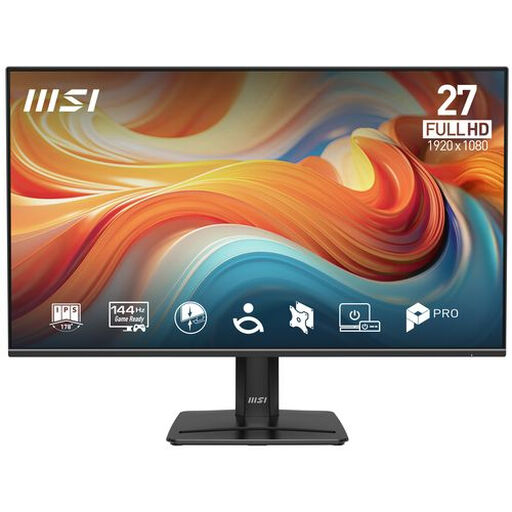 Image unavailable
PRO MP271 E14A 27-inch Full HD monitor
This Full HD model is worth considering if QHD resolution isn’t a priority. Compare the screen space with the number of windows you want to use at once.
27 inches; 1920 × 1080 pixels; Full HD; 144 Hz; IPS; HDR Ready; Adaptive-Sync.
View on Joybuy
Frequently asked questions
Do I need a special offline monitor for an app that doesn’t use cloud tools?
No. A monitor displays your computer’s picture; whether the app and development tools work without the cloud depends on your computer, software and setup. Before buying a monitor, check that its video connection is compatible with your computer.
Can any USB-C monitor display video from my laptop?
No. Check whether your laptop supports video over USB-C and what functions the monitor’s port offers. Dell states that the USB-C downstream port on the P2425H supports data only; Philips describes USB-C video and power support for the 24E1N1300AE/01 with compatible devices.
What should I consider when setting up my monitor?
Adjust the text scaling and screen position so you can read comfortably, and take reflections into account. Arboportaal also recommends varying your posture and taking short breaks when working at a screen.
Does working locally with a book-lending app mean I can ignore privacy rules?
No. According to the Dutch Data Protection Authority, collecting, recording or storing information about identifiable borrowers counts as processing personal data. Storing it locally doesn’t remove this consideration from the app’s design.
What are my rights if a monitor I bought online isn’t as it should be?
For a consumer purchase, a product must do what you could reasonably expect, according to ACM ConsuWijzer; the seller is your point of contact. Online purchases generally also come with a 14-day cooling-off period after delivery, subject to legal exceptions.


