Start by measuring the available width and depth of your desk, then work out how much room you need for your editor windows. A 23.8-inch QHD screen has more pixels than a Full HD screen with the same diagonal measurement, while USB-C power delivery is only useful if your laptop supports the required video connection. Check the dimensions with the stand included, and test your level using the aspect ratio of the screen your players are likely to use.
Who is this choice relevant to?
Level designer using an editor and preview on one screen
If you switch between editor panels and a gameplay preview, the usable screen space within your desk’s limits matters. Unity Technologies describes the Game view as showing what the built application looks like.
Laptop user with little room for cables
You want to connect your laptop on a small desk, so you’ll need to check that the video connection, charging power and monitor stand all suit your setup. Dell and BenQ list different USB-C and power options for their specific models.
Level designer assessing visuals during testing
If you mainly test moving gameplay or assess the colours of your level art, other screen features may matter more. ASUS, BenQ and AOC list different specifications for their individual models, so always check the exact version.
What should you look for when buying?
First measure the space on your desk, then compare the editor layout, connections and testing needs that matter for the way you work.
| What to consider |
What to look for |
Who is this important for? |
| Fit on your desk |
Measure the width and depth, including the stand; also check the space behind the screen and whether VESA mounting is an option. |
If I want to put a screen on a small desk, the stand needs to fit too. Around 29% of consumers say fit is their top buying priority. |
| Room for the editor and preview |
Compare the resolution and aspect ratio, and try a layout in your own editor. Also test the aspect ratio you intend to use for gameplay. |
If I want to view the level, settings and preview side by side, I consider the available pixel space and text scaling. Around 29% of consumers prioritise editor space. |
| Laptop connection |
Check video support through the laptop port, the power delivery required, the monitor connection and the cable supplied. |
If I want to use as few separate connections as possible, my laptop needs to support video and the required power delivery through the connection I choose. Around 18% of consumers give the laptop connection top priority. |
| Motion during gameplay tests |
Compare the refresh rate supported at the resolution you use with your test settings; Hz is not the same as a game’s frame rate. |
If I want to assess motion during gameplay tests, I consider not just the screen but also what my computer and prototype can deliver. Around 12% of consumers prioritise motion handling. |
| Colour assessment |
Compare the relevant colour specifications and calibration information with your project, and test the level on the devices your players are likely to use. |
If I’m assessing the colours in my level art, I want to know which colour characteristics matter for my project. Around 12% of consumers make colour assessment their top buying priority. |
Common buying mistakes
-
Looking only at the screen’s diagonal measurement
A screen may fit across your desk but its stand could take up too much depth.
Compare the dimensions with the stand included against your available space. If you’re using a monitor arm, check the mounting point and its load capacity too.
A monitor arm may require a suitable mounting point and a different desk layout.
-
Assuming every USB-C port does everything
A USB-C connection alone doesn’t confirm that your laptop supports video through that port or will receive enough power.
Check video support and the required wattage for your laptop, monitor and cable for the exact model version.
Depending on the combination, you may need a separate charger, adapter or cable.
-
Assuming a high Hz rating guarantees a smooth-running prototype
The monitor’s stated refresh rate is not the same as the frame rate delivered by your computer and prototype.
Only opt for a higher refresh rate if motion handling is one of your testing goals, and check how the game itself performs too.
Brands to consider
Dell
The P2425D and P2425DE are compact QHD models, while the P2425 is a 16:10 alternative. Dell clearly distinguishes the USB-C hub version from the P2425D.
- Dell lists a 23.8-inch QHD display and 100 Hz refresh rate for the P2425D and P2425DE.
- Dell lists a USB-C hub and 90 W power delivery for the P2425DE.
- According to Dell, the P2425 has a resolution of 1920 × 1200 pixels, which is not the same as QHD.
BenQ
The PD2506Q is worth comparing if both level art and a USB-C connection for your laptop matter to you.
- BenQ lists a 25-inch QHD display for the PD2506Q, with USB-C supporting DisplayPort Alt Mode and 65 W power delivery.
- BenQ specifies 100% sRGB and 95% P3; these are manufacturer figures.
- BenQ lists a 60 Hz refresh rate and a depth of 256.9 mm with the stand included. Check that the stand fits on your desk.
ASUS
The ProArt PA248QV combines a 16:10 layout with specifications suited to colour-focused work.
- ASUS lists a resolution of 1920 × 1200 pixels, 100% sRGB and factory calibration for the PA248QV.
- The stated resolution is not QHD; ASUS lists a maximum refresh rate of 75 Hz for this model.
AOC
The Q24G2A/BK is a compact QHD option to consider if motion during gameplay tests is a priority.
- AOC lists a 23.8-inch display, 2560 × 1440-pixel resolution and 165 Hz refresh rate for the Q24G2A/BK.
- The specification consulted is on a UK AOC product page. Check the full model code and the version sold in the Netherlands before treating different versions as identical.
Joybuy monitors for level design
This selection includes compact screens for editor space, laptop connectivity and assessing visuals, as well as larger options for gameplay testing. Check the dimensions of each model before choosing it for a small desk.
 No image available
Dell Pro Plus P2425DE QHD USB-C hub monitor
An option to compare if you’re looking for editor space and a laptop connection on a compact screen.
23.8 inches, 2560 × 1440 pixels and 100 Hz. Dell lists a USB-C hub and 90 W power delivery for the P2425DE; check that your laptop supports the required video connection and power delivery.
View at Joybuy
 No image available
Dell Pro Plus P2425D QHD monitor
A compact QHD option to compare if editor space matters more to you than a USB-C hub.
23.8 inches, 2560 × 1440 pixels and 100 Hz. Measure the space needed with the stand included, and check which connections work with your computer.
View at Joybuy
 No image available
ASUS ProArt Display PA24ACRV
Worth considering if you’re looking for a screen around 24 inches and colour assessment is part of your work.
23.8 inches and 2560 × 1440 pixels. Compare the colour specifications for this exact model version with your project requirements, and measure your available space.
View at Joybuy
 No image available
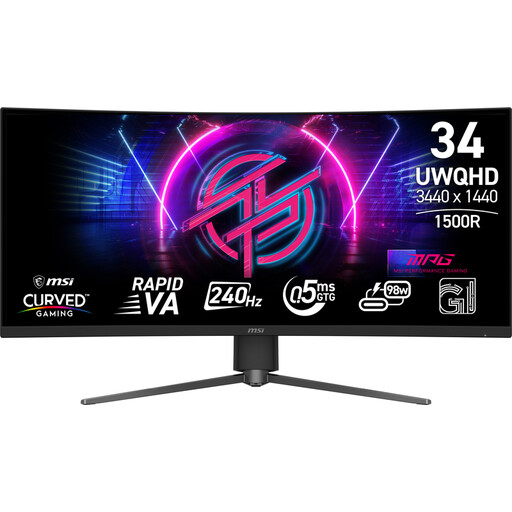
MSI MPG 346CQRF X24 34-inch ultrawide monitor
The larger screen layout may appeal if you need plenty of editor space alongside a gameplay preview, but it takes up more room than a monitor around 24 inches.
34 inches and 3440 × 1440 pixels. Measure the width and depth of your desk before considering this size.
View at Joybuy
 No image available
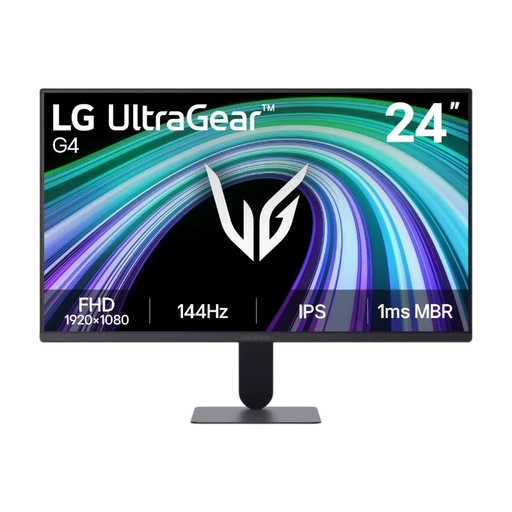
LG UltraGear 24G411B-B gaming monitor
A compact gaming monitor to include in your comparison if you carry out gameplay tests on a small desk.
23.8 inches. Check the resolution, connections and adjustability of the exact version, and measure whether the stand fits in your workspace.
View at Joybuy
Frequently asked questions
Does my monitor need to have the same aspect ratio as the finished game?
No, not necessarily: Unity’s Game view lets you test the game at different aspect ratios. Check the options in the engine you actually use, and test on the devices your players are likely to use too.
How can I set up a small workspace?
As well as the screen width, measure the depth with the stand included. Leave room for your keyboard and controls, and adjust an adjustable screen to suit you. For employees who spend more than two hours a day working with display screens, Arboportaal outlines additional workplace requirements; these do not automatically apply as a standard buying requirement for every individual consumer.
Will every USB-C monitor charge my laptop?
No. BenQ lists DisplayPort Alt Mode and 65 W power delivery for the PD2506Q; Dell lists 90 W for the P2425DE. Check your laptop’s video support and power requirements against the exact monitor version and cable.
What are my rights when buying online in the Netherlands?
For a typical online purchase by a consumer, you generally have a statutory 14-day cancellation period after delivery, subject to any applicable exceptions. ACM ConsuWijzer explains that your statutory guarantee depends on what you could reasonably expect from the product with normal use; a manufacturer’s warranty period does not replace these rights. The statutory cancellation period for consumers does not automatically apply to business purchases.


