Choosing a monitor for lecture slides in a student room mainly depends on how much desk space you have, how much screen space you need and which connections your laptop supports. A compact Full HD monitor may be enough for working on one slide at a time, while QHD gives you more pixels for multiple windows. USB-C is only useful if your laptop supports video output through that connection and the charging power is suitable. A larger 4K screen needs more space, so measure your desk before choosing one.
Who is this choice relevant to?
Student with a small desk
You work on lecture slides in a student room and need to fit your monitor and a comfortable working position into a limited space. Check the monitor’s dimensions and adjustment options; what will fit also depends on your desk.
Student working with lots of slide content
You want to see details or several work windows at once. Compare the screen size and resolution with the layout you use while editing.
Student who often works on a laptop
You regularly connect and disconnect your laptop and want to keep cables to a minimum. Check whether your laptop supports video over USB-C and whether the monitor’s charging power is suitable for your laptop.
What should you look for when buying?
Compact Full HD
Best for: a small desk and mainly working on one slide at a time. Philips says the 24E1N1100A/00 measures 23.8 inches and has a resolution of 1920 × 1080 pixels.
Trade-off: this model has fewer pixels than the QHD and 4K screens reviewed here. Check whether Full HD gives you enough space for your window layout.
QHD with USB-C
Best for: anyone looking for more pixels on a relatively compact screen and who may want to connect a laptop with a single cable. Dell lists the P2425DE as a 23.8-inch monitor with 2560 × 1440 pixels and USB-C power delivery of up to 90 W.
Trade-off: check that your laptop outputs video over USB-C and that the available charging power is suitable for it.
Larger 4K screen
Best for: anyone with enough desk space who wants extra pixels for detailed slides. LG lists the 27UP850K-W as a 27-inch monitor with 3840 × 2160 pixels.
Trade-off: a 27-inch screen takes up more space than the 23.8-inch models reviewed here, so measure the available space first.
| What to consider |
What should you check? |
Who is this important for? |
| Space for slides |
Compare the native resolution and physical dimensions of the exact model. Think about which windows you want to use at the same time. |
I want to see slides and work windows side by side while editing. Around 29% of consumers put extra screen space or detail first. |
| Fit and screen position |
Measure the space available on your desk and check the monitor’s stand dimensions and adjustability. |
I have a small desk and want to position the screen comfortably. Around 29% of consumers prioritise physical fit and adjustability. |
| Connecting a laptop |
Check whether your laptop supports video over USB-C and compare its charging requirements with the monitor’s stated maximum power output. |
I often connect and disconnect my laptop and want to keep cables to a minimum. Around 21% of consumers prioritise an easy laptop connection. |
| Features you need |
Decide which resolution, connections and adjustment options you really need before comparing models. |
I don’t want to choose features I won’t use for my slide work. Around 21% of consumers prefer to have only the monitor features they need. |
Common buying mistakes
-
Assuming a larger screen automatically gives you more usable workspace
A larger screen size doesn’t automatically make your preferred window layout work better. Resolution and the space available on your desk matter too.
Compare both the screen’s resolution and its dimensions. Decide in advance which windows you want to use at the same time.
-
Assuming USB-C always handles video and charging through one cable
A monitor’s stated charging power doesn’t confirm that it can display video from your laptop or charge it suitably.
Check your laptop’s USB-C video output and charging requirements against the specifications of the exact monitor.
-
Treating the manufacturer’s warranty as the full statutory guarantee
According to ACM ConsuWijzer, your statutory guarantee applies in addition to any retailer’s or manufacturer’s warranty.
Keep your proof of purchase and contact the retailer if there’s a problem.
Brands to compare
Philips
The 24E1N1100A/00 is a 23.8-inch Full HD option to compare with higher-resolution screens.
- Philips lists an IPS screen with 1920 × 1080 pixels.
- Check that the resolution, stand and connections suit your window layout and setup.
BenQ
The GW2490T is a 23.8-inch Full HD model for anyone who values screen adjustability.
- According to BenQ, the model offers 110 mm of height adjustment and HDMI and DisplayPort inputs.
- The specifications consulted don’t list a USB-C input. BenQ’s Eye-Care claims don’t prove that it prevents discomfort.
Dell
The P2425DE is a 23.8-inch QHD monitor with USB-C hub features for anyone looking for more pixels and laptop connectivity.
- Dell lists 2560 × 1440 pixels, height adjustment and power delivery of up to 90 W.
- The maximum power output alone doesn’t tell you whether a specific laptop will charge suitably.
LG
The 27UP850K-W is a 27-inch 4K option for anyone with room for a larger screen.
- LG lists height, tilt and pivot adjustment, as well as USB-C power delivery of up to 96 W.
- Check that the larger size and charging power suit your desk and laptop. LG’s claims about colour and HDR performance are manufacturer claims.
Monitors at Joybuy
This Joybuy selection mainly features 27-inch 4K monitors, alongside a 24.5-inch Full HD option for a more compact desk.
 Image unavailable
LG UltraFine 27U711B-B 27-inch 4K IPS monitor
A 27-inch 4K model to consider if you want extra screen space and detail and have enough room on your desk.
27 inches; 3840 × 2160 pixels; IPS panel; HDR10.
View at Joybuy
 Image unavailable
Philips 27E1N1800AE/00 27-inch 4K UHD IPS monitor
A 27-inch 4K monitor to consider if it fits your desk and you want a height-adjustable stand.
3840 × 2160 pixels; 60 Hz; 4 ms; HDMI and DisplayPort; height-adjustable stand.
View at Joybuy
 Image unavailable
MSI Modern MD272UPHG 27-inch 4K monitor
A 27-inch 4K model for anyone who wants to view slides and several work windows on screen.
3840 × 2160 pixels; PIP and PBP modes; USB-C with DP Alt Mode and power delivery up to 98 W; stand with height, tilt and swivel adjustment. Video and charging over USB-C depend on the laptop.
View at Joybuy
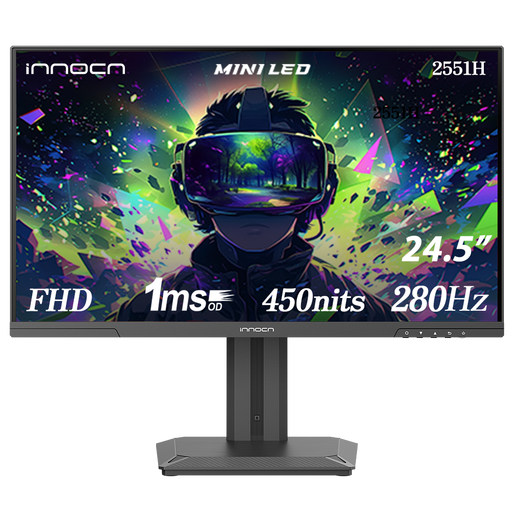 Image unavailable
INNOCN 2551H 24.5-inch Full HD monitor
A more compact screen to compare if your desk has less room than a 27-inch monitor would need.
24.5 inches; 1920 × 1080 pixels; height and tilt adjustment.
View at Joybuy
 Image unavailable
KTC M27P6 27-inch 4K MiniLED monitor, white
A larger 4K model to consider if you want extra pixels and have enough room for it on your desk.
3840 × 2160 pixels; Dual Mode: 4K 160 Hz/FHD 320 Hz; USB-C up to 65 W; stand with height, swivel and tilt adjustment. Video and charging over USB-C depend on the laptop.
View at Joybuy
Frequently asked questions
How should I position my monitor if I spend a long time working on slides?
Place the screen directly in front of you and adjust its position to suit your workspace. Arboportaal offers general workstation advice; it doesn’t mean that any one monitor model can prevent discomfort.
Can any laptop display video and charge at the same time through a single USB-C cable?
No. A monitor’s USB-C connection alone doesn’t guarantee this. Check that the USB-C port on your laptop supports video output and that the monitor’s charging power is suitable for your laptop. Dell and LG list maximum charging power for the models discussed.
What are my rights if a monitor I bought online is disappointing or breaks?
For an online consumer purchase, ACM ConsuWijzer says you will generally have a 14-day cooling-off period after delivery; applicable exceptions may affect this. You also have a statutory guarantee if, under normal use, the product doesn’t meet what you could reasonably expect. The retailer must then offer an appropriate solution at no cost; the statutory guarantee isn’t automatically a fixed two-year period.
Should I check the energy label when buying a monitor?
Compare the EU energy label and product information for the exact model. The European Commission says that electronic displays, including computer monitors, are covered by energy labelling and ecodesign rules. The label won’t tell you whether a monitor is suitable for your slide work.


