For testing keyboards at home, choose a monitor that suits your desk and lets you assess the interface clearly at the scale you want to use. A larger screen or more pixels won’t automatically make a focus indicator or focus order accessible: test these on the website or in the application itself, as the W3C advises. Choose a compact Full HD monitor for a smaller workspace, or consider QHD or 4K if you want more pixels for the interface and your notes. Also check the adjustability and connection options for your computer.
Who is this choice relevant to?
Accessibility tester
You test a website or application using a keyboard and want to see which element has focus and whether the order makes sense. The W3C describes visible focus and a meaningful focus order as properties of the interface being tested; a monitor doesn’t change how they work.
Home worker with long working days
You want to position the screen to suit your workspace and take account of light and reflections. Arboportaal advises placing the screen directly in front of you, with the top just below eye level and tilted to suit your position.
Laptop user who takes test notes
You may want to view the browser and your notes side by side on an external screen. Check that the monitor’s connections and any charging function work with your laptop and cable.
What should you look for when buying?
Compact Full HD
Ideal for: a smaller desk or checking one browser window at a time. The Philips 24E1N1300AE/01 is one example, with a 23.8-inch screen and 1920 × 1080 pixels.
Bear in mind: this model has fewer pixels than the QHD and 4K screens mentioned here. Also check that the screen height works for your setup.
QHD for more workspace
Ideal for: viewing the interface and test notes side by side. According to Dell, the Dell P2725DE is a 27-inch QHD monitor with height adjustment.
Bear in mind: a 27-inch screen needs more desk space. Check that your computer supports the video connection you want to use.
27-inch 4K
Ideal for: anyone who also wants to assess a detailed display. LG specifies a resolution of 3840 × 2160 pixels for the 27UP850K-W, with a stand that can be adjusted for height, tilted and rotated to portrait orientation.
Bear in mind: more pixels don’t replace testing keyboard operation, visible focus or focus order. Also assess text at the scale you plan to use.
First, work out how much space you have and what you want to see at the same time. Then check the screen position and how it connects to your computer.
| What to consider |
What to look for |
Who this matters to |
| Focus and navigation |
Check that text and focus indicators are easy to distinguish at your chosen scale and in your lighting. Test keyboard operation in the browser or application itself. |
If I want to assess whether focus is visible and the order is correct, I choose a screen that lets me follow the interface clearly. Around 33% of consumers prioritise assessing keyboard focus. |
| Desk placement |
Check the height adjustment, stand footprint, available desk space and light levels. |
If my screen needs to suit my desk and viewing position, I look at adjustability and reflections. Around 27% of consumers give workspace setup top priority. |
| Workspace and text |
Compare screen size and resolution, and try the settings you want to use in your operating system and browser. |
If I want to view an interface and test notes side by side, I compare how much space and how many pixels each screen offers. Around 20% of consumers prioritise having this workspace on screen at the same time. |
| Connection |
Check your computer’s video output and the cable you need. Also check whether the monitor and laptop support the charging function you want. |
If I want to use my laptop with a single connection, I check that video and, if needed, charging work with my devices and cable. Around 20% of consumers start with their connection requirements. |
Common buying mistakes
-
Thinking a sharper screen will fix a focus problem
Visible focus and a meaningful order of elements are features of the website or application you’re testing. A higher screen resolution won’t change how they work.
Test the interface itself using a keyboard, and choose a monitor to suit your workspace and how you want to view the results.
-
Looking only at screen size
A larger screen won’t necessarily be a better fit for a small or shallow desk. Screen position and reflections also affect your workspace setup.
Before buying, check the space available, adjustability and light levels. If you can’t position the monitor comfortably, you may need a separate stand or monitor arm.
-
Assuming USB-C always provides video and charging
A USB-C port on the monitor doesn’t guarantee that your computer will send video or charge through that connection.
Check how your laptop, monitor and cable work together.
Depending on the combination, you may need a different cable or a separate video or power connection.
Brands to consider
Dell
The Dell Pro P2725DE is a 27-inch QHD business monitor for anyone looking for height adjustment and USB-C.
- Dell specifies a resolution of 2560 × 1440 pixels, an IPS panel and height adjustment for this model.
- Check that the USB-C features work with your laptop; this doesn’t apply to all Dell monitors.
Philips
The Philips 1000 Series models mentioned here include a compact Full HD option and a 27-inch QHD model.
- Philips lists USB-C with power delivery for the 24E1N1300AE/01 and the 27E1N1600AE/00.
- The 24-inch model mentioned here has fewer pixels than the 27-inch QHD model. Manufacturer claims about visual effects aren’t independent measurements of their impact.
LG
The LG UltraFine 27UP850K-W is a 27-inch 4K option with USB-C mentioned here.
- LG specifies a resolution of 3840 × 2160 pixels and a stand that can be adjusted for height, tilted and rotated to portrait orientation.
- A 4K resolution alone doesn’t prove that the software being tested is accessible.
Lenovo
The ThinkVision T27h-30 is a 27-inch QHD option with a USB-C docking function mentioned here.
- For this model, Lenovo lists features including an Ethernet port and a height adjustment range of 155 mm.
- The features mentioned apply to this model and aren’t a general statement about Lenovo monitors.
Monitors at Joybuy
These Joybuy monitors are for anyone who wants to view an interface on an external screen while testing keyboards. Compare the size, resolution and connections with your workspace and computer.
 No image available
Philips 27E1N1800AE/00, 27-inch 4K UHD IPS monitor
An option if you’re looking for a 27-inch 4K screen to view the interface you’re testing.
- Resolution: 3840 × 2160
- Refresh rate: 60Hz; response time: 4ms
- Connections: HDMI and DisplayPort
- Height-adjustable stand
View at Joybuy
 No image available
MSI Modern MD272UPHG, 27-inch 4K UHD monitor
Ideal if you’re looking for a 27-inch screen with 4K resolution for viewing an interface.
- Resolution: 3840 × 2160
- Colour: black
View at Joybuy
 No image available
KTC H27D9, 27-inch QHD IPS monitor, 2560 × 1440, 120Hz
A QHD option if you’re looking for a larger screen for the interface and your test notes.
- Resolution: 2560 × 1440
- Panel: IPS; refresh rate: 120Hz
- Adaptive Sync
- Connections: HDMI and DisplayPort
View at Joybuy
 No image available
Dell Plus S2725QC, 27-inch 4K Ultra HD LCD monitor
Ideal if you want to compare a 27-inch 4K screen with the space and settings of your own workspace.
- Resolution: 3840 × 2160
- Colour: silver
View at Joybuy
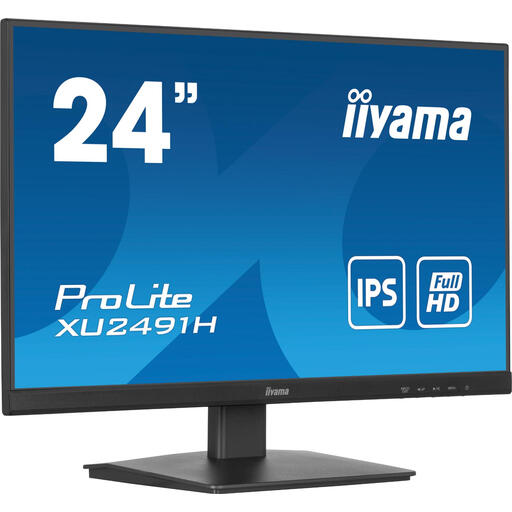 No image available
iiyama ProLite 24-inch IPS monitor, 100Hz
A more compact option if you’re looking for a 24-inch monitor for a smaller workspace.
- Panel: IPS
- Refresh rate: 100Hz
View at Joybuy
Frequently asked questions
Does a monitor with more pixels make keyboard navigation more accessible?
No. More pixels don’t change how a website or application works with a keyboard. The W3C describes visible focus and a meaningful focus order as properties of the interface, so test these yourself.
How should I set up my screen for working from home?
Arboportaal advises placing the screen directly in front of you, with the top just below eye level, and tilting it to suit your position. Also take lighting and reflections into account; following this advice doesn’t guarantee that you’ll avoid discomfort.
Can I connect and charge my laptop with a single USB-C cable?
That depends on the combination of laptop, monitor and cable. Philips lists video, data and power over USB-C for the 24E1N1300AE/01 when used with a compatible device. Before buying, check that your laptop supports the features you need.
Do Dutch regulations apply to monitors in my home workspace?
Employers also have a duty of care to provide a healthy and safe workspace when employees work from home, as Arboportaal explains. Arboportaal also states that if you work with a screen for more than 2 hours a day, the screen and keyboard must not be attached to each other. These rules for employees aren’t automatically product specifications for every private buyer.


