For viewing a transcript and index side by side, a 34-inch ultrawide is a good fit if you need more horizontal workspace; a 27-inch QHD monitor is a narrower option for everyday indexing. Philips describes the extra width of its ultrawide as providing room for side-by-side windows, while Dell lists the P2725DE as a 27-inch QHD screen. Check the adjustability and laptop connectivity too: a monitor won’t find or remove duplicate entries for you; you’ll need data software for that.
Who is this choice for?
Interview indexer
You want to compare transcripts and indexes clearly, and review possible duplicate entries before deleting them. Microsoft Support distinguishes between temporarily hiding duplicate values during data work and deleting them permanently.
Long-hours screen user
You process lots of recordings one after another and want a workstation you can adjust to suit you. Arboportaal points out that screen work should regularly be alternated with other tasks or a break.
Laptop user with a permanent workstation
You regularly connect your laptop to a larger screen and want to check in advance that the video signal, cable and any USB-C power supply are compatible with your device. Check the specifications of the exact monitor and laptop model; Dell and LG list different power options for their models.
What should you look for?
27-inch QHD work monitor
A good fit for: anyone who usually switches between two work windows and wants to use a separate screen with a laptop. Dell lists a resolution of 2560 × 1440 pixels and height and tilt adjustment for the P2725DE.
Keep in mind: the screen is narrower than a 34-inch ultrawide; check that your laptop can output a picture through your chosen connection and that the USB-C power delivery of up to 90 W is suitable for your laptop.
34-inch ultrawide
A good fit for: anyone who wants to keep a transcript, index and, if needed, recording controls open side by side for long periods. Philips lists a resolution of 3440 × 1440 pixels and a 21:9 aspect ratio for the 346E2CUAE/00.
Keep in mind: make sure you have enough desk space and check that your computer and connection support the resolution you want.
27-inch 4K monitor
A good fit for: anyone who values fine detail on a 27-inch screen. LG lists a resolution of 3840 × 2160 pixels and a height-adjustable stand for the 27UP850K-W.AEU.
Keep in mind: more pixels don’t automatically mean you can fit more readable index columns on screen. Check your text scaling, and note LG’s requirement to use the supplied USB-C cable for the stated USB-C functionality.
| What to consider |
What to check before buying |
Who is it most relevant to? |
| Space to compare entries |
Check whether a transcript, index and recording controls are comfortably readable side by side in your usual window layout. |
If I want to compare a transcript and index at the same time, I need enough horizontal space without having to switch between windows too often. Around 36% of consumers prioritise this comparison. |
| Adjustability for long work sessions |
Check the height adjustment and how the monitor will sit on your desk; also plan to alternate screen work with other tasks or breaks. |
For long indexing sessions, I want to adjust the screen to suit my workspace and alternate my screen work with other tasks. Around 29% of consumers prioritise adjustability and posture. |
| Connection to your work laptop |
Compare your laptop’s video output, cable and power requirements with the ports and power specifications of the exact monitor model. |
If I connect my laptop regularly, I want to know in advance whether the connection will output a picture and provide enough power. Laptop connectivity is a top priority for around 21% of consumers. |
| Legibility of fine details |
Check your preferred text scaling and window layout; weigh fine detail against the width you need. |
When I need to assess small text or details in recorded footage, I want to know whether they’ll remain readable at my chosen scale. Around 14% of consumers put fine detail first. |
Common pitfalls
-
Assuming a wider screen will automatically remove duplicates
An ultrawide can display more columns at once, but it won’t detect or remove duplicate index entries. Microsoft Support distinguishes between temporarily filtering duplicate values and deleting them permanently.
Before you start, decide which interview fields together make an entry unique, and check any entries that look suspicious before removing them in software.
Allow time to check index entries and review deletion actions for possible errors.
-
Assuming USB-C on a monitor guarantees a working one-cable setup
A USB-C port alone doesn’t confirm that a specific laptop will output a picture or receive enough power through that connection. The models mentioned also differ in their power specifications and cable requirements.
Check your laptop’s video output and power requirements, as well as the connection instructions for the exact monitor model.
Depending on the combination, you may need a different cable, a separate power supply or another connection.
-
Confusing a manufacturer’s warranty with all your consumer rights
The Dutch Government states that the Netherlands has no fixed statutory warranty period, and that additional warranties don’t replace your right to a product that is fit for purpose.
When considering a paid warranty, check what additional cover it offers and the terms and conditions. If a product is faulty, contact the seller.
Brands and models to consider
Dell
The Pro Plus P2725DE is a 27-inch QHD option for a permanent indexing workstation with laptop connections.
- Dell lists height and tilt adjustment, USB-C power delivery of up to 90 W and ethernet for this model.
- The monitor is narrower than the 34-inch ultrawide mentioned; check that it’s compatible with your laptop.
Philips
The E Line 346E2CUAE/00 offers a 34-inch ultrawide layout for anyone who wants to view lots of columns and windows at once.
- Philips lists a resolution of 3440 × 1440 pixels, a 21:9 aspect ratio and USB-C for this model.
- The extra width requires enough desk space, and the monitor doesn’t check for duplicates.
LG
The 27UP850K-W.AEU is a 27-inch 4K option for anyone who values fine detail and an adjustable stand.
- LG lists a resolution of 3840 × 2160 pixels and USB-C power delivery of up to 96 W for this product range.
- LG specifies that you must use the supplied cable for the stated USB-C functionality. A higher resolution doesn’t mean duplicate entries will be easier to identify.
Lenovo
The ThinkVision T27h-30 is a 27-inch QHD option with USB-C docking for a laptop workstation.
- For model 63A3GAT1EU, Lenovo lists a resolution of 2560 × 1440 pixels, USB-C, a hub and ergonomic features.
- Check that the connections and adjustment options suit your laptop and preferred desk setup.
Joybuy monitors for arranging multiple windows side by side
The Joybuy products below are 34-inch ultrawide monitors for anyone who wants to view a transcript, index and other work windows side by side.
 Image unavailable
Philips 34B2U5900C/00 Curved Dual-Mode Business Monitor
A good fit for anyone who wants a wide workspace and the option to switch between a laptop and multiple work windows.
The product description lists Dual Mode, USB-C up to 140 W, a USB hub and KVM.
The monitor won’t detect or remove duplicate entries; you’ll need data software for that.
View at Joybuy
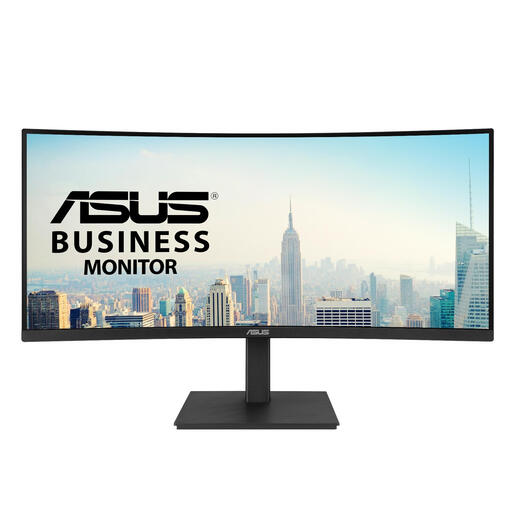 Image unavailable
ASUS VA34VCPSR 34-inch monitor
A good fit for anyone who wants to view a transcript and index side by side on a wide screen and adjust its position.
The product description lists a resolution of 3440 × 1440 pixels, a 21:9 layout, a USB hub and a height-adjustable stand.
The monitor won’t detect or remove duplicate entries; you’ll need data software for that.
View at Joybuy
 Image unavailable
Dell Pro Plus P3425WE 34.1-inch monitor
A good fit for anyone who wants to use multiple work windows side by side and connect a laptop at a permanent workstation.
The product description lists a resolution of 3440 × 1440 pixels, a 21:9 layout, USB-C power delivery up to 90 W, RJ45 and KVM; the height and tilt are adjustable.
The monitor won’t detect or remove duplicate entries; you’ll need data software for that.
View at Joybuy
 Image unavailable
LG 34WR50QK-B 34-inch monitor
A good fit for anyone who wants a wide layout and to display two input sources at the same time.
The product description lists a 21:9 layout, a resolution of 3440 × 1440 pixels and Picture-by-Picture (PBP), plus an ergonomically adjustable stand.
The monitor won’t detect or remove duplicate entries; you’ll need data software for that.
View at Joybuy
 Image unavailable
Philips E Line 346E2CUAE/00 34-inch monitor
A good fit for anyone who wants to view a transcript and index at the same time and connect a laptop at a permanent workstation.
The product description lists a resolution of 3440 × 1440 pixels, a 21:9 layout, MultiView and USB-C for video, data and charging.
The monitor won’t detect or remove duplicate entries; you’ll need data software for that.
View at Joybuy
Frequently asked questions
Can a monitor find or remove duplicate interview entries?
No. A monitor only displays entries; duplicate checking is done in the data software you use. Microsoft Support distinguishes in Excel between temporarily filtering or hiding duplicate values and deleting them permanently. Decide which columns together uniquely identify an interview, and keep the original before deleting any entries.
How should I set up and maintain my workstation?
Position the screen directly in front of you and arrange your setup to suit your desk and tasks. Arboportaal states that employees should regularly alternate screen work with other tasks or a break. LG recommends gently wiping dust from the screen with a soft cloth, such as a microfibre cloth.
What rights apply to an online purchase in the Netherlands?
There is no fixed statutory warranty period for consumer purchases in the Netherlands; according to the Dutch Government, the seller remains your point of contact if a product is faulty. Online consumer purchases generally come with a cooling-off period of up to 14 days after delivery, subject to exceptions listed by ACM ConsuWijzer. Check the terms and conditions that apply to your purchase and product.
Can I simply index recorded interviews containing personal data?
Not without first assessing whether the processing is appropriate. The Dutch Data Protection Authority states that processing personal data requires a legal basis under the GDPR; consent is one possible basis, but it isn’t automatically the only one. The applicable legal basis and other obligations depend on the processing and aren’t determined by your choice of monitor.
Do monitors have a European energy label?
Yes. According to the European Commission, computer monitors are covered by the energy labels for electronic displays, which use a scale from A to G. Compare the label or product information for the exact model you’re considering.


