What should you look for when choosing a monitor for illustration?
First decide whether your work will remain digital or also be printed. Then check whether the workspace uses one or two computers, and compare the screen size and adjustability with the space available.
| Factor to consider |
What should you check? |
Who is this important for? |
| Colour for your output |
Check the stated coverage of the relevant colour space, the available colour modes and whether calibration equipment needs to be purchased separately. Adobe describes soft proofing with colour profiles as part of a colour-managed workflow. |
If I want to print my polder illustration too, I want to be able to match the colour settings to the file and intended output. Around 36% of consumers prioritise colour reproduction for their output. |
| Switching between computers |
Check whether KVM is included and which video and USB connections you need for both computers. Also check that the stated USB-C power delivery is suitable for your laptop. |
If I use two computers at the same drawing desk, I don’t want to keep connecting a separate keyboard and mouse. Around 29% of consumers make switching between computers their top priority. |
| Room for your canvas |
Compare the resolution, physical dimensions, viewing distance and scaling settings. A larger diagonal does not automatically mean more pixels. |
If I want to view landscape details alongside references and palettes, plenty of screen space is important. Around 21% of consumers are mainly looking for more canvas space. |
| Adjustability |
Check the height, swivel and tilt adjustments, and look at the EU energy label. Find out which accessories, if any, are included with the monitor. |
When several people share the same workspace, I want to be able to readjust the screen for the user and the task. Around 14% of consumers prioritise adjustability and running costs. |
Joybuy monitors for this shared illustration workspace
These models suit different needs, including a spacious 4K workspace, colour management, adjustability or switching between computers. Check which connections and features suit your workspace for each model.
 No image available
Dell UltraSharp U3226Q 32-inch 4K UHD 120 Hz QD-OLED monitor
Suitable if you’re looking for a large 4K screen with colour management and computer-switching features.
32 inches, 4K UHD, 120 Hz and QD-OLED, according to the product name. The product description lists Thunderbolt 4, a built-in colorimeter, automatic calibration and Auto-KVM.
Joybuy
 No image available
CRUA 49-inch curved ultrawide gaming monitor, 32:9
Could suit a workspace where a wide surface for landscapes, references and palettes is a priority. Compare the monitor’s width with your desk before buying.
49 inches, 5120 × 1440 pixels, 32:9, 1500R and a VA panel. The product name also lists 120% sRGB and a height-adjustable stand.
Joybuy
 No image available
KTC M27P6 27-inch 4K MiniLED monitor
Suitable if you’re looking for a 27-inch 4K screen and want to switch between computers. Check that the connections you need work with both computers.
The product name lists MiniLED and 4K. The product description mentions a KVM switch and an adjustable stand.
Joybuy
 No image available
BenQ PD3225U 32-inch 4K Ultra HD monitor
Suitable if you want to combine a spacious 4K screen with a KVM function in a shared workspace.
32 inches and 3840 × 2160 pixels. The product description lists a built-in KVM switch, Thunderbolt 3 and Power Delivery up to 85 W.
Joybuy
 No image available
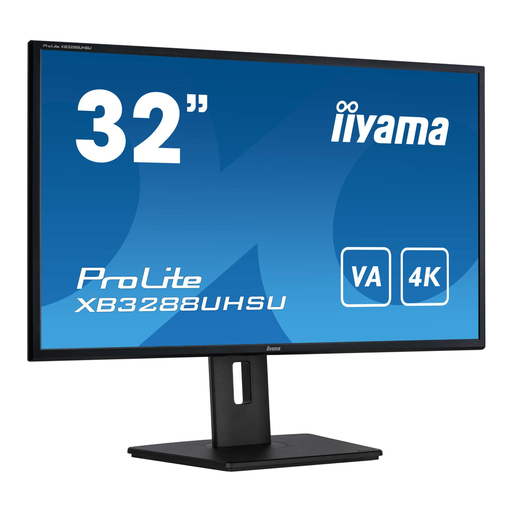
iiyama ProLite 32-inch 4K VA monitor
Suitable if you’re looking for a large 4K workspace and want to be able to adjust the screen position.
32 inches and 3840 × 2160 pixels. The product description lists a height-adjustable stand with pivot function.
Joybuy
Frequently asked questions about monitors for illustration
Do I need a monitor with the widest possible colour gamut for a polder illustration?
Not necessarily. Match the colour space and colour mode to the file and intended output. For print, soft proofing with the intended output profile may help, but the screen’s stated coverage alone cannot predict the print.
Is a USB-C hub the same as a KVM for two computers?
No, a USB-C hub is not automatically a KVM. Check explicitly whether the model you choose has KVM, and which video and USB connections both computers need. BenQ lists KVM for the PD2706UA and PD3205U.
What should you readjust when someone else sits down at the screen?
Adjust the screen height, viewing angle and preferred colour mode to suit the user and the task. An adjustable monitor is one part of a suitable workspace setup, not the whole solution.
What should you look for in energy use and after-sales service?
Compare the EU energy label and check whether a calibration sensor you need must be purchased separately. ACM ConsuWijzer explains that under the statutory guarantee, the seller must resolve a fault free of charge in accordance with the law. For an ordinary online consumer purchase, you generally have a 14-day cooling-off period after delivery; conditions and exceptions depend on the purchase.
Do Dutch workplace rules apply if this is an employee’s workspace?
Yes. The Working Conditions Decree requires screen work to be alternated at set intervals with other work or a break. The Dutch Government also states that employers must provide homeworkers with a good and safe workspace. This does not make any specific monitor model compulsory, and does not necessarily apply to every freelance illustrator.


