Who is this choice relevant to?

Comparing a budget with statements

If you want to compare a budget and a bank statement side by side, weigh the extra workspace against the space the screen takes up. Dell Netherlands and LG Netherlands list specific models in different screen sizes and resolutions; how well they work with your window layout will depend on how you use them.

One desk, multiple users

If people take turns using the same screen, check the adjustment options on the exact model and whether you can position it to avoid reflections. Arboportaal advises adjusting screen legibility and positioning to suit the user.

A household with different laptops

If you use different laptops, it helps to know in advance which connections carry video and whether a USB-C connection also supplies power. Compare the features of both the monitor and the laptop; USB-C does not mean the same thing on every model.

What should you look for when choosing?

Compact and adjustable

Choose this if: desk space is limited and you mainly view one document at a time.

Trade-off: a smaller screen gives you less room for side-by-side windows.

27-inch QHD for multiple windows

Choose this if: you want to view statements and a budget at the same time, and the screen fits on your desk.

Trade-off: check the space available on your desk and whether your computer supports the resolution you want.

USB-C for switching between laptops

Choose this if: a laptop needs to send video over USB-C and receive power while in use.

Trade-off: the laptop must support video over USB-C, and the charging power must meet its requirements.

What to consider What to check before buying Who is this important for?
Side-by-side documents Measure the space available and compare the screen size and resolution of the exact models. If I want to view a budget and statement at the same time, I weigh the extra workspace against the space on my desk. Around 31% of consumers prioritise having a clear overview.
Adjustability Check the stand included and the available height, tilt and swivel adjustments. If several people use the desk, I want to be able to adjust the screen for each user. Around 31% of consumers prioritise adjustability.
Switching between computers Note the video outputs on both computers, and check USB-C video support and the required charging power on both devices. If I switch between laptops, I want to know in advance which connection carries video and whether charging is possible. Around 23% of consumers prioritise switching easily.
Features you need List the connections and adjustment options you need, as well as the screen space you want, before comparing models. If I only use the monitor for managing household finances, I mainly want to pay for features I need. Around 15% of consumers say keeping spending under control is their top priority.

Common pitfalls

  • Assuming USB-C provides full laptop docking

    A USB-C port may support data only, while another version may also carry video and power. Dell lists a USB-C downstream port on the P2425 for data, with a maximum of 15 W; LG and AOC describe different features on their specific models.

    Check the direction and function of the USB-C port, video support and required charging power for both the monitor and laptop.

    You may also need a separate video or power connection.

  • Focusing only on screen size

    A larger screen does not, by itself, tell you how many documents you can comfortably arrange side by side. Dell states that the P2425 has a resolution of 1920 × 1200 pixels; LG lists 2560 × 1440 pixels for the 27BA45QB-B.

    Compare the size and resolution of the exact models, and check that your computer supports the display you want.

  • Not checking a retailer’s listing against the manufacturer’s specifications

    The Joybuy listing for the LG 27BA65QB-B.AEU gives different maximum resolutions on the same product page. The manufacturer’s specifications provide a basis for checking this kind of discrepancy.

    Check key specifications with the manufacturer and ask the retailer for clarification if product listings contradict one another.

Brands and models to consider

Dell

According to Dell, the P2425 reviewed is a compact 16:10 model with several adjustment options.

  • Dell lists a 24.07-inch IPS panel with a resolution of 1920 × 1200 pixels, plus height, tilt, swivel and pivot adjustment.
  • According to Dell, the USB-C downstream port is for data only and supplies a maximum of 15 W; do not treat it as laptop docking.

LG

The 27BA45QB-B reviewed offers 27-inch QHD; the separate 27BA65QB-B has USB-C with a maximum of 65 W, according to LG.

  • LG lists adjustable stands for these separate models and, for the 27BA65QB-B, USB-C for video, data and power.
  • For the 27BA65QB-B, check whether your laptop supports USB-C video and whether the power output meets its charging requirements.

AOC

The Q27P3CV reviewed is a 27-inch QHD IPS model with a clearly specified USB-C video connection.

  • AOC lists DisplayPort Alternate Mode and Power Delivery of up to 65 W for this model.
  • These features do not automatically make the monitor compatible with every laptop; check the specifications of both devices.

Philips

The 24B2N4200/00 reviewed is a compact Full HD IPS monitor with SmartErgoBase.

  • Philips lists a 23.8-inch screen with a resolution of 1920 × 1080 pixels.
  • Claims about viewing comfort or smoother images are not an independently demonstrated improvement for managing household finances.

Lenovo

According to Lenovo, the ThinkVision T24v-30 combines a 23.8-inch Full HD screen with meeting features.

  • Lenovo lists height adjustment, a built-in camera and microphones.
  • The camera and microphones may not be relevant if the desk is only used for managing household finances.

Joybuy monitors for this use

This selection from Joybuy includes compact adjustable monitors and QHD models for viewing documents side by side.

Dell UltraSharp U2724D 27-inch QHD monitor

Dell UltraSharp U2724D 27-inch QHD monitor

Worth considering if you’re looking for a larger screen for viewing documents side by side.

27 inches; 2560 × 1440 pixels; IPS Black panel.

View at Joybuy

ASUS BE248CFN 24.1-inch WUXGA monitor

ASUS BE248CFN 24.1-inch WUXGA monitor

A compact option to consider if the screen needs to be adjusted for several users at a shared desk.

24.1 inches; 1920 × 1200 pixels; WUXGA.

The product description lists a USB hub with four USB-A ports and height adjustment of up to 13 cm.

View at Joybuy
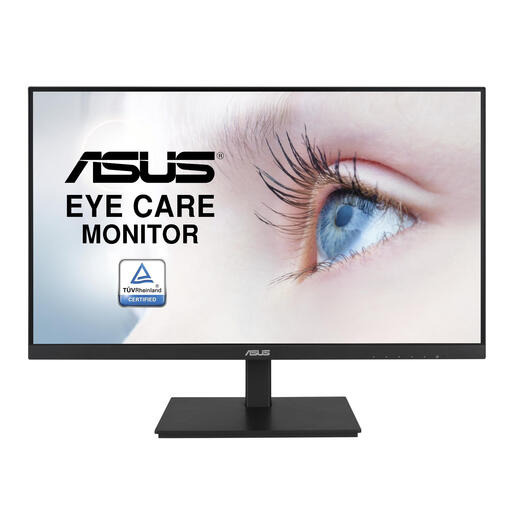
ASUS VA24DQSB 23.8-inch Full HD monitor

ASUS VA24DQSB 23.8-inch Full HD monitor

A compact screen size to consider when managing household finances at a shared desk.

23.8 inches; 1920 × 1080 pixels; Full HD.

View at Joybuy

Dell Pro Plus P2425DE 24-inch QHD monitor

Dell Pro Plus P2425DE 24-inch QHD monitor

A 24-inch QHD model to consider if you’re looking for a compact screen for viewing multiple documents.

24 inches; 2560 × 1440 pixels; QHD.

View at Joybuy

Dell Pro Plus P2425D 24-inch QHD monitor

Dell Pro Plus P2425D 24-inch QHD monitor

A compact QHD option to consider if you view documents at the same desk and want to be able to adjust the monitor.

24 inches; 2560 × 1440 pixels; QHD.

The product description lists height, tilt, swivel and pivot adjustment.

View at Joybuy

Frequently asked questions

How should you adjust a monitor when someone else takes over the desk?

Readjust the height and viewing angle, and make sure the text is easy to read and the screen is free from reflections. Arboportaal gives this advice for screen work; it does not guarantee that a particular model will prevent discomfort.

Does USB-C on a monitor mean one cable will also charge your laptop?

No, this varies by model. Dell lists a USB-C downstream port on the P2425 for data, with a maximum of 15 W, while LG lists USB-C for video, data and power up to a maximum of 65 W on the 27BA65QB-B. Also check that your laptop supports the features you need.

What are your rights if a monitor bought online doesn’t work properly?

When you buy as a consumer, the retailer must supply a product that works properly, and they are your point of contact if something goes wrong. ACM ConsuWijzer explains that, for a standard online consumer purchase, you generally have a statutory cooling-off period of up to 14 days after delivery; this is a separate right from a remedy for a faulty product.

Do Dutch workplace health and safety rules require a monitor for managing household finances at home to be adjustable?

Not simply because you manage your own household finances at home. The rules on screen work apply to work carried out by employees; if the same desk is also used for employment, the workstation and the employer’s duty of care are relevant. Arboportaal explains this context.

Where can you take an old monitor when you buy a new one?

According to the Dutch government, you can return an old electrical appliance of a similar type to the retailer selling the new one. The local council recycling centre is another option.
