What should you look for?
First decide how large you want the recipe text to appear. Then consider how much workspace, flexibility in positioning and connectivity you need.
| What to consider |
What to look for when buying |
Who is this important for? |
| Enlarged text that stays readable |
Try the monitor in your intended workspace and test your preferred text size or scaling in Windows and your recipe software. |
When I write and reread recipes, I want to make the text larger without having to search for tiny symbols. Around 36% of consumers in this context make readable, enlarged text their top priority. |
| Workspace after enlarging text |
Decide whether you want one large recipe window or several windows side by side; check how they look with your preferred scaling setting. |
When I want to view recipes, source pages and my own layout side by side, I want to know how much room is left after enlarging the text. Around 29% of consumers make workspace their top priority. |
| Positioning and reflections |
Check how adjustable the exact model is and see how light sources in your workspace fall on the screen. |
If I’m reading or editing recipes for long periods, I want to position the screen comfortably and assess any distracting reflections. Around 21% of consumers make screen positioning their top priority. |
| Connecting to your computer |
Check your laptop’s video output, the monitor’s input, the cable you need and, if applicable, whether USB-C charging is supported. |
If you use a laptop and want to handle video or charging through a single connection, check that both devices support this. Around 14% of consumers make connectivity their top priority. |
Joybuy monitors for organising recipes
These Joybuy models cover options from Full HD and QHD to 4K, whether you want one enlarged recipe window or room for several windows after enlarging the text.
 No image available
Philips 27E1N1800AE/00 27-inch 4K UHD IPS monitor
Suited to anyone looking for a 27-inch 4K screen who wants to enlarge recipe text in their software; 4K won’t make text larger automatically.
3840 × 2160, 60 Hz and 4 ms; with HDMI and DisplayPort.
The product name specifies a height-adjustable stand.
View at Joybuy
 No image available
INNOCN CB27U1 27-inch 4K UHD monitor
An option if you’re looking for a 27-inch 4K screen and want to use recipes alongside other content; first check how enlarging the text affects the available space.
3840 × 2160 IPS screen, 120 Hz and HDR500; with FreeSync and PIP/PBP.
The product name specifies USB-C with 90 W Power Delivery, HDMI, DisplayPort and a height-adjustable stand. Video and charging over USB-C depend on your laptop’s support and using the right cable.
View at Joybuy
 No image available
Dell UltraSharp U2724D 27-inch QHD monitor
Suited to anyone who wants room for multiple windows as well as enlarged text while organising recipes; test your preferred scaling with your own software.
27-inch LCD screen with 2560 × 1440 pixels (QHD).
View at Joybuy
 No image available
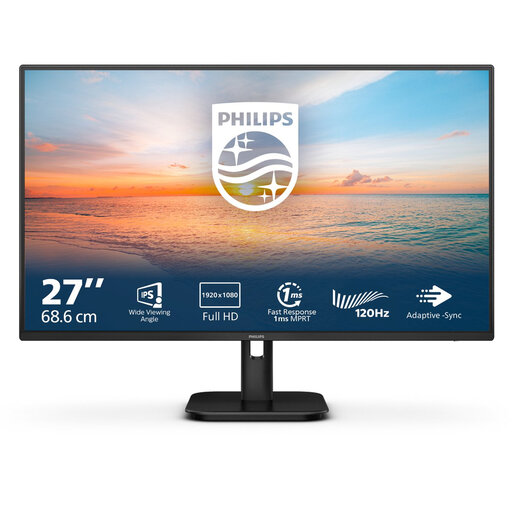
Philips 27E1N1100A/00 27-inch Full HD IPS monitor
An option for a simple workspace with one enlarged recipe window; adjust the text size in the software you use.
27-inch Full HD IPS screen, 75 Hz and VESA mounting.
Full HD has fewer pixels for displaying multiple windows than the QHD and 4K options listed.
View at Joybuy
Frequently asked questions
Will a 4K monitor automatically make my recipe text larger?
No, 4K won’t enlarge text automatically. In Windows, you can adjust the text size or display scaling; also check the settings in the software you use to store recipes.
How can you position a monitor comfortably when organising recipes?
Assess the screen height, reflections, contrast and lighting in your own workspace. Arboportaal lists small symbols, insufficient contrast and reflections as possible causes of poor readability, but doesn’t recommend a universal setting.
Can you connect and charge your laptop with a single USB-C cable?
Only if both the monitor and laptop support the necessary features. BenQ lists USB-C with 65 W Power Delivery for the GW2790QT; LG lists 90 W Power Delivery for the 27U730A-B. Check your laptop’s specifications and which cable you need.
What rules apply when buying a monitor online in the Netherlands?
According to the Rijksoverheid, when you buy from a business at a distance, you’ll often have a 14-day cooling-off period. You’re also entitled to a product that is fit for purpose; the Rijksoverheid states that there is no fixed statutory warranty period in the Netherlands. An extra warranty offered by a retailer is not the same as this legal right.
Do you need to choose a particular energy class for a monitor?
The European Commission lists rules for electronic displays, including monitors, with some exceptions within the scope of those rules. This doesn’t mean you have to choose a particular energy class as a buyer; check the product information for the exact model.


