When editing a poetry recording visually, start by checking how much space the entire screen, including its stand, will take up. Then decide how much of the waveform, controls and text you want to see at once. A fixed monitor of around 24 inches offers a different balance between workspace and desk space compared with a portable screen. If you’re using a laptop, its video connection and any USB-C power requirements must also be compatible. A monitor displays the recording, but it can’t tell you how the voice sounds.
Who is this choice relevant to?
Editors with a small, fixed desk
If you need space for a keyboard and recording equipment, compare the dimensions of both the screen and the stand, not just the diagonal measurement. Dell publishes product dimensions so you can assess the complete setup.
Editors who view the recording and text at the same time
If you want to keep the waveform and poem text or transcript on screen together, weigh the extra vertical pixels and resolution against readability at your chosen screen size. Dell and Philips publish resolution details for monitors like these.
Laptop users who want to keep their workspace tidy
If you want to put the screen away after editing or move your workspace, check that your laptop’s video output and power supply are compatible with the monitor. Lenovo specifies USB-C with DP 1.2 Alt Mode for the ThinkVision M14d.
What should you look for?
| What to consider |
What should you check? |
Who is this important for? |
| Desk space |
Measure the available width and depth, then compare them with the dimensions of the screen and stand. Check that you’ll still have room for a keyboard and recording equipment. |
If my desk is small, I want to know how much space the complete setup will take up first. Around 31% of consumers put desk space first. |
| Keeping everything in view while editing |
Compare 1920 × 1080, 1920 × 1200 and 2560 × 1440, and check that text and controls remain easy to read at your chosen scaling. Dell and Philips list examples of monitors with these resolutions. |
If you want to see the waveform, controls and poem text at the same time, consider both the available screen space and readability. Around 31% of consumers give having everything in view while editing top priority. |
| Laptop connections and cables |
Check whether your laptop port outputs video, what the monitor port is designed for, and whether it supplies enough power. For the P2425, Dell distinguishes between a USB-C downstream port for data and the hub on the P2425DE. |
I want to connect my laptop with as few separate cables as possible, and first check whether the ports support video and power. Around 19% of consumers prioritise laptop connectivity. |
| Adjustability and readability |
Compare the height and tilt adjustments, screen reflections and text size at your usual viewing distance. Arboportaal highlights the importance of readable symbols and limiting distracting reflections. |
If you spend longer working on a timeline, you’ll want to adjust the viewing position and text size to suit your workspace. Around 19% of consumers put adjustability and readability first. |
Common mistakes
-
Comparing only the screen size
The space you need depends on the whole setup, not just the visible screen.
Measure the available desk width and depth, then compare them with the dimensions of the screen, including its stand.
If the supplied stand doesn’t fit, you may need a different stand or setup.
-
Assuming every USB-C port carries video and power
Dell says the USB-C downstream port on the P2425 is intended for data; it isn’t the same as the USB-C hub on the P2425DE.
Check the function of the monitor port for the exact model, and whether your laptop can output video through the connection you plan to use.
If the connection isn’t suitable, you may need an extra cable or a separate laptop charger.
-
Thinking the screen can assess sound quality
A waveform or spectrogram gives you visual information about audio, but it can’t tell you how the voice sounds.
Use the screen to keep everything in view while editing, and assess the recording by listening to it separately.
Brands to consider
Dell
Dell offers a range of fixed monitors of around 24 inches, with different resolutions and connectivity options.
- Dell specifies a resolution of 1920 × 1200 pixels and an adjustable stand for the P2425.
- Dell says the USB-C downstream port on the P2425 is intended for data; the P2425DE is a separate model with a USB-C hub.
Philips
Philips offers, among other options, a compact Full HD monitor and a separate 16:10 model with WUXGA resolution.
- Philips specifies a 16:10 screen with 1920 × 1200 pixels for the 24B2U3301D/00.
- For the 24E1N1300AE/00, check the details of the exact model before using refresh rate as a deciding factor.
Lenovo
The ThinkVision M14d is a portable monitor for anyone who wants to put their workspace away after editing.
- Lenovo specifies a 14-inch screen, 2240 × 1400 pixels and USB-C with DP 1.2 Alt Mode.
- Check that your laptop can output video through that connection and that the smaller screen size suits your editing sessions.
Monitors at Joybuy
This selection includes portable monitors and fixed screens, including models with a 16:10 aspect ratio or QHD resolution for anyone who wants to keep text or controls on screen while editing.
 Image unavailable
UPERFECT portable monitor, 16 inches, 2560 × 1600
A portable option for anyone who wants to put their screen away after use.
16 inches, 2560 × 1600 pixels and 16:10. The product information lists USB-C for video and power, mini-HDMI and VESA compatibility.
Joybuy
 Image unavailable
ASUS BE248CFN monitor, 24.1 inches, 1920 × 1200
A fixed 16:10 screen for anyone who wants extra vertical space for the timeline and text.
WUXGA resolution; the product description lists a USB hub and height adjustment of up to 13 cm.
Joybuy
 Image unavailable
ASUS ProArt PA248CNV, 24.1 inches, 1920 × 1200
A fixed 16:10 monitor for anyone who wants to adjust their viewing position while editing.
The product description lists height, tilt, swivel and pivot adjustments.
Joybuy
 Image unavailable
ASUS ProArt Display PA24ACRV, 23.8 inches, 2560 × 1440
A fixed QHD screen for anyone who wants to display more editing windows or text alongside the timeline on a compact screen.
The product description lists USB-C for video and data with 90 W Power Delivery, plus an adjustable stand.
Joybuy
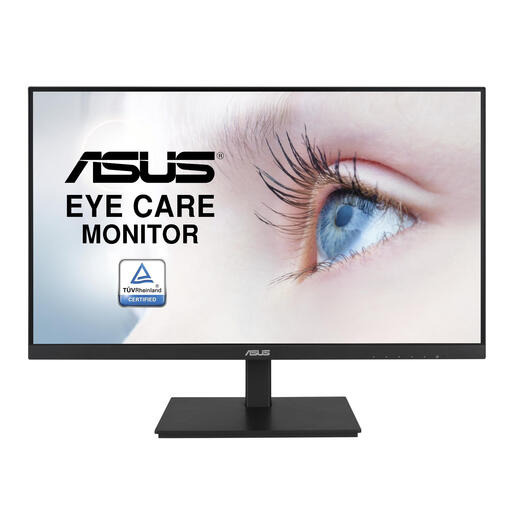 Image unavailable
ASUS VA24DQSB, 23.8 inches, 1920 × 1080
A fixed Full HD screen of around 24 inches for anyone who wants to view a single editing timeline.
IPS screen; the product description lists a height-adjustable stand and a USB hub.
Joybuy
Frequently asked questions
Do I mainly need a higher refresh rate for editing a voice recording?
Start with a timeline and controls that are easy to read at your chosen scaling. Also check that you have enough space to view the waveform and, if needed, the poem text at the same time.
Can I connect a portable USB-C monitor to any laptop?
No, not based on the connector shape alone. Lenovo specifies USB-C with DP 1.2 Alt Mode for the ThinkVision M14d; check whether your laptop port can output video and how the screen is powered.
How should I set up a screen for longer editing sessions?
Adjust the screen position and text size so the controls are easy to read, and reduce distracting reflections. Arboportaal highlights these considerations for screen-based work; the right setup depends on the user and workspace.
What are my rights when I buy a monitor online in the Netherlands?
According to the Dutch government, a 14-day cooling-off period applies in many cases to consumer purchases made at a distance. This is separate from your rights if a product is faulty: in that case, contact the seller to find a solution. The precise rules depend, among other things, on the type of purchase.
Are there legal requirements for my screen-based workspace?
Employers are responsible for meeting workplace health and safety requirements for employees who work with screens. Arboportaal lists requirements for workspaces where an employee spends more than two hours a day working with a screen; these are not general purchasing requirements for every private buyer.


