
Designer who scrutinises every detail
You compare fine details or colours in project files and want to know which screen features matter.


Choose a monitor to suit your main task. For colour-critical design files, a suitable colour space and documented calibration matter more than a higher refresh rate. For meetings, the audio features you need are the deciding factor. Also compare how clearly you can see fine details, how much desk space you have and how the monitor connects to your laptop. Decide separately whether you only need to hear conversations or also want to speak and make video calls.
You compare fine details or colours in project files and want to know which screen features matter.
You want to hear conversations while viewing files, or take part in meetings yourself. This determines whether you mainly need audio playback or also a microphone and camera.
You switch between design and meeting windows, so you need a monitor that connects and fits into your workspace.
Best for: assessing sRGB or Rec.709 files when colour consistency matters more than having a large meeting window. BenQ lists 99% coverage of both colour spaces and a factory calibration report for the PD2705U.
Keep in mind: BenQ specifies a 60 Hz refresh rate and built-in speakers rated at 2.5 W each. These specifications don’t tell you how clearly you’ll hear conversations in your room. Check separately whether you need a microphone or webcam.
Best for: viewing fine details and playing audio from conversations. Dell lists USB-C and two 5 W speakers for the S2725QC.
Keep in mind: speaker power isn’t a listening test or proof of colour calibration. If you’ll actively take part in meetings, check which microphone and camera you want to use.
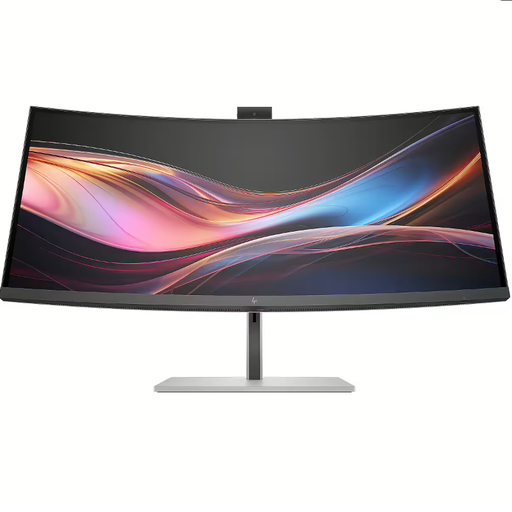
Best for: work where you often want to view a design and a meeting window side by side, and share video and audio during calls. Philips lists a 3440 × 1440 screen, a 5MP webcam and a noise-cancelling microphone for the 34E1C5600HE/00.
Keep in mind: a wider screen needs more desk space. The stated resolution and features don’t prove that the screen is suitable for every colour-critical workflow.
| What to consider | What to look for when buying | Who is this important for? |
|---|---|---|
| Viewing fine design details | Compare the screen size and native resolution, and check that text scaling and window layouts work well for your files. | If I want to assess small lines and labels without the text becoming uncomfortably small, I focus on the combination of screen size and resolution. Around 36% of consumers prioritise being able to read fine details. |
| Hearing conversations or taking part | Check the speakers, microphone, webcam and audio connection for meetings separately. | If I want to follow conversations while reviewing work, or speak myself, I check which features I need. Around 29% of consumers prioritise this need for conversation. |
| Assessing colours for your design work | Compare the colour space of your files with that of the exact model, and check what calibration information is available. | If colour is crucial to assessing my designs, I want to know which colour space the screen specifies and what calibration information is available. Around 21% of consumers make colour assessment their top priority. |
| Workspace and laptop connection | Check the dimensions, adjustability, video support through your laptop port and the power output required for charging. | If my desk has limited space or I want to connect the monitor to my laptop, I consider how it will fit and whether it’s compatible. Around 14% of consumers prioritise their workspace and connection needs. |
Built-in speakers play sound, but that doesn’t mean you’ll be clearly heard during a meeting.
First decide whether you only want to listen or also take part. Check the features of the exact model and consider whether you need separate equipment to speak or make video calls.
You may need a separate microphone or webcam to take an active part.
Colour space coverage, a calibration report and the colour reproduction of an individual unit are different things.
Make sure the stated colour space suits your files and check what calibration information is available for the model.
Your laptop and cable must also support the monitor’s functions and connection.
Check the specifications of both devices and the cable before relying on a single USB-C cable.
Depending on the combination, you may need a different cable, an adapter or a separate power supply.
The PD2705U is a 27-inch 4K option designed for working with sRGB and Rec.709 files.
The Plus S2725QC is a general-purpose 27-inch 4K USB-C option for anyone looking to combine image detail with audio playback.
The 34E1C5600HE/00 is an ultrawide option for viewing project files alongside a meeting window.
The 27UP850K-W is a 27-inch 4K option for anyone considering its stated DCI-P3 coverage and adjustability.
These Joybuy products are suited to assessing design details and colour, and following conversations while you work.
 No image available
A 27-inch 4K monitor for anyone who wants to view design details and take colour specifications into account.
The product information lists 3840 × 2160 pixels, USB-C with up to 98 W, built-in speakers and an adjustable stand. It also mentions 97% DCI-P3, 94% Adobe RGB and factory calibration.
Check that the stated colour space suits your files and that the audio features work for the way you follow conversations.
 No image available
A 27-inch 4K UHD monitor for anyone who wants to assess fine details on a desktop screen.
The product information lists 3840 × 2160 pixels, an IPS panel, USB-C with 90 W Power Delivery and a height-adjustable stand. It also mentions sRGB and Adobe RGB colour space coverage.
Check which audio solution you want to use if you need to hear conversations while you work.
 No image available
A 40-inch ultrawide monitor for anyone who wants to view project files and multiple windows side by side.
The product information lists a 5120 × 2160 IPS screen with a 21:9 aspect ratio, PIP/PBP, built-in speakers and USB-C with 65 W Power Delivery. It also mentions 99% sRGB, a colour calibration report and height adjustment.
Check that the wide screen will fit on your desk and that the connections are compatible with your laptop.
 No image available
A 34-inch WQHD conference monitor for anyone who wants to use a meeting window alongside project files.
The product information lists an integrated webcam and microphone, Thunderbolt 4, colour calibration and 98% DCI-P3. According to the product description, a charger isn’t included as standard.
Check that the stated colour space suits your files and what power supply and connection you need.
 No image available
A 27-inch 4K monitor for anyone who wants to view details and play audio from conversations.
The product information lists 3840 × 2160 pixels, USB-C with up to 65 W Power Delivery, built-in speakers and height and tilt adjustment.
Check separately which microphone or camera you need if you’ll be taking part in conversations yourself.
No, not if you only want to hear the conversation; in that case, check the audio playback. If you want to speak, check whether you’ll use a microphone through the monitor, computer or separate equipment. You’ll also need a camera for video calls; Philips lists both input features for the 34E1C5600HE/00.
Only if your laptop port and cable support the required video connection and the power output is suitable for your laptop. BenQ lists USB-C with DisplayPort Alt Mode and 65 W Power Delivery for the PD2705U; this doesn’t automatically apply to every laptop.
Position the screen to suit you and avoid distracting reflections. The Dutch Arboportaal outlines employers’ obligations for working with screens, including alternating screen work with other tasks or taking a break. These obligations aren’t a general legal minimum for every private buyer.
According to the Dutch government, if a product is faulty, the seller must provide a solution. When comparing extended warranties, look at the specific additional cover and check the terms and costs.
The European Commission states that electronic displays are covered by EU ecodesign rules; obligations relating to placing products on the market apply to the relevant market operators. For online consumer purchases, ACM ConsuWijzer says there is often a statutory 14-day cooling-off period after delivery, although exceptions need to be assessed for each purchase.