
Programmers who need large text
You enlarge code and pattern details, and want to know what can fit side by side and remain readable at that text size. Microsoft Support explains how to make text larger independently in Windows.


Start with the text size you actually need, then see how much room is left to view code and pattern information side by side. A larger, high-resolution screen could be one option, but an adjustable monitor and suitable connectivity are also important for your workspace. A coding mode or extra docking features are no substitute for testing your text scaling and window layout.
You enlarge code and pattern details, and want to know what can fit side by side and remain readable at that text size. Microsoft Support explains how to make text larger independently in Windows.
You switch between source data, an editor and a preview. Available screen space and an adjustable setup may be important; Arboportaal highlights height adjustment as a consideration when working with a screen.
You may want to connect your laptop with a single cable. This only works if your laptop supports video output through the USB-C port you choose and the power supply is suitable; check the specifications of both devices.
| Consideration | What should you check? | Who is this important for? |
|---|---|---|
| Readable text | Try your usual text size and display scaling with real index entries. Compare screen size and resolution. | I want to see code and pattern names at a size I can read, without making the index too small to use. Around 36% of consumers prioritise readable enlarged text for this. |
| Two windows side by side | Open the editor and index side by side at your preferred scale, and check that the lines, columns and controls all fit. | I want to view code and pattern information at the same time, so I spend less time switching between windows. Around 29% of consumers prioritise having this workspace available simultaneously. |
| Posture and reflections | Check the height adjustment, your preferred rotation or pivot position, the screen surface and the space available on your desk. Bear in mind light and reflections. | I want to position the screen comfortably for long periods of index work. Around 21% of consumers prioritise workspace adjustability for this. |
| Connectivity and laptop power | Compare the video connections with those on your computer. For USB-C, check whether your laptop outputs video through that port and how much charging power it needs. | I want to use my laptop, display and peripherals through a single connection if possible. Around 14% of consumers prioritise this type of connectivity. |
More pixels do not automatically make letters bigger. Your chosen text size and display scaling also affect how much of your index and code you can see at once.
Compare real code and pattern details using the same text size and scaling that you find comfortable.
A stated Power Delivery rating alone does not tell you whether your laptop can output video through that port or how much power it needs.
Check your laptop port, cable and required charging capacity before relying on a one-cable setup.
If the connection or power supply is not suitable, you may still need a separate power supply or another connection.
According to ACM ConsuWijzer, statutory warranty in the Netherlands depends on what you could reasonably expect from the product, so it does not automatically end after two years.
Keep your proof of purchase and product specifications, and contact the retailer if there is a fault.
According to BenQ, the RD320U range is designed for programming. The RD320U is a 31.5-inch 4K model.
The P2725QE is a 27-inch 4K work monitor with USB-C hub features.
The Philips 27E1N1800AE/00 is a 27-inch 4K monitor with an IPS panel.
The ProArt PA32QCV is a 31.5-inch 6K monitor for anyone who can also make use of its resolution and connections for other tasks.
These models offer different screen sizes and layouts for working with enlarged code and pattern information. Test your own text scaling and window layout, and check that the connections are compatible with your computer.
 No image available
A 32-inch curved screen for trying out your own editor and index layout.
3840 × 2160 pixels, VA panel and 3000R curvature.
The product description states that the desk or VESA mount must support at least 15 kg and recommends installation by two people.
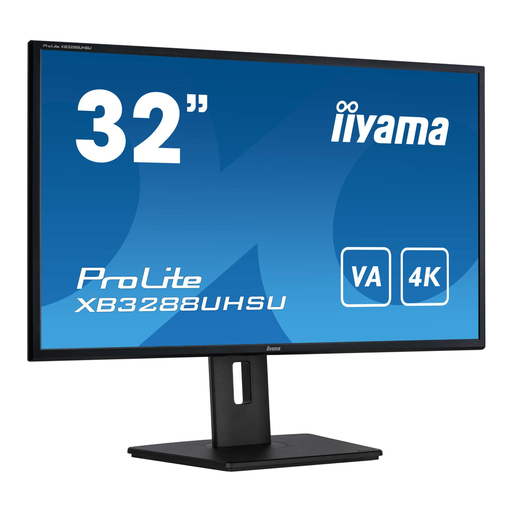 No image available
A 32-inch 4K screen for assessing enlarged code and pattern information at your preferred scale.
VA panel, 3840 × 2160 pixels, height adjustment and pivot.
The description lists HDMI and DisplayPort connections.
 No image available
A wide screen for trying out code and an index side by side, if it fits your desk.
Dual QHD resolution of 5120 × 1440 pixels, curved screen and height-adjustable stand.
The description lists a USB-C dock, KVM and RJ45 connection.
 No image available
A 34-inch widescreen display for trying out an editor and index side-by-side layout.
3440 × 1440 pixels and Picture-by-Picture, according to the product description.
 No image available
A more compact 27-inch screen for seeing how much room is left for two windows at your chosen text scale.
IPS panel, 3840 × 2160 pixels and 120 Hz.
The description lists USB-C with 90 W Power Delivery, height adjustment, pivot and Picture-by-Picture. Check that your laptop supports video over USB-C and how much charging power it needs.
No. Adjust the text size or display scaling on your computer, then check how much code and index content remains visible at once. Microsoft Support explains how to change text settings separately from the overall display in Windows.
Adjust the height and position, and reduce distracting reflections. Arboportaal outlines specific obligations for employers when people work with screens; these do not automatically apply to every private home-working situation.
Only if your laptop can output video through that USB-C port and the connection and power supply are suitable. Dell lists up to 90 W for the P2725QE; BenQ lists DisplayPort Alt Mode and 90 W Power Delivery for the RD320U. Also check how much charging power your laptop needs.
For an online consumer purchase, you generally have a statutory 14-day cooling-off period after delivery, subject to legal exceptions. Separately, statutory warranty in the Netherlands depends on what you could reasonably expect from the product; according to ACM ConsuWijzer, it does not simply have a fixed duration of two years.