Start by measuring the available width and depth of your desk, allowing room for your keyboard and printed proofs. A compact 24-inch 16:10 screen may suit page layouts, while a larger screen gives you more room to work but takes up more desk space. If the handbook will be printed, look beyond colour coverage alone. And if you use a laptop, check that the monitor can carry a video signal and provide enough charging power.
Who is this choice relevant to?
Designer working with limited desk space
You’re bringing together text and images for the club handbook, but you also need room for a keyboard and printed proofs. Compare the monitor’s overall dimensions, including its stand, rather than just the screen size.
Creator of a printed handbook
You want to check photos and club colours before sending the file to the printer. A colour-managed workflow matters more than a colour coverage percentage on its own.
Designer connecting a laptop
You want to switch between using your laptop and working at your desk. Check whether the monitor port carries a video signal and provides enough power to charge your laptop.
What should you look for?
First, measure the space on your desk, including room for your keyboard and paperwork. Then decide how much screen space you need and which connections and colour controls suit the way you work.
| What to consider |
What to look for when buying |
Who is this important for? |
| Desk space and positioning |
Measure the available width and depth, then compare the monitor’s overall dimensions, including its stand. ASUS lists the PA248QV as 53,30 cm wide and 21,10 cm deep; its US specifications page warns that dimensions may vary by region. BenQ lists the PD2705Q as 614 mm wide and 230,7 mm deep. |
If I also need room for my keyboard and printed proof pages, I want to know how much space the stand takes up. Around 31% of consumers rank desk space and positioning as their top purchasing priority. |
| Page overview and legible detail |
Compare the aspect ratio and resolution with the text size and window layout you use. Dell and ASUS list a resolution of 1920 × 1200 for the P2425 and PA248QV; BenQ lists 2560 × 1440 for the PD2705Q. |
When I want to see pages and layout tools at the same time, a suitable workspace matters more than screen size alone. Around 25% of consumers give page overview and text the highest priority. |
| Colour checking for print |
EIZO lists 99% Adobe RGB for the CS2400S and support for ColorNavigator. Adobe describes a colorimeter as a tool for objective screen calibration; also discuss the output profile with your printer. |
If photos and club colours matter in the printed version, I want to make sure my colour workflow is right for the printer. Around 25% of consumers prioritise checking colour for print. |
| Laptop connection |
Check the video capabilities of the monitor and laptop ports, along with the required charging power. Dell describes the P2425’s USB-C downstream port as data-only, with a maximum of 15 W; BenQ lists DisplayPort Alt Mode and 65 W Power Delivery for the PD2705Q. |
If I want to connect my laptop to the monitor, I need to know whether the ports support video and provide enough power. Around 19% of consumers rank laptop connectivity as their top purchasing priority. |
Pitfalls to avoid
-
Comparing screen size alone
A larger screen doesn’t tell you how much desk space the stand will take up. BenQ lists the PD2705Q as 614 mm wide and 230,7 mm deep; the dimensions of the ASUS PA248QV may vary by region.
Measure the available space on your desk and compare it with the monitor’s overall dimensions, including the stand.
-
Assuming every USB-C port works as a laptop dock
Dell describes the P2425’s USB-C downstream port as data-only, with a maximum of 15 W. It isn’t a video input for a laptop.
Compare the monitor’s video capabilities and Power Delivery with your laptop’s connections and power requirements.
You may also need a separate video connection or laptop power supply.
-
Assuming colour coverage guarantees accurate print colour
A stated colour space is a product specification; calibration and checking the final print output are separate steps.
Decide how important print colour is for your handbook, then discuss the output profile and, if needed, a proof with your printer.
Relevant brands to consider
These examples relate to specific product lines we researched. The brand names alone don’t tell you whether every model is available or suitable for you.
Dell
The P2425 we researched is a 24-inch 16:10 monitor for page layout.
- Dell lists a 1920 × 1200 resolution, height adjustment and 99% sRGB for this model.
- Dell says the USB-C downstream port is for data only and supports a maximum of 15 W. Don’t use it as a USB-C video connection for a laptop.
ASUS
The ProArt PA248QV we researched is a compact 24.1-inch 16:10 option with colour settings for design work.
- ASUS lists a 1920 × 1200 resolution, 100% sRGB and an adjustable stand.
- The US ASUS specifications page we consulted notes that dimensions and accessories may vary by region. Check the details for the version you’re considering.
EIZO
The ColorEdge CS2400S we researched is designed for colour management on a relatively compact screen.
- EIZO lists 99% Adobe RGB for this model and mentions calibration with ColorNavigator.
- The manufacturer’s information doesn’t guarantee that a printer will reproduce every proof in the same way. Agree a colour workflow with your printer.
BenQ
The PD2705Q we researched is a 27-inch QHD option for anyone who wants more workspace on screen.
- BenQ lists a 2560 × 1440 resolution, 100% sRGB and USB-C with 65 W Power Delivery.
- The listed dimensions are 614 mm wide and 230,7 mm deep. Check that the monitor and stand will fit on your desk, and that 65 W is suitable for your laptop.
Joybuy products
This selection from Joybuy includes compact monitors, including QHD models with colour features, as well as larger 27-inch screens. Compare each model’s footprint, resolution and laptop connections with your own workspace.
 No image available
ASUS ProArt Display PA24ACRV
A compact QHD option to consider if you’re looking for extra screen detail and colour features.
23,8 inches; 2560 × 1440; 95% DCI-P3; Calman certification listed. USB-C with up to 90 W Power Delivery. The listed dimensions with stand are 539,6 × 197,2 mm; the stand is height-adjustable.
View at Joybuy
 No image available
iiyama ProLite XB2497HSN-B1
A compact Full HD option to consider if you want to connect a laptop and need an adjustable stand.
23,8 inches; 1920 × 1080 in 16:9; 100 Hz. The product description lists USB-C for video and data, with up to 65 W Power Delivery, Ethernet, and height, swivel, tilt and pivot adjustment. The listed dimensions with stand are 539,5 × 209,5 mm.
View at Joybuy
 No image available
HP Series 5 Pro 524pu
A compact monitor to consider if you want to combine colour information with a USB-C laptop connection.
23,8 inches; Full HD, 1920 × 1080 in 16:9; 100% sRGB. USB-C with video, data and up to 100 W Power Delivery. The listed dimensions with stand are 539,4 × 189,5 mm. A charger isn’t included as standard.
View at Joybuy
 No image available
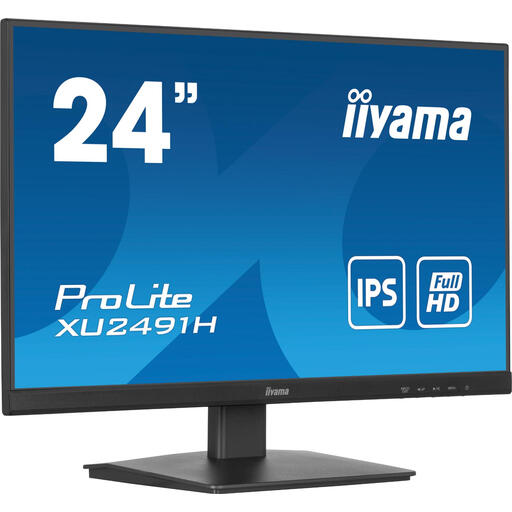
iiyama ProLite 24-inch IPS monitor
A Full HD option to consider if you’re looking for a compact screen with HDMI and DisplayPort connections.
23,8-inch IPS panel; 1920 × 1080; 100 Hz. HDMI, DisplayPort and VESA mounting are listed. The listed width and depth with stand are 539,5 × 211 mm; the monitor can be tilted.
View at Joybuy
 No image available
ASUS ProArt PA278CV
A larger screen to consider if you need more screen space and have room for its footprint on your desk.
27 inches; 2560 × 1440; 100% sRGB. The product description lists factory calibration and Calman verification, plus USB-C with up to 65 W Power Delivery. The listed dimensions with stand are 615 × 228 mm.
View at Joybuy
Frequently asked questions
Is 24 inches enough for laying out a handbook?
A 24-inch 16:10 screen may suit page layout; according to their manufacturers, the Dell P2425 and ASUS PA248QV we researched both have a resolution of 1920 × 1200. Compare your preferred text size and window layout with the space available on your desk.
Are screen colours enough to check a printed handbook?
No. A stated colour space alone doesn’t confirm how the print will look. Adobe describes a colorimeter as a tool for objective screen calibration; for print, also discuss the output profile and, if needed, a proof with your printer.
Does every USB-C monitor send video and power to my laptop?
No, check what both devices can do. Dell lists a USB-C downstream port for data and up to 15 W on the P2425; BenQ lists DisplayPort Alt Mode and 65 W Power Delivery for the PD2705Q. Also compare these features with your laptop’s port and power requirements.
How should I set up a monitor if I work at a screen for long periods?
Consider adjustability, reflections and lighting when setting up your workspace. Information from the Dutch Arboportaal on working with display screens is aimed at employers and employees; it doesn’t automatically mean that someone creating a club handbook at home has to buy specific equipment.
What if my monitor breaks sooner than expected?
For a consumer purchase in the Netherlands, statutory guarantee rights may apply alongside any manufacturer’s warranty. ACM ConsuWijzer explains that, under the applicable conditions, the seller must put right at no cost a product that breaks sooner than expected under normal use. Statutory guarantee rights don’t have a fixed time limit.


