Who is this choice relevant to?

Multitrack editor

You want to be able to view an audio timeline alongside a transcript and translation. Consider the usable horizontal workspace and text scaling. The Audacity Manual describes different views for audio editing; product specifications from Dell Netherlands and LG Netherlands list screen sizes and resolutions.

Shared-workspace user

You share a desk or peripherals, or switch between computers. Connections, any KVM switch and an adjustable stand may all be relevant. Arboportaal outlines requirements for employees who work with screens; Dell Netherlands and BenQ Netherlands list features for specific models.

Text-focused proofreader

You read a lot of bilingual text and have less need for an extra-long timeline. Compare text clarity, adjustable scaling and how much desk space the screen takes up. The specifications from Dell Netherlands and BenQ Netherlands show the resolutions and sizes of the models mentioned.

What should you look for when choosing?

Ultrawide monitor

Choose this option: if you often keep an audio timeline and text windows open side by side and have enough desk width. The 34-inch models mentioned from Dell Netherlands and LG Netherlands have a resolution of 3440 × 1440 pixels.

Bear in mind: the physical width, your chosen text scaling and the computer connections. Extra horizontal space does not automatically replace a second screen.

27-inch 4K monitor

Choose this option: if transcripts, subtitles or translation notes and a more compact desk matter more than having one long timeline in view. Dell Netherlands and BenQ Netherlands list resolutions of 3840 × 2160 pixels for the 27-inch models mentioned.

Bear in mind: the workspace is less wide than on the 34-inch ultrawide models mentioned. Check that text is comfortable to read at your preferred scaling.

Consideration What should you check? Who is this most relevant to?
Timeline and bilingual text Compare the aspect ratio, resolution, screen width and readable text scaling with your usual window layout. If I want to see an audio timeline alongside text in two languages, I mainly look at usable width and readability. Around 31% of consumers say timeline visibility is their top priority.
Switching between computers Check the video inputs, USB ports, KVM specification, required USB-C video mode and charging power. If I share computers with other people, I want to know whether the keyboard and mouse can switch between them too. Around 25% of consumers prioritise switching between computers and sharing peripherals.
Adjustability for different users Check the height adjustment or compatibility with a monitor arm, desk depth and any reflections. If several people use the same screen, I want to be able to adjust it to suit each person. Around 19% of consumers say adjustability is their top priority.
Text readability Try your preferred text scaling and compare both resolution and screen size, not just the 4K or ultrawide label. If I mainly read and proofread transcripts and translations, text readability matters more than an extra-long timeline. Around 13% of consumers give readability top priority.
Features and energy use Compare the EU energy label and check which cables, connections or stand you need for your setup. If I only want features that suit my work, I also look at energy use and any extras I might need. Around 12% of consumers prioritise avoiding unnecessary features and choosing products that meet their needs.

Common points to consider

  • Confusing USB-C or a USB hub with a KVM switch

    Video signal, laptop charging and sharing USB peripherals are separate functions. Having a USB-C port or hub does not, by itself, mean you can switch between computers while using the same keyboard and mouse.

    Make a note of which computers and devices you want to connect, then check the ports and KVM specification for the exact model.

    Without the right switching feature, changing computers may mean using extra cables, a separate switch or unplugging and reconnecting devices manually.

  • Treating ultrawide and 4K as the same screen space

    The 34-inch ultrawide models mentioned have 3440 × 1440 pixels; the 27-inch 4K models mentioned have 3840 × 2160 pixels. The first option prioritises width, while the second offers more vertical pixels in a more compact size.

    At your usual scaling, compare how much text you can comfortably read alongside the audio timeline and how much of the timeline remains visible.

  • Assuming monitor speakers are suitable for checking audio

    Built-in speakers are a product specification, but that does not prove they are suitable for assessing speech, editing mistakes or the finished result.

    Choose a screen based on workspace and connections, and consider audio monitoring as a separate requirement.

  • Assuming an extended warranty replaces your statutory rights

    A commercial warranty is separate from your statutory rights if a product does not meet what you could reasonably expect from it. The Dutch government identifies the retailer as your point of contact for a faulty product.

    Check exactly what cover an additional service provides and, if a fault occurs, remember your statutory rights in relation to the retailer.

Brands to consider

Dell

The Dutch models mentioned include both a 27-inch 4K USB-C hub monitor and a 34.1-inch ultrawide Thunderbolt hub monitor.

  • Dell lists a resolution of 3440 × 1440 pixels for the U3425WE; an independent review describes its KVM feature for multiple computers.
  • Dell lists a resolution of 3840 × 2160 pixels and 90 W power delivery over USB-C for the P2725QE.
  • The P2725QE does not have the same horizontal aspect ratio as the U3425WE. These are differences between these models, not a judgement on all Dell monitors.

LG

The Dutch product information describes the 34U650A-B as a 34-inch ultrawide IPS monitor with 3440 × 1440 pixels.

  • The wide screen layout may be useful if you want to view several programme windows side by side.
  • A wide workspace is no proof of time savings when editing a podcast. Check the switching features separately if several computers share the workspace.

BenQ

According to its Dutch specifications, the PD2706U is a 27-inch 4K model with USB-C, KVM and height adjustment.

  • BenQ lists 90 W USB-C Power Delivery and a KVM switch.
  • The extensive colour features of this design-focused model may not be relevant if you only use the screen for audio editing.

Philips

The Dutch product page describes the 346B1C/00 as a curved 34-inch ultrawide screen with 3440 × 1440 pixels, USB-C and an ergonomic stand.

  • You can compare the model with other wide screens for viewing a timeline alongside text windows.
  • Philips' claims about eye comfort and energy savings are the manufacturer's claims. For energy use, compare the label for the specific model.

Joybuy products

This selection includes ultrawide monitors for a broad workspace and more compact 27-inch 4K models for those who prioritise text and a smaller screen size.

LG UltraWide 34U601B-B WQHD VA monitor

LG UltraWide 34U601B-B 34-inch WQHD VA monitor

The 34-inch ultrawide format is worth considering if you want to view an audio timeline alongside text windows.

Specifications: WQHD, VA panel, 1800R curved screen and 120 Hz.

Joybuy
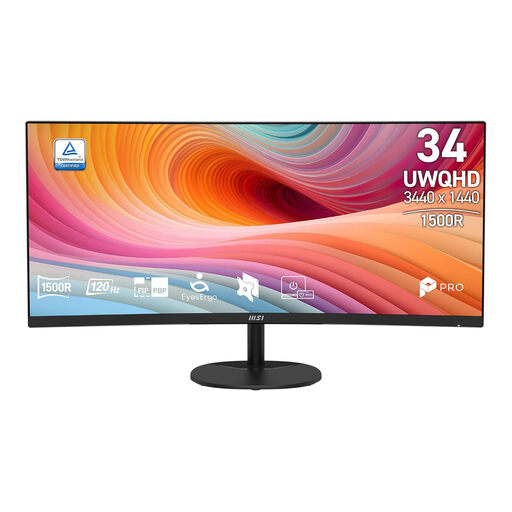
MSI Pro MP341CQ E12 34-inch UWQHD monitor

MSI Pro MP341CQ E12 34-inch UWQHD monitor

The 34-inch ultrawide design suits a layout where you want to place a timeline and text windows side by side.

Specifications: 34 inches, UWQHD, 120 Hz, curved VA screen.

Joybuy

LG UltraFine 27U711B-B 27-inch 4K IPS monitor

LG UltraFine 27U711B-B 27-inch 4K IPS monitor

This more compact 27-inch model is an option if text and a smaller format matter more than an extra-wide timeline.

Specifications: 16:9, 3840 × 2160 pixels, IPS panel.

Joybuy

Gawfolk 34-inch curved UWQHD gaming monitor

Gawfolk 34-inch curved UWQHD monitor

The ultrawide format is an option if you want to view the timeline and bilingual text side by side.

Specifications: 3440 × 1440 pixels, 144 Hz, 1500R curvature, VA panel.

Joybuy

Gawfolk GF340C-H 34-inch curved UWQHD monitor

Gawfolk GF340C-H 34-inch curved UWQHD monitor

The 34-inch ultrawide layout is worth considering if you want a broad workspace for your timeline and text.

Specifications: 3440 × 1440 pixels, 165 Hz, VA panel.

Joybuy

Frequently asked questions

Do I automatically need two monitors to edit in two languages?

No, it depends on how you arrange your windows. An ultrawide screen can show a timeline and text windows side by side; a second screen may be useful if you prefer to keep those workspaces separate. Check how many video outputs your computer and software support.

How should I set up a monitor in a shared workspace?

Adjust the height, viewing position, text scaling and lighting for each user, and watch out for distracting reflections. For employees who work with screens for more than two hours a day, Arboportaal outlines specific requirements for setting up a workstation, including keeping the screen and keyboard separate. These work-related requirements do not automatically apply to every personal user.

Can a KVM monitor switch my audio equipment between two computers?

That depends on the KVM feature and connections of the specific model. Check separately how your audio interface connects, and do not assume the audio connection will remain uninterrupted while switching.

How do I compare monitor energy use?

Compare the EU energy label and product information for the exact models. The European Commission describes an energy label scale for screens; do not treat a manufacturer's claims about savings as a substitute for the information on the label.

What are my rights in the Netherlands if my monitor develops a fault?

For a consumer purchase, the product must meet what you could reasonably expect from it; if it is faulty, the retailer is your point of contact. According to the Dutch government, there is no fixed statutory warranty period of two years. For a business purchase, you should check the relevant contract separately.
